
不工作dotnetcore RC2
我正在位置上学习一个Pluralsight课程,这个课程似乎是在dotnetcore还没有击中RC2时构建的,所以对于新的部分,说明有点不一样。
基本上,我的剃须刀视图没有成功地为帮助者提供智能感知( intellisense ),尽管帮助器本身也在工作,保存asp-validation-summary。
从预先构建的模板中,我可以看到被识别的帮助者拥有自己的颜色如下:
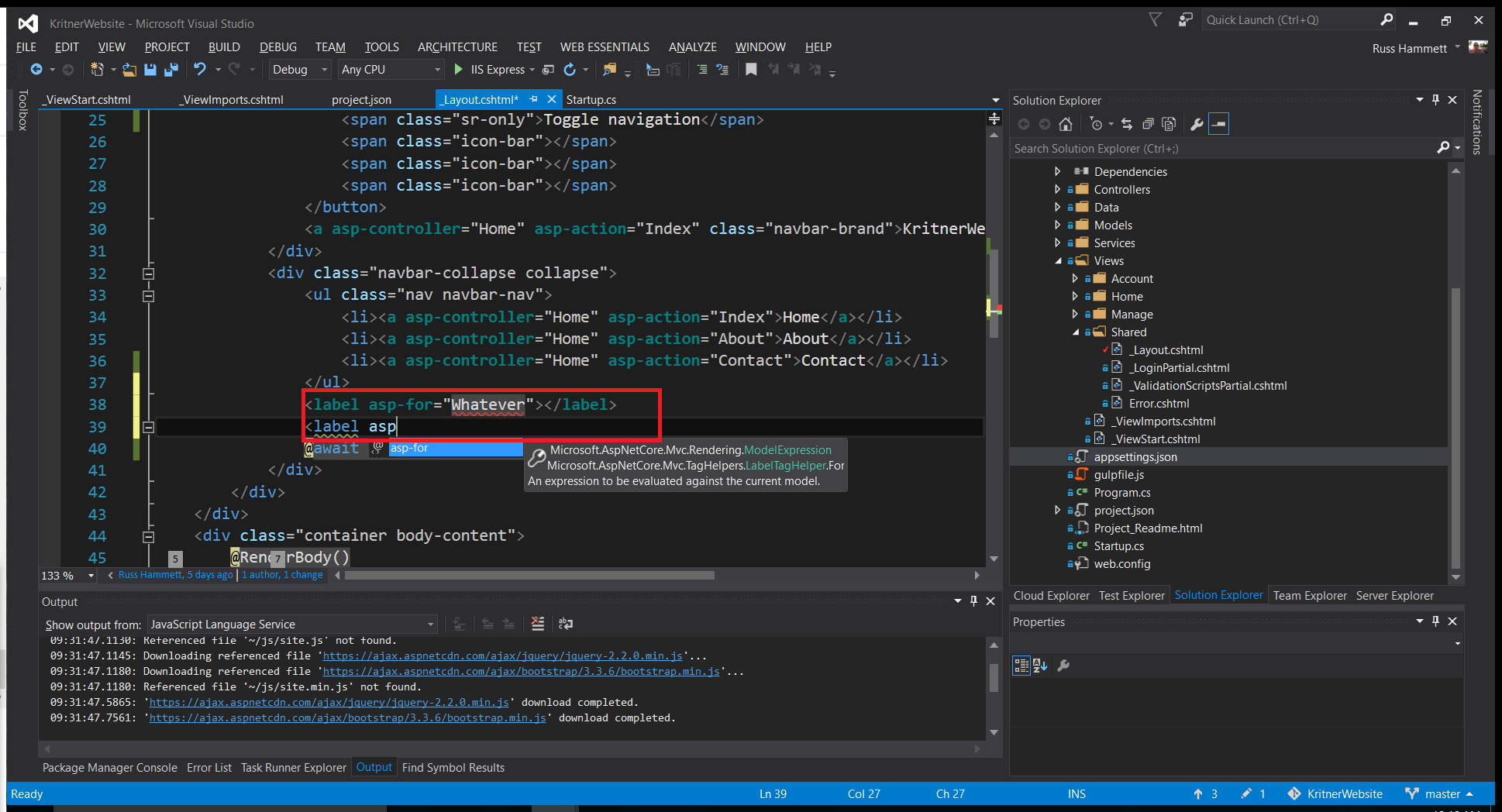
但是,在我从一个空项目开始并继续工作的项目中,我得到了以下信息:
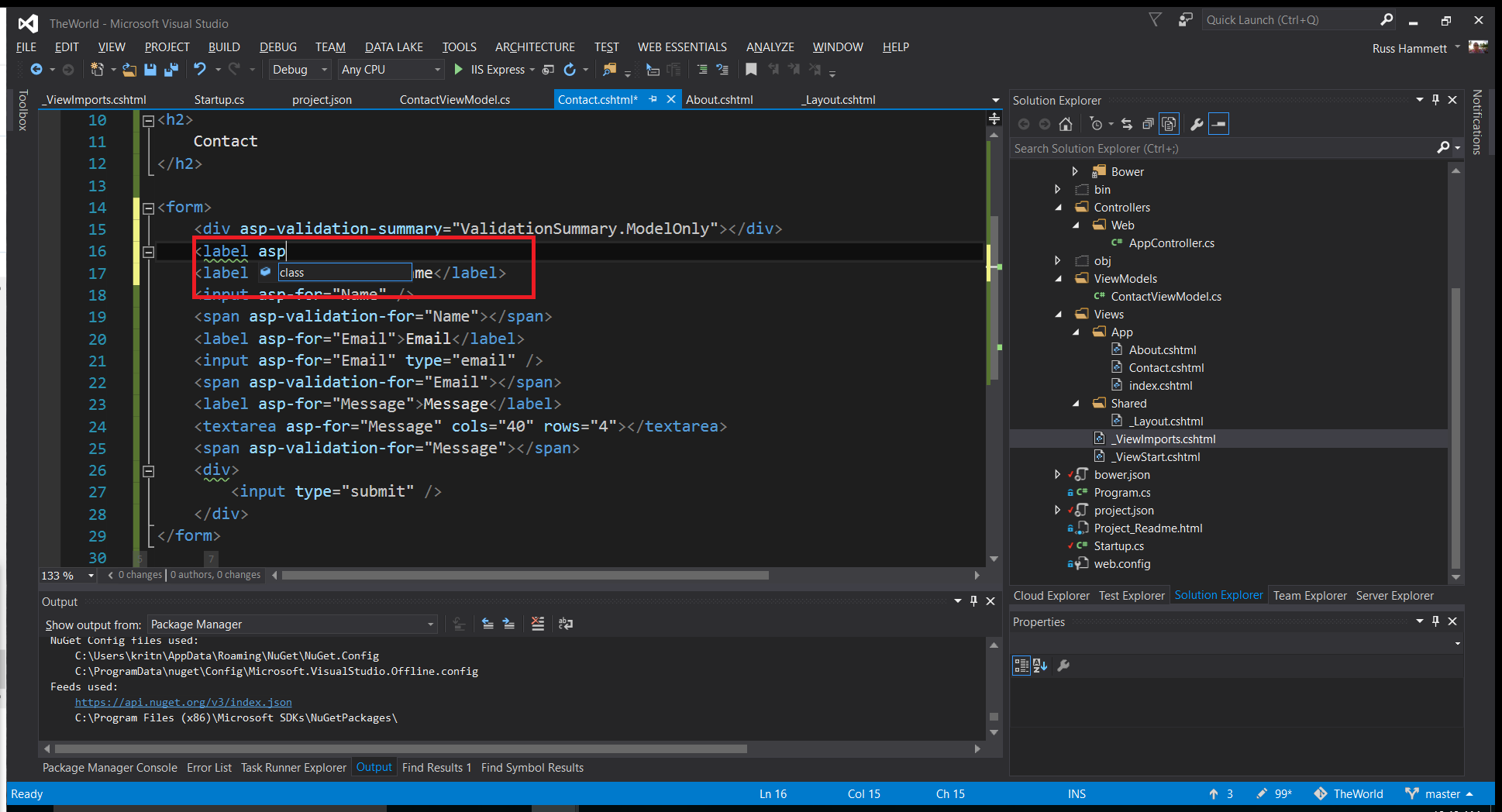
正如您所看到的,我没有得到剃须刀视图所识别的帮助,尽管使用这些帮助的人是正确的,如下所示:
<form>

    <label for="Name">Name</label>
    <input type="text" data-val="true" data-val-length="The field Name must be a string with a minimum length of 5 and a maximum length of 255." data-val-length-max="255" data-val-length-min="5" data-val-required="The Name field is required." id="Name" name="Name" value="" />
    <span class="field-validation-valid" data-valmsg-for="Name" data-valmsg-replace="true"></span>
    <label for="Email">Email</label>
    <input type="email" data-val="true" data-val-email="The Email field is not a valid e-mail address." data-val-required="The Email field is required." id="Email" name="Email" value="" />
    <span class="field-validation-valid" data-valmsg-for="Email" data-valmsg-replace="true"></span>
    <label for="Message">Message</label>
    <textarea cols="40" rows="4" data-val="true" data-val-length="The field Message must be a string with a minimum length of 5 and a maximum length of 1024." data-val-length-max="1024" data-val-length-min="5" data-val-required="The Message field is required." id="Message" name="Message">
</textarea>
    <span class="field-validation-valid" data-valmsg-for="Message" data-valmsg-replace="true"></span>
    <div>
        <input type="submit" />
    </div>
</form>
以上内容不包括我截图中的台词:
<div asp-validation-summary="ValidationSummary.ModelOnly"></div>因为一旦我添加了这一行,页面就根本不会呈现。我收到一个500个内部服务器错误。
以下是我想让我的intellisense工作的相关部分,主要是从Github问题获取的
Startup.cs
    public class Startup
    {
        // This method gets called by the runtime. Use this method to add services to the container.
        // For more information on how to configure your application, visit http://go.microsoft.com/fwlink/?LinkID=398940
        public void ConfigureServices(IServiceCollection services)
        {
            services.AddMvc();
        }

        // This method gets called by the runtime. Use this method to configure the HTTP request pipeline.
        public void Configure(IApplicationBuilder app)
        {
            app.UseStaticFiles();

            app.UseMvc(config =>
            {
                config.MapRoute(
                    name: "Default",
                    template: "{controller}/{action}/{id?}",
                    defaults: new { controller = "App", action = "Index" }
                );
            });
        }
    }
Project.json
{
  "dependencies": {
    "Microsoft.NETCore.App": {
      "version": "1.0.0-rc2-3002702",
      "type": "platform"
    },
    "Microsoft.AspNetCore.Server.IISIntegration": "1.0.0-rc2-final",
    "Microsoft.AspNetCore.Server.Kestrel": "1.0.0-rc2-final",
    "Microsoft.AspNetCore.StaticFiles": "1.0.0-rc2-final",
    "Microsoft.AspNetCore.Mvc": "1.0.0-rc2-final",
    "Microsoft.AspNetCore.Razor.Tools": {
      "version": "1.0.0-preview1-final",
      "type": "build"
    },
    "Microsoft.VisualStudio.Web.CodeGenerators.Mvc": {
      "version": "1.0.0-preview1-final",
      "type": "build"
    }
  },

  "tools": {
    "Microsoft.AspNetCore.Razor.Tools": {
      "version": "1.0.0-preview1-final",
      "imports": "portable-net45+win8+dnxcore50"
    },
    "Microsoft.AspNetCore.Server.IISIntegration.Tools": {
      "version": "1.0.0-preview1-final",
      "imports": "portable-net45+win8+dnxcore50"
    }
  },

  "frameworks": {
    "netcoreapp1.0": {
      "imports": [
        "dotnet5.6",
        "dnxcore50",
        "portable-net45+win8"
      ]
    }
  },

  "buildOptions": {
    "emitEntryPoint": true,
    "preserveCompilationContext": true
  },

  "runtimeOptions": {
    "gcServer": true
  },

  "publishOptions": {
    "include": [
      "wwwroot",
      "web.config"
    ]
  },

  "scripts": {
    "postpublish": [ "dotnet publish-iis --publish-folder %publish:OutputPath% --framework %publish:FullTargetFramework%" ]
  }
}
_ViewImports.cshtml
@addTagHelper *, Microsoft.AspNetCore.Mvc.TagHelpers请注意,我已经看到了这里这个问题,但这与(似乎)不同的名称空间和不同的RC有关。链接的问题是dotnet,我使用的是dotnetcore和RC2。
有什么想法吗?问题的基本摘要:除了asp-验证-摘要(到目前为止)之外,没有标记帮助器intellisense,尽管帮助者(大部分)工作。
回答 2
Stack Overflow用户
发布于 2016-06-05 18:31:21
这似乎是“你曾试过一次又一次地关机吗?”一旦重新启动Visual,我的助手就开始拥有正确的颜色高亮和智能感知。
此外,由于现在已经正确地拥有了intellisense,我可以看到asp-validation-results的语法与早期版本的core略有不同。
<div asp-validation-summary="ValidationSummary.ModelOnly"></div>现在需要:
<div asp-validation-summary="ModelOnly"></div>Stack Overflow用户
发布于 2016-06-11 08:56:21
我通过从下面的链接重复相同的指令来修复这个问题,然后重新启动visual studio。
https://github.com/aspnet/Tooling/issues/484#issuecomment-219807702
https://stackoverflow.com/questions/37643347
复制相似问题
腾讯云开发者

Copyright © 2013 - 2026 Tencent Cloud. All Rights Reserved. 腾讯云 版权所有
深圳市腾讯计算机系统有限公司 ICP备案/许可证号:粤B2-20090059  粤公网安备44030502008569号
腾讯云计算(北京)有限责任公司 京ICP证150476号 | 京ICP备11018762号