
如何将按钮放在与django-bootstrap3分页相同的行上
如何将按钮放在与django-bootstrap3分页相同的行上
提问于 2016-06-04 02:11:22
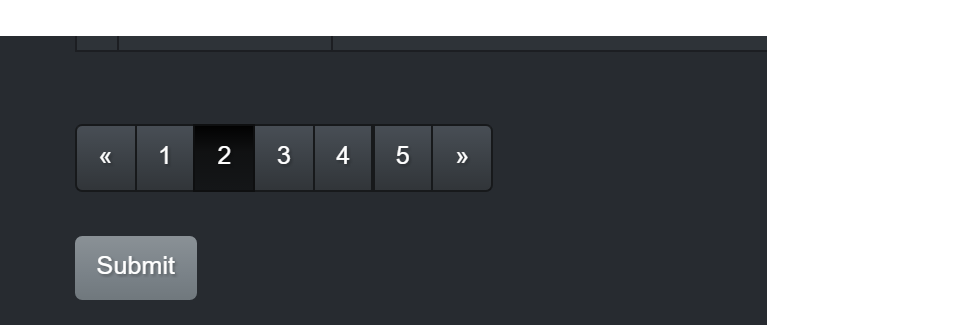
我使用django- table 2和django-bootstrap3来呈现表w/分页。我想在与分页相同的行中添加一个按钮,但我的提交按钮显示在分页下面。如何使按钮与表的右下角与分页链接沿同一行对齐?
这是我的表格模板:
  <div class="row">
    <div class="col-md-12">
      <form method='POST' action='{% url "playlists:add_track" %}'>{% csrf_token %}
        {% render_table table "django_tables2/bootstrap3.html" %}
        <button class="btn btn-primary" type="submit" name="action">Submit</button>
      </form>
    </div>
  </div>
下面是来自tables2应用程序的自定义引导3.html:
{% load querystring from django_tables2 %}
{% load trans blocktrans from i18n %}
{% load bootstrap3 %}

{% if table.page %}
    <div class="table-responsive">
{% endif %}

{% block table %}
    <table{% if table.attrs %} {{ table.attrs.as_html }}{% endif %}>
        {% block table.thead %}
            <thead>
            <tr>
                {% for column in table.columns %}
                    {% if column.orderable %}
                        <th {{ column.attrs.th.as_html }}><a href="{% querystring table.prefixed_order_by_field=column.order_by_alias.next %}">{{ column.header }}</a></th>
                    {% else %}
                        <th {{ column.attrs.th.as_html }}>{{ column.header }}</th>
                    {% endif %}
                {% endfor %}
            </tr>
            </thead>
        {% endblock table.thead %}
        {% block table.tbody %}
            <tbody>
            {% for row in table.page.object_list|default:table.rows %} {# support pagination #}
                {% block table.tbody.row %}
                    <tr class="{% cycle "odd" "even" %}">
                        {% for column, cell in row.items %}
                            <td {{ column.attrs.td.as_html }}>{{ cell }}</td>
                        {% endfor %}
                    </tr>
                {% endblock table.tbody.row %}
            {% empty %}
                {% if table.empty_text %}
                    {% block table.tbody.empty_text %}
                        <tr><td colspan="{{ table.columns|length }}">{{ table.empty_text }}</td></tr>
                    {% endblock table.tbody.empty_text %}
                {% endif %}
            {% endfor %}
            </tbody>
        {% endblock table.tbody %}
        {% block table.tfoot %}
            <tfoot></tfoot>
        {% endblock table.tfoot %}
    </table>
{% endblock table %}

{% if table.page %}
    {% block pagination %}
        {% bootstrap_pagination table.page url=request.get_full_path %}
        {#{ table.page|pagination }#}
    {% endblock pagination %}
    </div>
{% endif %}
下面是呈现的输出,其中按钮显示在分页下面,而不是在同一行上:
回答 1
Stack Overflow用户
回答已采纳
发布于 2016-06-04 04:45:59
尝试将表和按钮放置在两个相邻的列中:
<div class="row">
  <form method='POST' action='{% url "playlists:add_track" %}'>{% csrf_token %}
    <div class="col-sm-10">
      {% render_table table "django_tables2/bootstrap3.html" %}
    </div>
    <div class="col-sm-2">
      <button class="btn btn-primary" type="submit" name="action">Submit</button>
    </div>
  </form>
</div>
UPD。
表格模板:
<div class="row">
  <div class="col-xs-12">
    <form method='POST' action='{% url "playlists:add_track" %}'>{% csrf_token %}
      {% render_table table "django_tables2/bootstrap3.html" %}
    </form>
  </div>
</div>
bootstrap3.html:
{% load querystring from django_tables2 %}
{% load trans blocktrans from i18n %}
{% load bootstrap3 %}

{% if table.page %}
    <div class="table-responsive">
{% endif %}

{% block table %}
    <table{% if table.attrs %} {{ table.attrs.as_html }}{% endif %}>
        {% block table.thead %}
            <thead>
            <tr>
                {% for column in table.columns %}
                    {% if column.orderable %}
                        <th {{ column.attrs.th.as_html }}><a href="{% querystring table.prefixed_order_by_field=column.order_by_alias.next %}">{{ column.header }}</a></th>
                    {% else %}
                        <th {{ column.attrs.th.as_html }}>{{ column.header }}</th>
                    {% endif %}
                {% endfor %}
            </tr>
            </thead>
        {% endblock table.thead %}
        {% block table.tbody %}
            <tbody>
            {% for row in table.page.object_list|default:table.rows %} {# support pagination #}
                {% block table.tbody.row %}
                    <tr class="{% cycle "odd" "even" %}">
                        {% for column, cell in row.items %}
                            <td {{ column.attrs.td.as_html }}>{{ cell }}</td>
                        {% endfor %}
                    </tr>
                {% endblock table.tbody.row %}
            {% empty %}
                {% if table.empty_text %}
                    {% block table.tbody.empty_text %}
                        <tr><td colspan="{{ table.columns|length }}">{{ table.empty_text }}</td></tr>
                    {% endblock table.tbody.empty_text %}
                {% endif %}
            {% endfor %}
            </tbody>
        {% endblock table.tbody %}
        {% block table.tfoot %}
            <tfoot></tfoot>
        {% endblock table.tfoot %}
    </table>
{% endblock table %}

{% if table.page %}
    </div>

    <div class="row">
        <div class="col-sm-10">
            {% block pagination %}
                {% bootstrap_pagination table.page url=request.get_full_path %}
                {#{ table.page|pagination }#}
            {% endblock pagination %}
        </div>
        <div class="col-sm-2">
{% endif %}

            <button class="btn btn-primary" type="submit" name="action">Submit</button>

{% if table.page %}
        </div>
    </div>
{% endif %}页面原文内容由Stack Overflow提供。腾讯云小微IT领域专用引擎提供翻译支持
原文链接:
https://stackoverflow.com/questions/37625678
复制相关文章
相似问题
腾讯云开发者

Copyright © 2013 - 2026 Tencent Cloud. All Rights Reserved. 腾讯云 版权所有
深圳市腾讯计算机系统有限公司 ICP备案/许可证号:粤B2-20090059  粤公网安备44030502008569号
腾讯云计算(北京)有限责任公司 京ICP证150476号 | 京ICP备11018762号