
CSS -特定大纲
CSS -特定大纲
提问于 2016-05-30 22:16:52
我想要创建一个特定的轮廓框使用css。
就像这张照片:
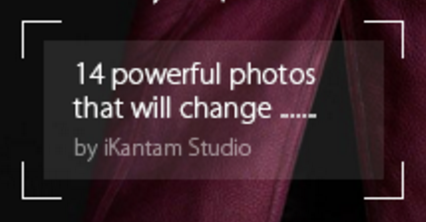
拜托,有什么帮助吗?
回答 2
Stack Overflow用户
回答已采纳
发布于 2016-05-30 22:41:13
您可以查看渐变、背景剪辑和背景大小:
示例可能的http://codepen.io/gc-nomade/pen/aZbrEQ
div {
  margin: 1em auto;
  width: 600px;
  max-width: 70%;
  padding: 40px;
  /* set offset here for border corners */
  background: linear-gradient(white, white) top left no-repeat, linear-gradient(white, white) top left no-repeat, linear-gradient(white, white) top right no-repeat, linear-gradient(white, white) top right no-repeat, linear-gradient(white, white) bottom left no-repeat, linear-gradient(white, white) bottom left no-repeat, linear-gradient(white, white) bottom right no-repeat, linear-gradient(white, white) bottom right no-repeat, rgba(255, 255, 255, 0.15);
  /* color receive
  background-clip:content-box;
  so it is not drawn on padding areas */
  background-clip: border-box, border-box, border-box, border-box, border-box, border-box, border-box, border-box, content-box;
  background-size: 2px 60px, 80px 2px;
  /* here give length and thickness of border corners */
  color: white;
}
p,
h2 {
  padding: 1em;
  margin:0;
}
html {
  height: 100%;
  background: url(http://lorempixel.com/640/480/nature/6);
  background-size: cover
}
body {
  min-height: 100%;
  background: rgba(0, 0, 0, 0.5);
  margin: 0;
  padding: 4em;
}<div>
<h2>title</h2>
<p>Pellentesque habitant morbi tristique senectus et netus et malesuada fames ac turpis egestas. Vestibulum tortor quam, feugiat vitae, ultricies eget, tempor sit amet, ante. Donec eu libero sit amet quam egestas semper. Aenean ultricies mi vitae est.
Mauris placerat eleifend leo. Quisque sit amet est et sapien ullamcorper pharetra. Vestibulum erat wisi, condimentum sed, commodo vitae, ornare sit amet, wisi. Aenean fermentum, elit eget tincidunt condimentum, eros ipsum rutrum orci, sagittis tempus
lacus enim ac dui. Donec non enim in turpis pulvinar facilisis. Ut felis. Praesent dapibus, neque id cursus faucibus, tortor neque egestas augue, eu vulputate magna eros eu erat. Aliquam erat volutpat. Nam dui mi, tincidunt quis, accumsan porttitor,
facilisis luctus, metus</p>
</div>
Stack Overflow用户
发布于 2016-05-30 22:29:11
只是为了证明你的问题有多简单。::before和::after隐藏了部分边界。z-index用于覆盖。
.dirt {
  position: relative;
  width: 200px;
  height: 100px;
  line-height: 100px;
  text-align: center;
  background-color: rgba(251, 145, 156, 1);
  border: 2px solid rgba(231, 0, 0, 1);
  box-sizing: border-box;
}
.dirt > span {
  position: relative;
  z-index: 15;
  background-color: rgba(255,255,255,0.5);
  padding: 25px;
}
.dirt::after,
.dirt::before {
  content: '';
  position: absolute;
  background-color: rgba(251, 145, 156, 1);
  /*same color*/
}
.dirt::before {
  top: 20%;
  bottom: 20%;
  left: -2px;
  /*border-width*/
  right: -2px;
  /*border-width*/
}
.dirt::after {
  top: -2px;
  /*border-width*/
  bottom: -2px;
  /*border-width*/
  left: 20%;
  right: 20%;
}<p>An example: (do not use)</p>
<div class="dirt">
<span>My little dirt text</span>
</div>
页面原文内容由Stack Overflow提供。腾讯云小微IT领域专用引擎提供翻译支持
原文链接:
https://stackoverflow.com/questions/37534260
复制相关文章
相似问题
腾讯云开发者

Copyright © 2013 - 2026 Tencent Cloud. All Rights Reserved. 腾讯云 版权所有
深圳市腾讯计算机系统有限公司 ICP备案/许可证号:粤B2-20090059  粤公网安备44030502008569号
腾讯云计算(北京)有限责任公司 京ICP证150476号 | 京ICP备11018762号