
无法使用呈现索引或移动页
我可以让我的项目运行良好,直到我引入春季移动。现在只有String将返回spring-mobile方法返回的浏览器:
@Controller
public class DeviceDetection {

    private Logger logger = LoggerFactory.getLogger(DeviceDetection.class);

    @RequestMapping(value="/index")
    public String detectDevice(Device device) {

        if (device.isNormal()) {
            System.out.println("Inside isNormal()");
            return "index";
        } else if (device.isMobile()) {
            System.out.println("Inside isMobile()");
            return "mobilePage";
        } else if (device.isTablet()) {
            return "mobilePage";
        }
        return "index";
    }

}
因此,我决定需要internalResourceViewResolver,但这只会给我带来以下错误:
Error creating bean with name 'viewResolver' defined in class path resource


    [org/springframework/boot/autoconfigure/web/WebMvcAutoConfiguration$WebMvcAutoCon
figurationAdapter.class]: Initialization of bean failed; nested exception is
org.springframework.beans.factory.BeanCreationException: Error creating bean
with name 'org.springframework.boot.autoconfigure.mobile
和
   DeviceDelegatingViewResolverAutoConfiguration$DeviceDelegatingViewResolverConfigur
ation$InternalResourceViewResolverDelegateConfiguration.viewResolver; nested
exception is
org.springframework.beans.factory.NoUniqueBeanDefinitionException: No
qualifying bean of type
[org.springframework.web.servlet.view.InternalResourceViewResolver] is
defined: expected single matching bean but found 2:
getViewResolver,defaultViewResolver
Resolver类
@Configuration
public class MvcConfiguration extends WebMvcConfigurerAdapter {

    @Bean
    public ViewResolver getViewResolver() {
        InternalResourceViewResolver resolver = new InternalResourceViewResolver();
        resolver.setPrefix("/WEB-INF/");
        resolver.setSuffix(".html");
        return resolver;
    }

    @Override
    public void configureDefaultServletHandling(
            DefaultServletHandlerConfigurer configurer) {
        configurer.enable();
    }
}
主班
@SpringBootApplication
public class StidhamFinancialApplication extends SpringBootServletInitializer {

    public static void main(String[] args) throws UnknownHostException {
        SpringApplication app = new SpringApplication(StidhamFinancialApplication.class);

        Environment env = app.run(args).getEnvironment();
       System.out.println(String.format("Access URLs:\n----------------------------------------------------------\n\t" +
                "Local: \t\thttp://127.0.0.1:%1s\n\t" +
                "External: \thttp://%2s:%3s\n----------------------------------------------------------",
            env.getProperty("server.port"),
            InetAddress.getLocalHost().getHostAddress(),
            env.getProperty("server.port")));
    }

    @Override
    protected SpringApplicationBuilder configure(SpringApplicationBuilder builder) {
        return builder.sources(StidhamFinancialApplication.class);
    }
}
项目结构:
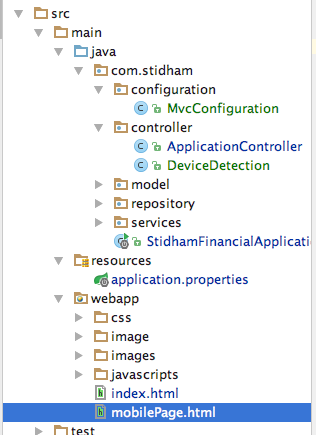
我在Tomcat 8上运行它..。
-更新1-更新1
//If I remove @ResponseBody it complains of a Circular view path [index] with
@ResponseBody it just renders a String and not a view

@RequestMapping(value="/index")
public @ResponseBody String detectDevice(Device device) {

    if (device.isNormal()) {
        System.out.println("Inside isNormal()");
        return "index";
    } else if (device.isMobile()) {
        System.out.println("Inside isMobile()");
        return "mobilePage";
    } else if (device.isTablet()) {
        return "mobilePage";
    }
    return "index";
}只有字符串index或mobilePage将在浏览器中呈现。如果我删除了@ResponseBody,那么该项目就会出现一个错误,说明如下:
2016-05-29 08:55:03.682 ERROR 8230 --- [nio-8080-exec-1]
o.s.boot.context.web.ErrorPageFilter     : Forwarding to error page
from request [/index.html] due to exception [Circular view path
[index]: would dispatch back to the current handler URL [/index] again.
Check your ViewResolver setup! (Hint: This may be the result of an
unspecified view, due to default view name generation.)]如果我删除了/index,那么这个方法就会被完全忽略,spring引导只是映射我的索引文件并再次工作,但是我需要移动站点才能工作。
好的,我添加了thymeleaf,我的索引页面再次呈现。更好的是,DeviceDetection正在工作,但是一旦我的项目查找了我的mobilePage,我会得到以下错误:
Error resolving template "mobile/index", template might not exist or might not be accessible by any of the configured Template Resolvers我必须添加下面的ing @Configuration才能使该项目开始工作。弹簧靴defaultViewResolver给我带来了许多问题。现在的项目结构如下:
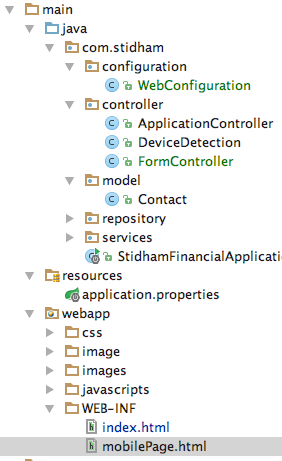
我也更新了GIT的项目。
回答 1
Stack Overflow用户
发布于 2016-05-30 18:53:57
首先,我需要使用类似Thymeleaf的东西并创建一个viewResolver。弹簧靴defaultViewResolver给我带来了麻烦:
@Configuration
public class WebConfiguration extends WebMvcAutoConfiguration.WebMvcAutoConfigurationAdapter {

    @Override
    public void configureDefaultServletHandling(DefaultServletHandlerConfigurer configurer) {
        configurer.enable();
    }

    @Bean
    public DispatcherServlet dispatcherServlet(){
        DispatcherServlet dispatcherServlet = new DispatcherServlet();

        dispatcherServlet.setThrowExceptionIfNoHandlerFound(true);

        return dispatcherServlet;
    }

    @Bean
    public ServletContextTemplateResolver templateResolver() {
        ServletContextTemplateResolver resolver = new ServletContextTemplateResolver();
        resolver.setPrefix("/WEB-INF/");
        resolver.setSuffix(".html");
        resolver.setTemplateMode("HTML5");
        resolver.setOrder(1);
        return resolver;
    }

}由于我使用的是Thymeleaf,所以我需要bindingResult和其他一些东西。这也是我实现springs移动Device接口来检测设备的地方。
@Controller
public class FormController {

    @RequestMapping(value="/", method= RequestMethod.GET)
    public String contactForm(@Valid @ModelAttribute("person") Contact contact, BindingResult bindingResult,
                              HttpServletRequest request, Model model, Device device) throws IOException {

        if(bindingResult.hasErrors()){
            System.out.println("There was a error "+bindingResult);
            return "error";
        }

        model.addAttribute("contact", new Contact());

        if(device.isNormal()){
            System.out.println("I am normal");
            return "index";
        } else if(device.isMobile()){
            System.out.println("I am a mobile");
            return "mobilePage";
        } else if (device.isTablet()){
            System.out.println("I am a tablet");
            return "mobilePage";
        }

        return "index";
    }
现在,我只需要将不同的视图放在正确的目录中,如下所示:
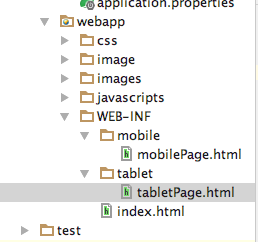
就是这样,而且运作得很好。
下面是我为使用实现Thymeleaf而创建的表单:
<!-- Contact form -->
<form action="#" th:action="@{/contact}" th:object="${contact}" method="POST" class="contact-form clear-fix">

<div class="clear-fix">

    <ul class="list-0 clear-fix">
        <!-- Name -->
    <li>
    <div class="block field-box">
     <label for="contact-form-name" class="text-color-black">Your Name</label>
    <input type="text" th:field="*{name}" class="contact noMarr col-md-6 text-color-black" id="contact-form-name" />
    </div>
    </li>
<!-- /Name -->
<!-- E-mail address -->
<li>
<div class="block field-box">
 <label for="contact-form-mail" class="text-color-black">Your E-mail</label>
<input type="text" th:field="*{email}" class="contact noMarr col-md-6 text-color-black" id="contact-form-mail" />
</div>
</li>
 <!-- /E-mail address -->
<!-- Website URL -->
<li>
<div class="block field-box">
<label for="contact-form-subject" class="text-color-black">Subject</label>
    <input type="text" th:field="*{subject}" class="contact noMarr col-md-6 text-color-black" id="contact-form-subject" />
</div>
    </li>
<!-- /Website URL -->
    <!-- Message -->
    <li>
<div class="block field-box ">
<label for="contact-form-message" class="text-color-black">Your message</label>
<textarea name="comment" class="contact col-md-12 text-color-black" th:field="*{message}" id="contact-form-message"></textarea>
</div>
</li>
<!-- /Message -->
<!-- Submit button -->
<li>
<div class="block field-box field-box-button text-color-black">
    <input type="submit" id="contact-form-submit" name="contact-form-submit" class="button text-color-black" value="Submit"/>
</div>
</li>
 <!-- /Submit button -->
 </ul>
 </div>
</form>https://stackoverflow.com/questions/37503086
复制相似问题
腾讯云开发者

Copyright © 2013 - 2026 Tencent Cloud. All Rights Reserved. 腾讯云 版权所有
深圳市腾讯计算机系统有限公司 ICP备案/许可证号:粤B2-20090059  粤公网安备44030502008569号
腾讯云计算(北京)有限责任公司 京ICP证150476号 | 京ICP备11018762号