
移到垃圾箱里去了?
关于色调GUI中的“移动到垃圾”功能,我有以下问题:
- 这些文件去哪儿了?
- 它们被储存了多久?
- 我能恢复吗?
回答 1
Stack Overflow用户
发布于 2016-05-28 14:12:11
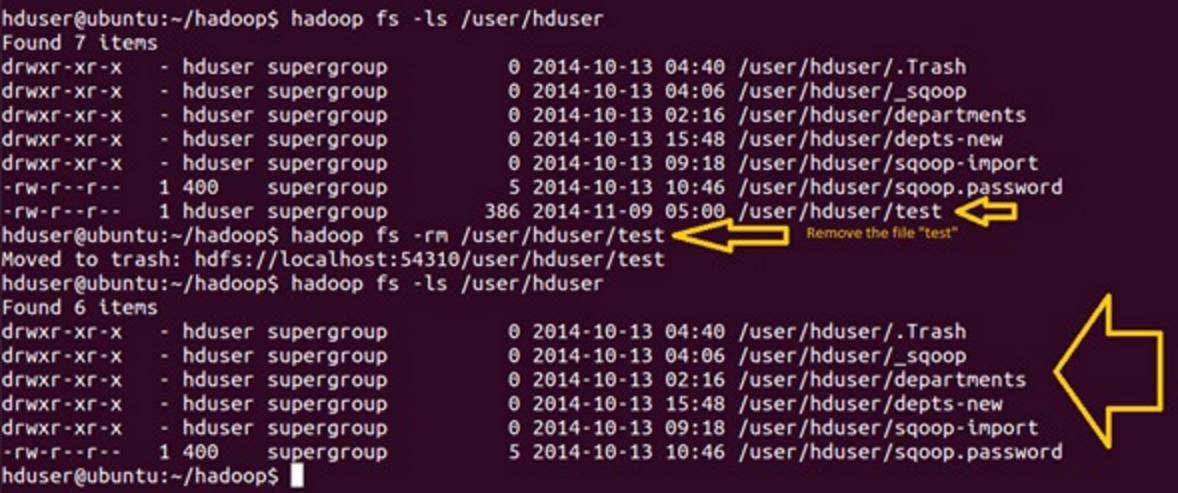
1) /user/hduser/.Trash,其中hduser是unix(操作系统用户,如果您使用的是来自windows + eclipse的java客户端,也可以是windows用户)。
2)这将取决于core-site.xml中的以下配置
<property>
  <name>fs.trash.interval</name>
  <value>30</value>
  <description>Number of minutes after which the checkpoint
  gets deleted. If zero, the trash feature is disabled.
  </description>
</property>3)为执行此恢复方法,应在hdfs中启用垃圾。可以通过设置大于0的属性fs.trash.interval (如上面提到的xml)启用回收器。
默认情况下,该值为零。它的值是删除检查点的分钟数。如果为零,则禁用垃圾功能。我们必须在core-site.xml中设置这个属性。
还有一个属性与上述属性有关联,称为fs.trash.checkpoint.interval。这是垃圾检查站之间的分钟数。这应该小于或等于fs.trash.interval。
每次检查指针运行时,它都会从当前创建一个新的检查点,并移除几分钟前创建的检查点。此属性的默认值为零。
<property>
  <name>fs.trash.checkpoint.interval</name>
  <value>15</value>
  <description>Number of minutes between trash checkpoints.
  Should be smaller or equal to fs.trash.interval.
  Every time the checkpointer runs it creates a new checkpoint
  out of current and removes checkpoints created more than
  fs.trash.interval minutes ago.
  </description>
</property>
如果在群集中启用了上述属性。然后被删除的文件将出现在hdfs的.Trash目录中。您有时间恢复文件,直到下一个检查点出现。在新的检查点之后,被删除的文件将不在.Trash中。所以在新检查点之前恢复。如果群集中未启用此属性,则可以启用此属性以供将来恢复。:)
https://stackoverflow.com/questions/37497959
复制相似问题
腾讯云开发者

Copyright © 2013 - 2026 Tencent Cloud. All Rights Reserved. 腾讯云 版权所有
深圳市腾讯计算机系统有限公司 ICP备案/许可证号:粤B2-20090059  粤公网安备44030502008569号
腾讯云计算(北京)有限责任公司 京ICP证150476号 | 京ICP备11018762号