
在TreeTableView中显示销售信息
我想要实现的或多或少是拥有Sale对象,当扩展到显示该Sale对象下的SaleTransaction对象时,Sale对象。在代码工程中的此图像中显示了与希望类似的内容
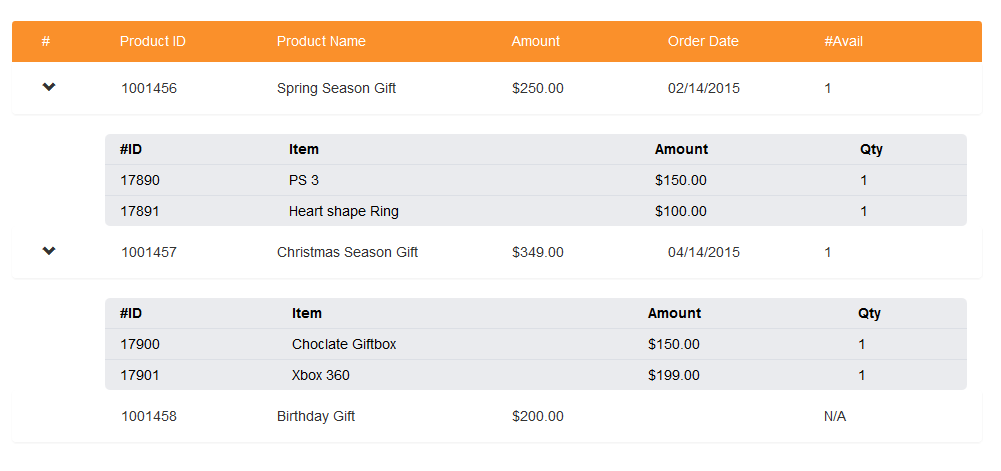
除了阅读之外,我还可以做其他CRUD功能(即创建、更新和删除)。
我试着使用TreeTableView实现它,如下所示:
 List<CreditSale> lstData = new ArrayList<CreditSale>(creditsaleservice.findAllCreditSales());

    TreeItem root = new TreeItem<>();
    for (CreditSaleTransaction cst : lstData.get(0).getCreditSaleTransaction()) {
        root.getChildren().addAll(new TreeItem<>(cst));
    }


    TreeTableColumn<CreditSaleTransaction, Product> productColumn = new TreeTableColumn<>("Product Name");

    productColumn.setPrefWidth(150);
    productColumn.setEditable(true);

    productColumn.setCellValueFactory((TreeTableColumn.CellDataFeatures<CreditSaleTransaction, Product> p)
            -> new ReadOnlyObjectWrapper<>(p.getValue().getValue().getProduct()));


    TreeTableColumn<CreditSaleTransaction, Float>  quantityColumn = new TreeTableColumn<>("Quantity");
    quantityColumn.setPrefWidth(150);
    quantityColumn.setEditable(true);
    quantityColumn.setCellValueFactory((TreeTableColumn.CellDataFeatures<CreditSaleTransaction,Float> p)
            -> new ReadOnlyObjectWrapper<>(p.getValue().getValue().getAmount()));

    TreeTableColumn<CreditSaleTransaction, Float>  unitPColumn = new TreeTableColumn<>("Unit Price");
    unitPColumn.setPrefWidth(150);
    unitPColumn.setEditable(true);
    unitPColumn.setCellValueFactory((TreeTableColumn.CellDataFeatures<CreditSaleTransaction,Float> p)
            -> new ReadOnlyObjectWrapper<>(p.getValue().getValue().getUnitPrice()));

    TreeTableView<CreditSaleTransaction> treeTableView = new TreeTableView<>();
    treeTableView.setRoot(root);

    treeTableView.getColumns().addAll(productColumn,quantityColumn,unitPColumn);
    treeviewanchorpane.getChildren().add(treeTableView);
但什么都没有展示。
回答 1
Stack Overflow用户
发布于 2016-06-30 12:41:10
如果您不介意丢失这些内部头,则可以使用TreeTableView实现类似的输出:

在这里,犹太人有一个很好的例子来说明如何处理这个问题:
**建议的自定义实现方法**
如果标头很重要,您可以创建一个自定义控件来获得所需的布局。我的建议是在一个容器(如一个VBox)中使用多个VBox,以外部项作为标题,内部项作为TableView中的内容。TitledPane希望有一个String作为标题,但是结合setGraphic和setContentDisplay,可以将其更改为允许您保持一致布局的Node。
这种方法将允许同时看到多个项目(内部和外部)。
如果您只希望一次能够看到内部的VBox,那么VBox将是一个合适的替代方案,因为它只允许在任何给定的时间扩展一个TitledPane。
TitledPane和Accordian都在本教程中介绍:
(我已经包括了一个如何实现这种方法的例子,以及在这个答案的末尾显示输出的图像)
**监测变化**
JavaFX提供了一个ObservableList,它将任何更改通知侦听器。有效使用这将使用户界面能够自动反映任何更改。
例如,一个用于检测元素何时被添加/删除的ListChangeListener,它涵盖了这里。
注意:如果修改了ObservableList中的子元素(例如嵌套销售项中的价格),则可能不存在更新事件。在这种情况下,应该向列表中添加一个提取器,该列表指定要观察的附加值,如果其中任何一个值发生更改,则触发事件更新。
还有一系列可供使用的属性/绑定,这些特性/绑定将在以下文档中讨论:
(该示例包含了如何使用上述内容的示例)
关于在TableView上实现CRUD功能的建议:
- 创建一个
Button栏:可以将其放置在每个TableView或nestedView下面,使用选定的单元格来确定何时启用按钮和修改哪些对象 - 在
EventHandlerTableView:Place a(见setOnEditCommit() ) - 在
TableView**:**中添加自定义单元格的有几个例子,说明如何创建自定义TableCell,在单击时删除行。
- 使用
ContextMenu**'s**的
示例:
我已经在可能的情况下添加了代码注释,但是如果有任何问题或建议的改进,请留下评论
NestedTableView
public class NestedTableView extends VBox {
    private ObservableList<Node> titledPanes = FXCollections.observableArrayList();
    private Region parent;

    public NestedTableView(Region parent, ObservableList<ProductBundle> bundlesToDisplay){
        this.parent = parent;
        VBox nestedView = new VBox();
        Bindings.bindContentBidirectional(nestedView.getChildren(), titledPanes);
        titledPanes.addAll(bundlesToDisplay.stream()
                .map(TablePane::new).collect(Collectors.toList()));
        getChildren().setAll(createHeader(), nestedView);
        getStylesheets().add("CSS/nestedTableViewStyles.css");
    }

    private HBox createHeader(){
        //Set up widths to align with the content headers beneath the header
        Label symbol = new Label("#");
        symbol.setPrefWidth(25); //Sum of the values used by the "arrow" region

        Label productId = new Label("Product Id");
        productId.prefWidthProperty().bind(parent.widthProperty().multiply(0.15));

        Label productName = new Label("Product Name");
        productName.prefWidthProperty().bind(parent.widthProperty().multiply(0.35)); //Give name extra space

        Label amount = new Label("Amount");
        amount.prefWidthProperty().bind(parent.widthProperty().multiply(0.15));

        Label date = new Label("Order Date");
        date.prefWidthProperty().bind(parent.widthProperty().multiply(0.15));

        Label quantityAvailable = new Label("#Available");
        quantityAvailable.prefWidthProperty().bind(parent.widthProperty().multiply(0.15));

        HBox header = new HBox(symbol, productId, productName, amount, date, quantityAvailable);
        header.getStyleClass().add("header");
        return header;
    }

    private class TablePane extends TitledPane {
        private ProductBundle productBundle;

        private HBox header;
        private TableView contentTableView;
        private MenuItem addToBundle, deleteBundle;

        public TablePane(ProductBundle productBundle){
            this.productBundle = productBundle;
            setupMenuItems();
            setupContentHeader();
            setGraphic(header);
            setContentDisplay(ContentDisplay.GRAPHIC_ONLY);
            if(!productBundle.getBundleItems().isEmpty()){
                createTableView();
                setContent(contentTableView);
            }

            //Only display the expandable "arrow" if there is content to display
            collapsibleProperty().bind(contentProperty().isNotNull());
            //If the "arrow" isn't displayed, pad the area to mimic the arrow being present to align headers
            header.paddingProperty().bind(
                    Bindings.when(collapsibleProperty()).then(Insets.EMPTY).otherwise(new Insets(0,0,0,15)));
            /*  For testing purposes. With more rows this will clutter the UI
                ToDo: add logic to determine how many panes to expand before the viewport has been filled
             */
            setExpanded(true);
        }

        private void setupMenuItems(){
            addToBundle = new MenuItem("Add to bundle");
            addToBundle.setOnAction(event -> {
                //ToDo: Add CRUD create logic here
                System.out.println("Add to bundle: " + productBundle.idProperty());
            });
            deleteBundle = new MenuItem("Delete bundle");
            deleteBundle.setOnAction(event -> {
                //ToDo: Add CRUD delete logic here
                System.out.println("Delete bundle: " + productBundle.idProperty());
            });
        }

        private void setupContentHeader(){
            header = new HBox();
            //Bind the content header to the root so that it aligned with the initial header
            header.prefWidthProperty().bind(parent.widthProperty());
            header.maxWidthProperty().bind(parent.widthProperty());

            /* Set up each TextField with widths to align with the TableView
               Each TextField is editable with the exception of id as it would be the primary key
               and amount as it's value is calculated from the sub items */
            TextField id = new TextField();
            id.setEditable(false);
            modifyTextFieldContextMenu(id);
            id.textProperty().bind(productBundle.idProperty());
            id.prefWidthProperty().bind(header.widthProperty().multiply(0.15));

            TextField name = new TextField();
            modifyTextFieldForCRUDFunctionality(name);
            name.textProperty().bindBidirectional(productBundle.nameProperty());
            name.prefWidthProperty().bind(header.widthProperty().multiply(0.35)); //Give name extra space

            TextField amount = new TextField();
            amount.setEditable(false);
            Bindings.bindBidirectional(amount.textProperty(), productBundle.amountProperty(),
                    new NumberStringConverter(NumberFormat.getCurrencyInstance(Locale.US)));
            amount.prefWidthProperty().bind(header.widthProperty().multiply(0.15));

            TextField date = new TextField();
            modifyTextFieldForCRUDFunctionality(date);
            date.textProperty().bind(productBundle.orderDateProperty());
            date.prefWidthProperty().bind(header.widthProperty().multiply(0.15));

            TextField quantityRemaining = new TextField();
            modifyTextFieldForCRUDFunctionality(quantityRemaining);
            //Only display a quantity if it's a valid value (to match example screen shot)
            quantityRemaining.textProperty().bind(
                    Bindings.when(productBundle.quantityAvailableProperty().greaterThan(0))
                            .then(productBundle.quantityAvailableProperty().asString()).otherwise("N/A"));
            quantityRemaining.prefWidthProperty().bind(header.widthProperty().multiply(0.15));

            header.getChildren().setAll(id, name, amount, date, quantityRemaining);
            header.getStyleClass().add("content-header");
        }

        private void modifyTextFieldContextMenu(TextField textField){
            TextFieldSkin skin = new TextFieldSkin(textField){
                @Override
                public void populateContextMenu(ContextMenu contextMenu) {
                    super.populateContextMenu(contextMenu);
                    contextMenu.getItems().add(0, addToBundle);
                    contextMenu.getItems().add(1, deleteBundle);
                    contextMenu.getItems().add(2, new SeparatorMenuItem());
                }
            };
            textField.setSkin(skin);
        }

        private void modifyTextFieldForCRUDFunctionality(TextField textField){
            textField.setEditable(true);
            textField.focusedProperty().addListener(new ChangeListener<Boolean>() {
                private String previousText;
                @Override
                public void changed(ObservableValue<? extends Boolean> observable, Boolean oldValue, Boolean newValue) {
                    String currentText = textField.getText();
                    if(newValue){
                        previousText = currentText;
                    }
                    //ToDo: Add CRUD update logic here
                    else if(!previousText.equals(currentText)){
                        System.out.println("Value has been changed from: " + previousText + " to: " + currentText);
                    }
                }
            });
        }

        private void createTableView(){
            TableColumn<BundleItem, String> idColumn = new TableColumn<>("#ID");
            idColumn.setCellValueFactory(param -> param.getValue().getItem().itemIdProperty());

            TableColumn<BundleItem, String> nameColumn = new TableColumn<>("Item");
            nameColumn.setCellValueFactory(param -> param.getValue().getItem().itemNameProperty());

            TableColumn<BundleItem, String> amountColumn = new TableColumn<>("Amount");
            amountColumn.setCellValueFactory(param -> param.getValue().getItem().amountProperty().asString("$%.2f"));

            TableColumn<BundleItem, Number> quantityColumn = new TableColumn<>("Qty");
            quantityColumn.setCellValueFactory(param -> param.getValue().quantityProperty());

            TableView<BundleItem> tableView = new TableView<>(productBundle.getBundleItems());
            tableView.setPadding(new Insets(10));
            //Equal column widths
            tableView.setColumnResizePolicy(TableView.CONSTRAINED_RESIZE_POLICY);
            tableView.getColumns().setAll(idColumn, nameColumn, amountColumn, quantityColumn);
            //Only show visible shows
            tableView.setFixedCellSize(30);
            tableView.prefHeightProperty().bind(Bindings.size(productBundle.getBundleItems())
                    .multiply(tableView.getFixedCellSize()).add(tableView.getFixedCellSize()*1.5));
            contentTableView = tableView;
        }
    }
}
与销售有关的物品:
public class ProductBundle {
    private ObservableList<BundleItem> bundleItems = FXCollections.observableArrayList();
    private SimpleStringProperty productId, productName, orderDate;
    private SimpleDoubleProperty amount = new SimpleDoubleProperty();
    private SimpleIntegerProperty quantityAvailable;

    private ProductBundle(String productId, String productName, String orderDate, int quantityAvailable){
        this.productId = new SimpleStringProperty(productId);
        this.productName = new SimpleStringProperty(productName);
        this.orderDate = new SimpleStringProperty(orderDate);
        this.quantityAvailable = new SimpleIntegerProperty(quantityAvailable);
    }

    public ProductBundle(String productId, String productName, String orderDate,
                         int quantityAvailable, ObservableList<BundleItem> bundleItems){
        this(productId, productName, orderDate, quantityAvailable);
        //Setup an extractor to "Observe" changes on the amount/quantity of any items in the bundle
        this.bundleItems = FXCollections.observableArrayList(new Callback<BundleItem, Observable[]>() {
            @Override
            public Observable[] call(BundleItem param) {
                return new Observable[]{param.amountProperty(), param.quantityProperty()};
            }
        });
        this.bundleItems.addAll(bundleItems);
        //Calculate the total worth of this bundle
        amount.bind(Bindings.createDoubleBinding(()->
                bundleItems.stream().collect(Collectors.summingDouble(BundleItem::getAmount)), this.bundleItems)
                .multiply(quantityAvailable));
    }

    public ProductBundle(String productId, String productName, String orderDate,
                         int quantityAvailable, double amount){
        this(productId, productName, orderDate, quantityAvailable);
        this.amount.set(amount);
    }

    public ObservableList<BundleItem> getBundleItems(){
        return bundleItems;
    }

    public SimpleStringProperty idProperty(){
        return productId;
    }

    public SimpleStringProperty nameProperty(){
        return productName;
    }

    public SimpleIntegerProperty quantityAvailableProperty(){
        return quantityAvailable;
    }

    public SimpleStringProperty orderDateProperty(){
        return orderDate;
    }

    public SimpleDoubleProperty amountProperty(){
        return amount;
    }

    public double getAmount(){
        return amount.get();
    }
}

public class BundleItem {
    private Item item;
    private SimpleIntegerProperty quantity;
    private SimpleDoubleProperty amount = new SimpleDoubleProperty();

    public BundleItem(Item item, int quantity){
        this.item = item;
        this.quantity = new SimpleIntegerProperty(quantity);
        amount.bind(item.amountProperty().multiply(quantity));
    }

    public Item getItem(){
        return item;
    }

    public SimpleIntegerProperty quantityProperty(){
        return quantity;
    }

    public SimpleDoubleProperty amountProperty(){
        return amount;
    }

    public double getAmount(){
        return amount.get();
    }
}

public class Item {
    private SimpleStringProperty itemId, itemName;
    private SimpleDoubleProperty amount;

    public Item(String itemId, String itemName, double amount){
        this.itemId = new SimpleStringProperty(itemId);
        this.itemName = new SimpleStringProperty(itemName);
        this.amount = new SimpleDoubleProperty(amount);
    }

    public SimpleStringProperty itemIdProperty(){
        return itemId;
    }

    public SimpleStringProperty itemNameProperty(){
        return itemName;
    }

    public SimpleDoubleProperty amountProperty(){
        return amount;
    }

    public double getAmount(){
        return amount.get();
    }

    public void setAmount(double newValue){
        amount.set(newValue);
    }
}
nestedTableViewStyles.css:
.header {
    -fx-background-color: darkorange;
    -fx-pref-height: 30;
    -fx-padding: 5 0 0 0;
}

.header > .label {
    -fx-text-fill: white;
}

.header > .label, .content-header > .text-field {
    -fx-alignment: center;
    -fx-text-alignment: center;
}

.content-header > .text-field, .content-header > .text-field:focused {
    /* Make the TextField's display similar to a Label */
    -fx-background-color: transparent;
}

.content-header, .titled-pane > .title, .table-view {
    -fx-background-color: white;
}

.titled-pane > .title {
    -fx-border-color: lightgray;
    -fx-border-width: 0 0 1 0;
}

.table-view {
     -fx-table-cell-border-color: transparent;
}

.table-view .column-header-background {
    -fx-border-radius: 5 5 0 0;
    -fx-background-radius: 5 5 0 0;
}

.table-view .column-header-background, .table-row-cell {
    -fx-background-color: lightgray;
    -fx-border-color: gray;
    -fx-border-width: 0 0 1 0;
}

.table-view .column-header-background .label {
    -fx-background-color: lightgray;
    -fx-text-fill: black;
    -fx-font-weight: bold;
}

.table-view .column-header {
    -fx-background-color: transparent;
}

.table-column {
    -fx-alignment: center;
}
用法:
public class NestedTableViewExample extends Application {

    @Override
    public void start(Stage primaryStage) throws Exception {
        ObservableList<ProductBundle> bundles =
                FXCollections.observableArrayList(
                        new ProductBundle("1001456", "Spring Season Gift", "02/14/2015", 1,
                                FXCollections.observableArrayList(
                                        new BundleItem(new Item("17890", "PS 3", 150.00), 1),
                                        new BundleItem(new Item("17891", "Heart shape ring", 100.00), 1)
                                )),
                        new ProductBundle("1001457", "Christmas Season Gift", "04/14/2015", 1,
                                FXCollections.observableArrayList(
                                        new BundleItem(new Item("17900", "Chocolate Giftbox", 150.00), 1),
                                        new BundleItem(new Item("17901", "Xbox 360", 199.00), 1)
                                )),
                        new ProductBundle("1001458", "Birthday Gift", "", 1, 200)
                );

        VBox root = new VBox();
        root.getChildren().setAll(new NestedTableView(root, bundles));
        Scene scene = new Scene(root, 500, 500);
        primaryStage.setScene(scene);
        primaryStage.setTitle("Nested TableView example");
        primaryStage.show();
    }
}
**产出:**
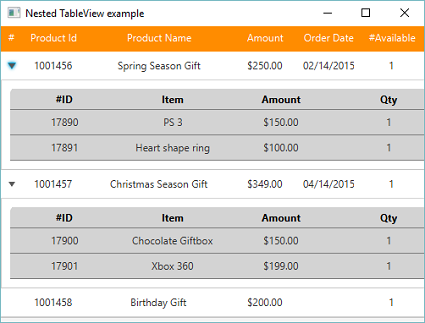
https://stackoverflow.com/questions/37492977
复制相似问题
腾讯云开发者

Copyright © 2013 - 2026 Tencent Cloud. All Rights Reserved. 腾讯云 版权所有
深圳市腾讯计算机系统有限公司 ICP备案/许可证号:粤B2-20090059  粤公网安备44030502008569号
腾讯云计算(北京)有限责任公司 京ICP证150476号 | 京ICP备11018762号