
在行下面添加空格和边框
在行下面添加空格和边框
提问于 2016-05-27 10:48:55
我有一张桌子,我需要下面有空格和边框的行。
如下所示:
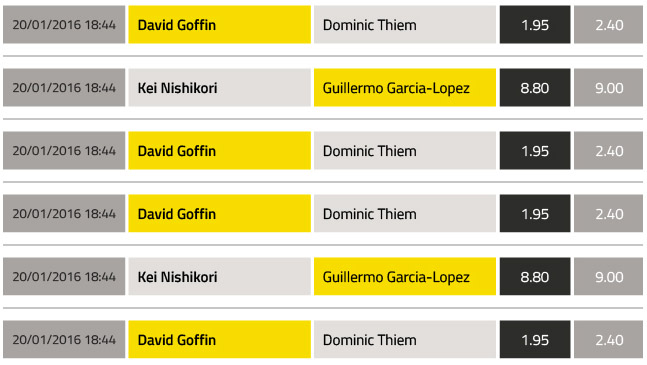
我试图用假白色边框和黑色背景的“间隔行”修复它,但我没有正确显示。
table {
  border-collapse:collapse;
}
td {
  padding:1em 2em;
  background-color:#ccc;
  border-top:10px solid white;
  border-bottom:10px solid white;
  border-right:4px solid white;
  text-align:center;
  vertical-align:middle;
}
tr:first-child td {border-top:0}
td:last-child {border-right:0}

tr.spacer {
  height:1px;
  background-color:black;
  border:1px solid black;
}<table>
<tr>
<td>One</td>
<td>Two</td>
<td>Three</td>
<td>Four</td>
</tr>
<tr class="spacer"></tr>
<tr>
<td>One</td>
<td>Two</td>
<td>Three</td>
<td>Four</td>
</tr>
<tr class="spacer"></tr>
<tr>
<td>One</td>
<td>Two</td>
<td>Three</td>
<td>Four</td>
</tr>
</table>
有什么想法吗?
回答 3
Stack Overflow用户
回答已采纳
发布于 2016-05-27 11:12:28
尝试使用:after添加一些虚拟内容并对齐:
td:after {
   content: 'border';
    position: absolute;
    bottom: -5px;
    background: red;
    width: 105%;
    left: 0px;
    text-indent:-9999px;
    height:1px;
}你需要制作<td>的position:relative。
Stack Overflow用户
发布于 2016-05-27 10:53:53
作为一个快速解决办法,试着..。
tr{
padding-bottom: 10px;
margin-bottom:10px;
border-bottom: 1px solid grey;
float: left;}
哦,把tr间隔元素去掉。
Stack Overflow用户
发布于 2016-05-27 11:14:03
我已经完成了把背景表的颜色作为边框。“行间隔”的高度与假边框加1 1px的高度相同。
table {
  border-collapse:collapse;
  background-color:black
}
td {
  padding:1em 2em;
  background-color:#ccc;
  border-top:10px solid white;
  border-bottom:10px solid white;
  border-right:4px solid white;
  text-align:center;
  vertical-align:middle;
}
tr:first-child td {border-top:0}
td:last-child {border-right:0}

tr.spacer {
  height:11px;
}<table>
<tr>
<td>One</td>
<td>Two</td>
<td>Three</td>
<td>Four</td>
</tr>
<tr class="spacer"></tr>
<tr>
<td>One</td>
<td>Two</td>
<td>Three</td>
<td>Four</td>
</tr>
<tr class="spacer"></tr>
<tr>
<td>One</td>
<td>Two</td>
<td>Three</td>
<td>Four</td>
</tr>
</table>
页面原文内容由Stack Overflow提供。腾讯云小微IT领域专用引擎提供翻译支持
原文链接:
https://stackoverflow.com/questions/37481513
复制相关文章
相似问题
腾讯云开发者

Copyright © 2013 - 2026 Tencent Cloud. All Rights Reserved. 腾讯云 版权所有
深圳市腾讯计算机系统有限公司 ICP备案/许可证号:粤B2-20090059  粤公网安备44030502008569号
腾讯云计算(北京)有限责任公司 京ICP证150476号 | 京ICP备11018762号