
Firefox不为单选按钮加载css
Firefox不为单选按钮加载css
提问于 2016-05-27 07:39:24
所以我有这个单选按钮的html代码,它在chrome上工作得很好,但是firefox上单选按钮的css没有工作。有什么问题吗?那是我的代码,我遗漏了什么吗?
input[type='radio'] {

    border-radius:50%;
    outline:none;
}

input[type='radio']:before {
    content:'';
    display:block;
    width:50%;
    height:50%;
    margin: 25% auto;
    border-radius:50%;
}
input[type='radio']:checked:before {
    background-color: #0496fd;
}

.bob-bound
{
    padding-bottom:0.2px;
	padding-right:10px;
	margin:auto;
	border: solid 0px blue;
	height: 110px;
	position:relative;
	background-color: #f5f5f5;
}

.bob-bound-type-lable{
	position: absolute;
	margin-top:20px;
	margin-left:30px;
	border: solid 0px red;
	width: 239px;
    height: 18px;
    font-family: HelveticaNeue-Light, Arial;
    font-size: 16px;
    color: #000000;
}

.bob-button {
    width: 250px;
    height: 46px;
    vertical-align:right;
    background-color: #ffffff ;
    border: solid 1px #bfbfbf;
    padding-left:5px;
    font-family: ArialMT, Arial, sans-serif;
    font-size: 15px;
    margin-left:12px;
    cursor:pointer;
}
.bob-button:hover {
	background-color: #f3f8fd;
}


.bob-recommendation-button
{
    position:absolute;
	right:0px;
	width: 292px;
	top:49px;
	border: solid 0px red;
}

.bob-Inbound{
    position:absolute;
    top:6px;
    margin-left:8px;
    width: 112px;
    height: 17px;
    font-family: ArialMT, Arial, sans-serif;
    font-weight:bold;
    font-size: 16px;
    border: solid 0px red;
}

.bob-Outbound {
	position:absolute;
	top:6px;
	margin-left:12px;
    width: 239px;
    height: 17px;
    font-family: ArialMT, Arial, sans-serif;
    font-weight:bold;
    font-size: 16px;
    border: solid 0px red;
    margin-bottom:20px;
}
.bob-bound-type{
	position: absolute;
	width:437px;
	margin-top:56px;
	font-size: 14px;
	margin-left:27px;
	border: solid 0px red;
}
.bob-radio{
    background:green;
    width: 24px;
    height: 24px;
    background-color: #ffffff;
    border: solid 1px #bbbbbb;
}

.bob-second-radio{
	margin-left:120px;
}<div class="bob-bound">
<div class="bob-bound-type-lable">
Contact Type
</div>
<div class="bob-bound-type">
<input type="radio" name="radiogroup" id="Inbound" class="bob-radio" value="Inbound" checked="checked"/>
<label for="Inbound" class="bob-Inbound">Inbound</label>
<input type="radio" name="radiogroup" id="Outbound" class="bob-radio bob-second-radio" value="Outbound"/>
<label for="Outbound" class="bob-Outbound">Outbound</label>
</div>
</div>
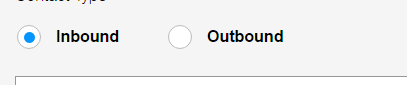
这就是它应该显示的方式:
回答 2
Stack Overflow用户
回答已采纳
发布于 2016-05-27 07:51:43
普遍的共识是,在Firefox中使用CSS设计单选按钮是一件愚蠢的差事。但是有几种解决办法可以达到同样的效果。我个人的最爱是隐藏实际的单选按钮,而不是使用图像来显示它是选中还是未选中。
这里有一个很好的例子:
Mozilla Firefox input radio button styling and default settings
Stack Overflow用户
发布于 2016-05-27 07:54:36
样式输入元素(特别是单选按钮和复选框)在导航器中可能不可靠。最好将样式应用于标签或伪元素。
页面原文内容由Stack Overflow提供。腾讯云小微IT领域专用引擎提供翻译支持
原文链接:
https://stackoverflow.com/questions/37477587
复制相关文章
相似问题
腾讯云开发者

Copyright © 2013 - 2026 Tencent Cloud. All Rights Reserved. 腾讯云 版权所有
深圳市腾讯计算机系统有限公司 ICP备案/许可证号:粤B2-20090059  粤公网安备44030502008569号
腾讯云计算(北京)有限责任公司 京ICP证150476号 | 京ICP备11018762号