
向ReportBuilder3.0添加条形码
我试图在我的RDL报告中嵌入一个条形码,这是由MicrosoftSQLServerReportBuilder3.0开发的。
我在互联网上找到了几个建议的解决方案,其中之一是添加一个DLL引用并添加一些代码,但是它没有工作,而且总是无法加载DLL,我通过使用API作为映像的源找到了另一个解决方案,但这对我来说不是一个可行的解决方案,因为我的服务器中并不总是有互联网连接。
在我的报告中有使用Code 128字体的方法吗?或者任何其他不需要互联网连接的解决方案?
回答 2
Stack Overflow用户
发布于 2016-05-27 12:06:20
经过大量的研究,我设法将条形码嵌入到我的报告中,并让它使用Code 128字体运行。
但是,字体本身是不够的,因为您需要首先准备文本才能扫描条形码,下面的解决方案不需要在客户端计算机上安装字体,只需要在服务器上安装它:
- 首先,您需要安装
Code 128字体,如果您还没有!您可以从这里下载它。 - 打开您的报告或创建一个新的。
- 我们需要添加
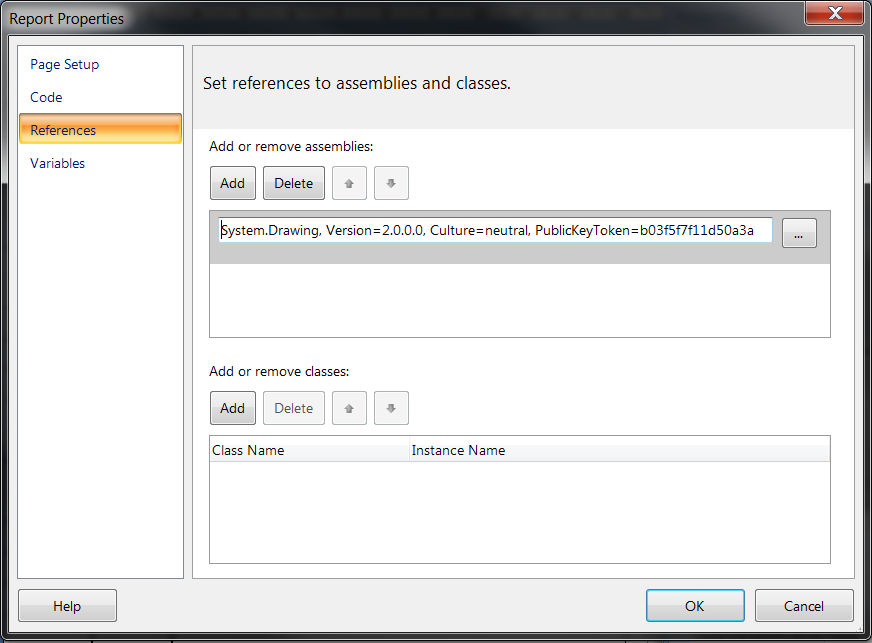
System.DrawingDLL文件作为引用: 这可以通过以下方式完成:转到Report Properties (右键单击body -> Report Properties),单击References选项卡,单击添加或删除程序集节E 222中的Add按钮,单击Open按钮E 123……e 224浏览C:\Windows\Microsoft.NET\Framework\v2.0.50727\System.Drawing.dll文件,然后单击E 126OpenE 227。 你应该有这样的东西:
- 现在,我们需要向报告中添加一些自定义代码:
转到Report Properties中的 code 选项卡,复制并通过以下代码,然后单击Ok
Function StringToBarcode(value As String) As String
  Dim charPos, minCharPos As Integer
  Dim currentChar, checksum As Integer
  Dim isTableB As Boolean = True, isValid As Boolean = True
  Dim returnValue As String = String.Empty

  If (value Is Nothing OrElse value.Length = 0) Then
    Return String.Empty
  End If

  'Check for valid characters
  For charCount As Integer = 0 To value.Length - 1
    currentChar = Asc(value.Substring(charCount, 1))
    If (Not (currentChar >= 32 AndAlso currentChar <= 126)) Then
      isValid = False
      Exit For
    End If
  Next

  If Not (isValid) Then Return returnValue
  charPos = 0
  While (charPos < value.Length)
    If (isTableB) Then
      'See if interesting to switch to table C
      'yes for 4 digits at start or end, else if 6 digits
      If (charPos = 0 OrElse charPos + 4 = value.Length) Then
        minCharPos = 4
      Else
        minCharPos = 6
      End If
      minCharPos = IsNumber(value, charPos, minCharPos)

      If (minCharPos < 0) Then
        'Choice table C
        If (charPos = 0) Then
        'Starting with table C
        'char.ConvertFromUtf32(205)
          returnValue = Chr(205).ToString()
        Else
          'Switch to table C
          returnValue = returnValue + Chr(199).ToString()
        End If
        isTableB = False
      Else
        If (charPos = 0) Then
          'Starting with table B
          returnValue = Chr(204).ToString()
          'char.ConvertFromUtf32(204);
        End If
      End If
    End If

    If (Not isTableB) Then
      'We are on table C, try to process 2 digits
      minCharPos = 2
      minCharPos = IsNumber(value, charPos, minCharPos)

      If (minCharPos < 0) Then
        'OK for 2 digits, process it
        currentChar = Integer.Parse(value.Substring(charPos, 2))
        If (currentChar < 95) Then
          currentChar = currentChar + 32
        Else
          currentChar = currentChar + 100
        End If
        returnValue = returnValue + Chr(currentChar).ToString()
        charPos += 2
      Else
        'We haven't 2 digits, switch to table B
        returnValue = returnValue + Chr(200).ToString()
        isTableB = True
      End If
    End If

    If (isTableB) Then
      'Process 1 digit with table B
      returnValue = returnValue + value.Substring(charPos, 1)
      charPos += 1
    End If

   End While

  'Calculation of the checksum
  checksum = 0
  Dim loo As Integer
  For loo = 0 To returnValue.Length - 1
    currentChar = Asc(returnValue.Substring(loo, 1))
    If (currentChar < 127) Then
      currentChar = currentChar - 32
    Else
      currentChar = currentChar - 100
    End If
    If (loo = 0) Then
      checksum = currentChar
    Else
      checksum = (checksum + (loo * currentChar)) Mod 103
    End If
  Next

  'Calculation of the checksum ASCII code
  If (checksum < 95) Then
    checksum = checksum + 32
  Else
    checksum = checksum + 100
  End If

  ' Add the checksum and the STOP
  returnValue = returnValue + _
  Chr(checksum).ToString() + _
  Chr(206).ToString()

  Return returnValue
End Function

Function IsNumber(InputValue As String, CharPos As Integer, MinCharPos As Integer) As Integer
  MinCharPos -= 1
  If (CharPos + MinCharPos < InputValue.Length) Then
    While (MinCharPos >= 0)
      If (Asc(InputValue.Substring(CharPos + MinCharPos, 1)) < 48 _
      OrElse Asc(InputValue.Substring(CharPos + MinCharPos, 1)) > 57) Then
      Exit While
    End If
    MinCharPos -= 1
    End While
  End If
  Return MinCharPos
End Function

Public Function Code128(ByVal stringText As String) As Byte()
  Dim result As Byte() = Nothing

  Try
  result = GenerateImage("Code 128", StringToBarcode(stringText))
  Catch ex As Exception
  End Try

  Return result
End Function

Public Function GenerateImage(ByVal fontName As String, ByVal stringText As String) As Byte()
  Dim oGraphics As System.Drawing.Graphics
  Dim barcodeSize As System.Drawing.SizeF
  Dim ms As System.IO.MemoryStream

  Using font As New System.Drawing.Font(New System.Drawing.FontFamily(fontName), 30)
  Using tmpBitmap As New System.Drawing.Bitmap(1, 1, System.Drawing.Imaging.PixelFormat.Format32bppArgb)
  oGraphics = System.Drawing.Graphics.FromImage(tmpBitmap)
  oGraphics.TextRenderingHint = System.Drawing.Text.TextRenderingHint.SingleBitPerPixel
  barcodeSize = oGraphics.MeasureString(stringText, font)
  oGraphics.Dispose()
  End Using

  Using newBitmap As New System.Drawing.Bitmap(barcodeSize.Width, barcodeSize.Height, System.Drawing.Imaging.PixelFormat.Format32bppArgb)
  oGraphics = System.Drawing.Graphics.FromImage(newBitmap)
  oGraphics.TextRenderingHint = System.Drawing.Text.TextRenderingHint.SingleBitPerPixel

  Using oSolidBrushWhite As New System.Drawing.SolidBrush(System.Drawing.Color.White)
  Using oSolidBrushBlack As New System.Drawing.SolidBrush(System.Drawing.Color.Black)
  oGraphics.FillRectangle(oSolidBrushWhite, New System.Drawing.Rectangle(0, 0, barcodeSize.Width, barcodeSize.Height))
  oGraphics.DrawString(stringText, font, oSolidBrushBlack, 0, 0)
  End Using

  End Using

  ms = New System.IO.MemoryStream()
  newBitmap.Save(ms, System.Drawing.Imaging.ImageFormat.Png)
  End Using
  End Using

  Return ms.ToArray()
End Function- 在报表中插入图像,并选择数据库作为图像源,并使用
image/png作为MIMI类型
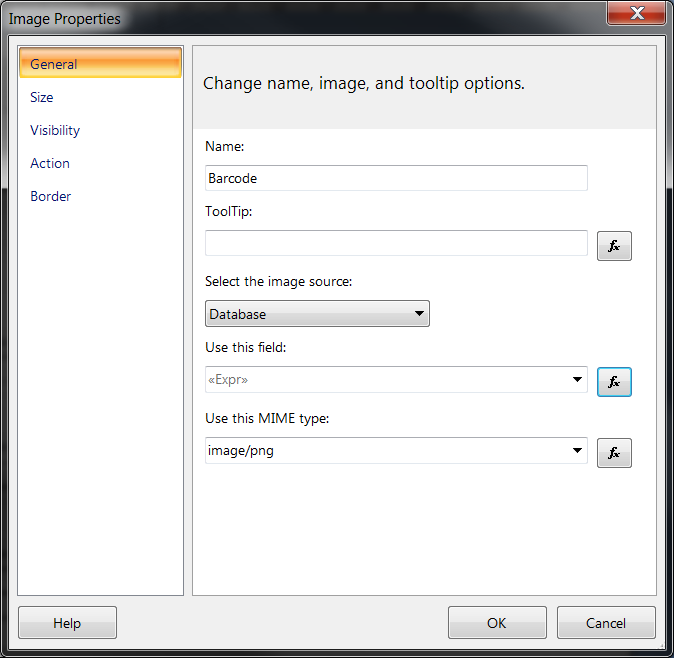
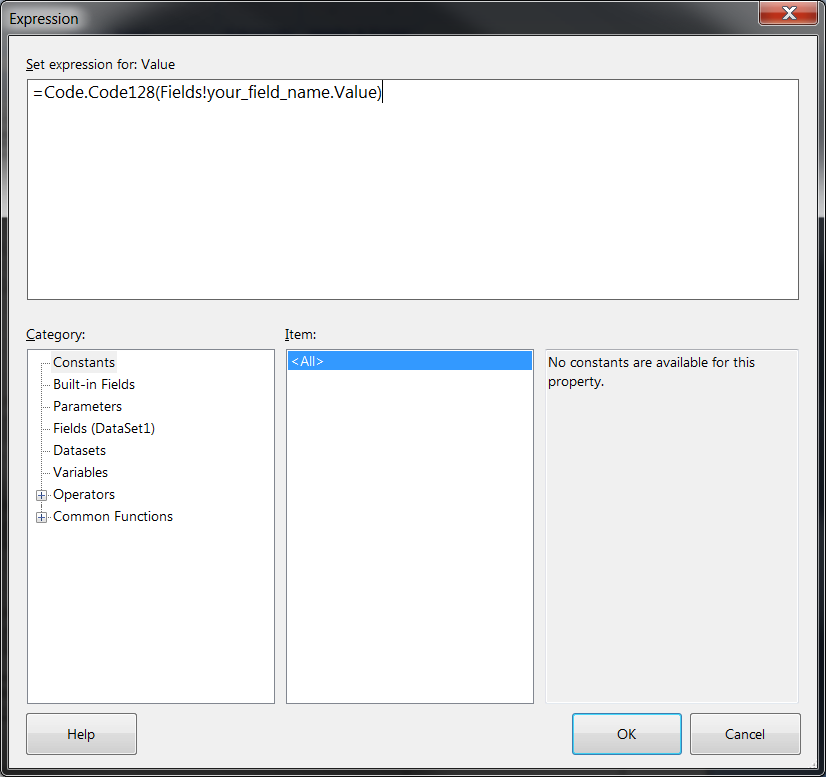
- 点击fx按钮在中使用这个字段按钮,并使用这个函数
=Code.Code128(Fields!your_field_name.Value),按Ok和Ok。
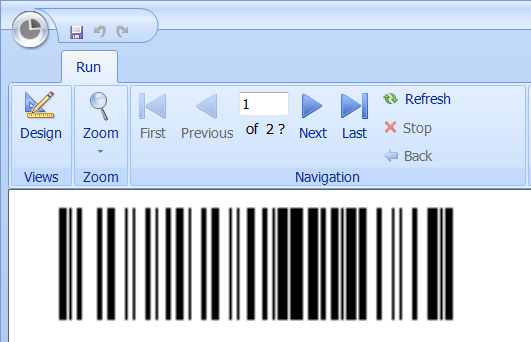
- 运行报告,现在您有一个条形码:)
Stack Overflow用户
发布于 2016-05-24 23:05:19
有一些非常复杂的解决方案,但我能够做到这一点,只要使用一个字体。确保在值的开头和结尾都有星号。如果字体还没有安装在计算机上,你可能不得不安装它。我在Visual中使用了SSDT,但是报表生成器也应该可以工作。如果遇到特定问题或错误,请发布更新。
https://stackoverflow.com/questions/37410327
复制相似问题
腾讯云开发者

Copyright © 2013 - 2026 Tencent Cloud. All Rights Reserved. 腾讯云 版权所有
深圳市腾讯计算机系统有限公司 ICP备案/许可证号:粤B2-20090059  粤公网安备44030502008569号
腾讯云计算(北京)有限责任公司 京ICP证150476号 | 京ICP备11018762号