
是否有一种CSS方法来使动态数据驱动的字符适合于div按钮?
我正在编辑一个数据驱动的网站,它使用来自自动化数据库引擎的数据。在HTML中,我有一个固定大小的按钮,其中有来自数据库的文本。我想添加一些css样式,以调整字体大小,使其始终适合在div按钮内。
这是我的代码:
CSS:
.button {
    width: 216px;
    height: 44px;
    background-color: 00baf2;
    color: #fff;
    border-radius: 5px;
    font-size: 23px;
    line-height: 45px;
    font-weight: 500;
    text-align: center;

@media screen and (max-width : 768px) {
    .button {
        width: 400px;
        height: 81px;
        font-size: 30px;
        line-height: 40px;
        background-size: 400px 81px !important;
        float: none !important;
        clear: both;
        margin: 25px auto;
    }
HTML
<div class="button">View Your Plan</div> (static/not data-driven)
<div class="button">Current Members Click Here</div> (data-driven)
<div class="button">Enroll Now</div> (static/not data-driven)
第二个/中间按钮是一个数据驱动按钮。有时候,这个词会比“现在的会员点击这里”更长。有时,它会是“在这里看你的计划折扣计划”。问题是,如果去掉字体大小和线条高度,就会默认字体大小,从而使字体变小。如何解决这个问题,以便动态文本始终适合在div按钮内,无论它是短还是长?是否可以仅用CSS完成,或者是否有JS解决方案?
下面是它现在的样子:桌面视图

移动视图
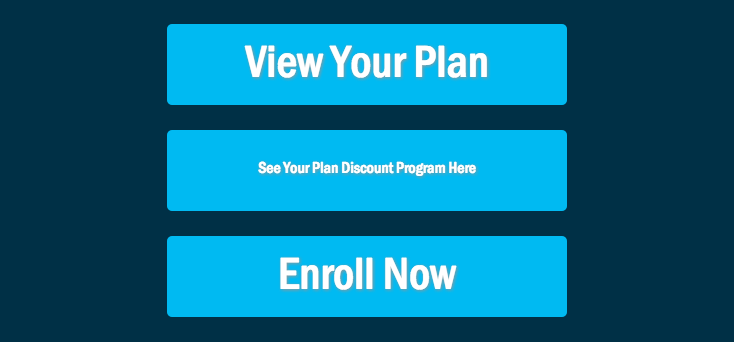
目标:桌面

莫比尔县

回答 3
Stack Overflow用户
发布于 2016-05-23 17:28:18
你想要的是一个动态的字体大小来适应,而你不能仅仅用CSS就能做到。您可以有条件地应用不同的类,这可能会影响字体大小。例如:
.button.small-text {
    font-size:12px;
}
.button.medium-text {
    font-size:18px;
}
.button.large-text {
    font-size:23px;
}
您需要在媒体查询中重新定义这些内容,以适应不同的按钮宽度。
然后,您必须使用后端或前端脚本应用small-text、medium-text或large-text。
使用jQuery,这看起来可能是:
$('.button').removeClass('small-text medium-text large-text');
$('.button').each(function() {
    var len = $(this).text().length;
    if (len < 20) {
        $(this).addClass('large-text');
    } else if (len < 40) {
        $(this).addClass('medium-text');
    } else {
        $(this).addClass('small-text');
    }
});Stack Overflow用户
发布于 2016-05-23 17:57:00
编辑:
我刚读到一条评论,你希望数据驱动按钮的字体比其他按钮要小。只需在我为该按钮使用的类中指定它,在字体大小中设置一个较小的vw。
这是可能的,使用大众单位,你将需要支持旧的浏览器,但附带一个退路。我不知道这是否会破坏更大的桌面,但希望您能够了解这种方法。
  .button {
    width: 216px;
    min-height: 44px;
    background-color: #00baf2;
    color: #fff;
    border-radius: 5px;
    font-size: 23px;
    font-size: 2vw;
    font-weight: 500;
    text-align: center;
    line-height: 44px;
  }
  .button.data-driven {
    line-height: 22px;
  }
  @media (max-width: 992px) and (min-width: 768px) {
    .button {
      font-size: 23px;
      font-size: 2vw;
    }
    .button.data-driven {
      line-height: initial;
    }
  }
  @media screen and (max-width: 768px) {
    .button {
      width: 400px;
      height: 81px;
      font-size: 30px;
      line-height: 81px;
      background-size: 400px 81px !important;
      float: none !important;
      clear: both;
      margin: 25px auto;
      padding-top: 0;
    }
    .button.data-driven {
      line-height: 81px;
    }
}<div class="button">View Your Plan</div>(static/not data-driven)
<div class="button data-driven">Current Members Click Here</div>(data-driven)
<div class="button">Enroll Now</div>(static/not data-driven)
Stack Overflow用户
发布于 2016-05-23 17:32:08
您所要做的就是将height移到按钮上,以使其具有动态。因此,按钮将随着文本的增加而增长。并向按钮类添加一个display:inline-block。
如果需要使按钮具有固定/恒定的高度,请在按钮的字体大小中使用%值。与font-size:10%;一样,%表示一个相对值,您可以使用它。
https://stackoverflow.com/questions/37396934
复制相似问题
腾讯云开发者

Copyright © 2013 - 2026 Tencent Cloud. All Rights Reserved. 腾讯云 版权所有
深圳市腾讯计算机系统有限公司 ICP备案/许可证号:粤B2-20090059  粤公网安备44030502008569号
腾讯云计算(北京)有限责任公司 京ICP证150476号 | 京ICP备11018762号