
带有头问题的jQuery-Select2数组
带有头问题的jQuery-Select2数组
提问于 2016-05-20 17:58:45
Select2:https://select2.github.io/
最终结果应该类似于https://select2.github.io/examples.html示例多个选择框。
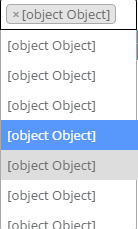
问题:它显示下拉列表,但所有选项都是对象。
码
$(document).ready(function () {
        function attribute(text) {
            this.text = text;
            this.children = [];
            this.addChild = function (tid, tvalue) {
                var val = { id: tid, text: tvalue };
                this.children.push(val);
            }
        }
        $.get("/products/attributelist", function (data) {
            var attributeList = [];
            $.each(data.AttributeGroups, function (i, val) {
                var tmpAttr = new attribute(val.Name);
                $.each(val.Attributes, function (val1) {
                    tmpAttr.addChild(val1.Id, val1.Name);
                });
                attributeList.push(tmpAttr);
            });
            $(".js-example-basic-multiple").select2({
                data: attributeList
            });
        });
    });
他们的建议数据格式
  {
  text: 'Group label',
  children: [
    {
      id: 'nested-1',
      text: 'First nested option'
    },
    // ... more data objects ...
  ]
}回答 2
Stack Overflow用户
回答已采纳
发布于 2016-05-20 18:37:29
您将函数(属性)列表推送到attributeList数组,因此,为了获得适当的格式,您可以:
var properArray = [];

for (var i = 0; i< attributeList.length; i++) {
  properArray.push({text: attributeList[i].text, children: attributeList[i].children})
}
并将properArray传递给select2数据。
Stack Overflow用户
发布于 2016-05-20 18:40:44
试试这个
$(document).ready(function () {
        function attribute(text) {
            return {
                text:text,
                children:[],
                addChild : function (tid, tvalue) {
                    var val = { id: tid, text: tvalue };
                    this.children.push(val);
                }
            }
        }
        $.get("/products/attributelist", function (data) {
            var attributeList = [];
            $.each(data.AttributeGroups, function (i, val) {
                var tmpAttr = attribute(val.Name);
                $.each(val.Attributes, function (val1) {
                    tmpAttr.addChild(val1.Id, val1.Name);
                });
                attributeList.push(tmpAttr);
            });
            $(".js-example-basic-multiple").select2({
                data: attributeList
            });
        });
});页面原文内容由Stack Overflow提供。腾讯云小微IT领域专用引擎提供翻译支持
原文链接:
https://stackoverflow.com/questions/37353043
复制相关文章
相似问题
腾讯云开发者

Copyright © 2013 - 2026 Tencent Cloud. All Rights Reserved. 腾讯云 版权所有
深圳市腾讯计算机系统有限公司 ICP备案/许可证号:粤B2-20090059  粤公网安备44030502008569号
腾讯云计算(北京)有限责任公司 京ICP证150476号 | 京ICP备11018762号