
使用UIAlertController动作编程链接到嵌入式UIViewController
使用UIAlertController动作编程链接到嵌入式UIViewController
提问于 2016-05-20 16:51:26
用户目前使用的是一个ViewController,它是Modally。
我正在尝试连接UIAlertViewController的OK按钮操作,以编程方式链接到嵌入在UINavigationController中的UIViewController。
就像这样:
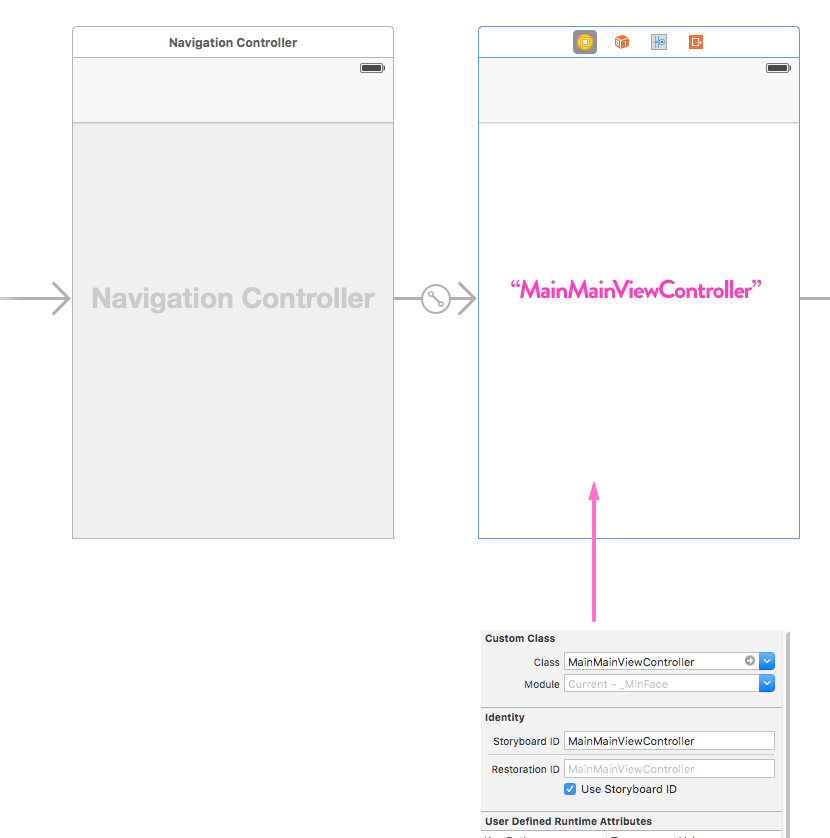
这是我的相关代码片段:
func paymentQueue(queue: SKPaymentQueue, updatedTransactions transactions: [SKPaymentTransaction]) {

....// some code

case .Restored:

....// some code
let alert = UIAlertController(title: "Thank You!", message: "You now have FULL ad-free Access", preferredStyle: UIAlertControllerStyle.Alert)
let OKAction = UIAlertAction(title: "OK", style: UIAlertActionStyle.Default) { (action:UIAlertAction) in
// Goto Main Page:
let storyboard = UIStoryboard(name: "Main", bundle: nil)
let vc = storyboard.instantiateViewControllerWithIdentifier("MainMainViewController");
self.navigationController?.presentViewController(vc, animated: true, completion: nil)
}
alert.addAction(OKAction)
self.presentViewController(alert, animated: true, completion: nil)

break;

default:
break;
}本质上,当用户恢复购买(或成功购买)时,我希望他们单击OK将其发送到另一个ViewController - MainMainViewcontroller。
但是当我点击OK按钮时,什么都不会发生。
我哪里出问题了?
(预先多谢诸位先生/梅斯达梅斯;)
回答 1
Stack Overflow用户
回答已采纳
发布于 2016-05-20 17:46:59
往这边写。
func paymentQueue(queue: SKPaymentQueue, updatedTransactions transactions: [SKPaymentTransaction]) {

....// some code

case .Restored:

....// some code
let alert = UIAlertController(title: "Thank You!", message: "You now have FULL ad-free Access", preferredStyle: UIAlertControllerStyle.Alert)
let OKAction = UIAlertAction(title: "OK", style: UIAlertActionStyle.Default) { (action:UIAlertAction) in
// Goto Main Page:
let storyboard = UIStoryboard(name: "Main", bundle: nil)
let navVC = storyboard.instantiateViewControllerWithIdentifier("Navigation");
self.presentViewController(navVC, animated: true, completion: nil)
}
alert.addAction(OKAction)
self.presentViewController(alert, animated: true, completion: nil)

break;

default:
break;
}页面原文内容由Stack Overflow提供。腾讯云小微IT领域专用引擎提供翻译支持
原文链接:
https://stackoverflow.com/questions/37351942
复制相关文章
相似问题
腾讯云开发者

Copyright © 2013 - 2026 Tencent Cloud. All Rights Reserved. 腾讯云 版权所有
深圳市腾讯计算机系统有限公司 ICP备案/许可证号:粤B2-20090059  粤公网安备44030502008569号
腾讯云计算(北京)有限责任公司 京ICP证150476号 | 京ICP备11018762号