
使用进行两步登录
使用进行两步登录
提问于 2016-05-17 16:57:05
当我激活了Swisscom通行帐户中的两步登录方法(密码和短信代码)时,如何使用云创建CLI登录到Swisscom应用程序云
$ cf login -a https://….appcloud.swisscom.com -u …
API endpoint: https://….appcloud.swisscom.com

Password>
Authenticating...
Credentials were rejected, please try again.
在命令行输入密码后,我确实会收到SMS代码,但是不可能在命令行中输入它。
回答 2
Stack Overflow用户
回答已采纳
发布于 2016-05-18 07:31:14
如果您启用Passeport的双因素身份验证,则必须使用--sso标志并遵循说明:
cf login -a https://api.lyra-836.appcloud.swisscom.com --sso
API endpoint: https://api.lyra-836.appcloud.swisscom.com

One Time Code ( Get one at https://login.lyra-836.appcloud.swisscom.com/passcode )>切换到浏览器并获得OTP是必要的,因为cf cli还不支持直接在cli上执行两步操作。
我们将将此信息添加到正式文档中。
Stack Overflow用户
发布于 2017-09-06 05:36:45
由于许多用户登录到iAPC (内部应用程序云)有问题,我在这里发布了这些步骤。对于外部用户来说,这个API端点是不可到达的,您需要在Corproot网络中(配置了代理).。
unset https_proxy http_proxy HTTP_PROXY HTTPS_PROXY
cf login -a https://api.scapp-console.swisscom.com --sso
API endpoint: https://api.scapp-console.swisscom.com

One Time Code ( Get one at https://login.scapp-console.swisscom.com/passcode )>
Authenticating...
OK

Select an org (or press enter to skip):
(...)

Select a space (or press enter to skip):
(...)

Space> test
Targeted space Test


API endpoint:   https://api.scapp-console.swisscom.com (API version: 2.92.0)
User:           xxx.xxx@swisscom.com
Org:            xxx
Space:          xxx
一次代码的截图(您需要复制并粘贴到CF CLI中)
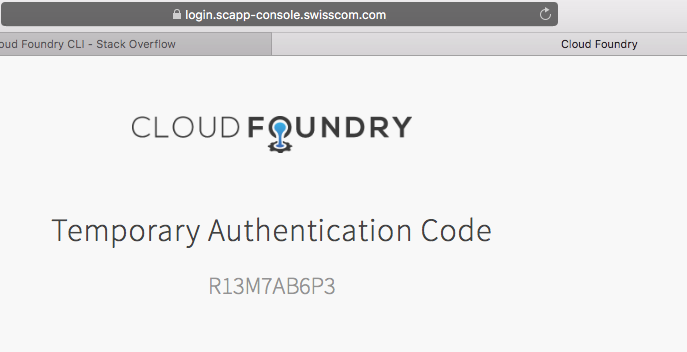
此CF安装连接到Corproot域。您需要使用Corproot凭据(与桌面使用的相同)。
如果您做错了,这是如何出错(Credentials were rejected, please try again):
cf push
FAILED
Not logged in. Use 'cf login' to log in.

cf login
API endpoint: https://api.scapp-console.swisscom.com
Email> xxx.xxx@swisscom.com
Password>
Authenticating...
Credentials were rejected, please try again页面原文内容由Stack Overflow提供。腾讯云小微IT领域专用引擎提供翻译支持
原文链接:
https://stackoverflow.com/questions/37282225
复制相关文章
相似问题
腾讯云开发者

Copyright © 2013 - 2026 Tencent Cloud. All Rights Reserved. 腾讯云 版权所有
深圳市腾讯计算机系统有限公司 ICP备案/许可证号:粤B2-20090059  粤公网安备44030502008569号
腾讯云计算(北京)有限责任公司 京ICP证150476号 | 京ICP备11018762号