
使用REngine版本1.5.5创建R.Net实例
使用REngine版本1.5.5创建R.Net实例
提问于 2016-05-10 13:40:46
我试图在R Language中使用R.Net版本1.5.5 (从NuGet加载)创建一个"Hello“示例。不幸的是,我所看到的在线样本都没有奏效。
,这就是我所做的:
- 安装Microsoft R Open 3.2.4,增强型R发行版
- 安装用于的r工具 (R版本3.2.4 (2016-03-16))
- 创建一个R项目&测试一个简单的脚本
- 创建了一个MVC应用程序&引用了R.Net版本1.5.5版本的NuGet
我的问题:
我看到的所有在线示例都必须使用早期版本,因为我无法为我的生命创建一个REngine实例!事实上,我一直在想:
找不到Dll
...yet C:\Program Files\Microsoft\MRO\R-3.2.4\bin\x64\r.dll确实存在。
Q:如何使用R.Net版本1.5.5创建REngine实例
我的代码看起来像:
class Program
{
    #region <Methods>

    static void Main(string[] args)
    {
        SetupPath(); // current process, soon to be deprecated

        using (REngine engine = REngine.CreateInstance("RDotNet"))
        {
            engine.Initialize(); // required since v1.5
            CharacterVector charVec = engine.CreateCharacterVector(new[] {"Hello, R world!, .NET speaking" });

            engine.SetSymbol("greetings", charVec);
            engine.Evaluate("str(greetings)"); // print out in the console

            string[] a = engine.Evaluate("'Hi there .NET, from the R engine'").AsCharacter().ToArray();

            Console.WriteLine("R answered: '{0}'", a[0]);

        }

        Console.WriteLine("Press any key to exit the program");
        Console.ReadKey();
    }

    public static void SetupPath()
    {
        var oldPath = System.Environment.GetEnvironmentVariable("PATH");
        var rPath = @"C:\Program Files\Microsoft\MRO\R-3.2.4\bin\x64";

        if (!Directory.Exists(rPath))
            throw new DirectoryNotFoundException(string.Format(" R.dll not found in : {0}", rPath));

        var newPath = string.Format("{0}{1}{2}", rPath, System.IO.Path.PathSeparator, oldPath);

        System.Environment.SetEnvironmentVariable("PATH", newPath);
    }

    #endregion
}回答 1
Stack Overflow用户
回答已采纳
发布于 2016-05-10 21:59:24
我不想回答我自己的问题,但现在.
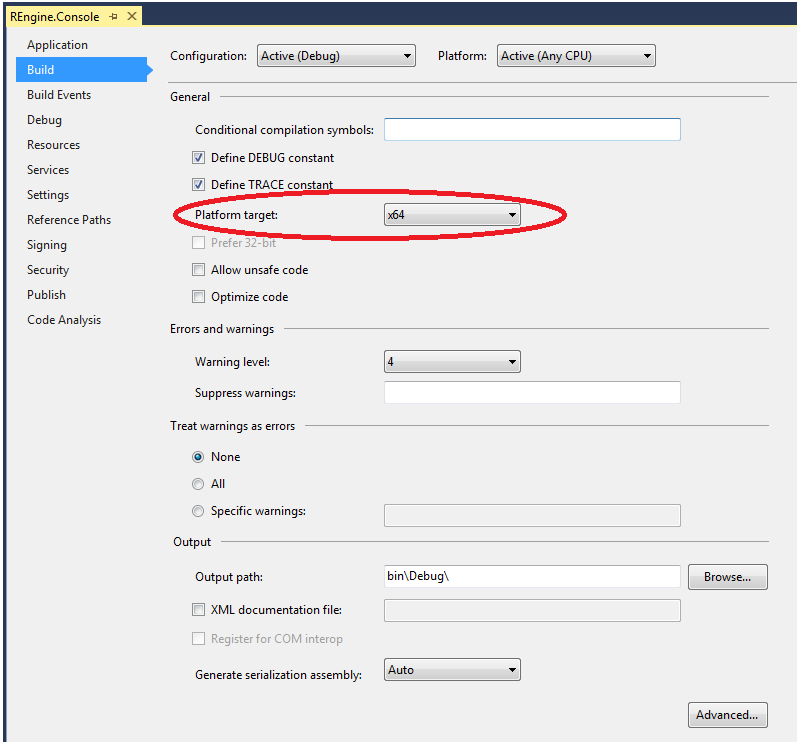
Microsoft 3.2.4增强型R发行版安装x64文件。因此,在任何CPU下运行都会导致失败,因为它将选择x86 (默认情况下)。
在下
项目属性->构建:在“通用”部分
- 选择x64作为您的
Platform Target
页面原文内容由Stack Overflow提供。腾讯云小微IT领域专用引擎提供翻译支持
原文链接:
https://stackoverflow.com/questions/37140322
复制相关文章
相似问题
腾讯云开发者

Copyright © 2013 - 2026 Tencent Cloud. All Rights Reserved. 腾讯云 版权所有
深圳市腾讯计算机系统有限公司 ICP备案/许可证号:粤B2-20090059  粤公网安备44030502008569号
腾讯云计算(北京)有限责任公司 京ICP证150476号 | 京ICP备11018762号