
BezierPath在Swift中使用操场
BezierPath在Swift中使用操场
提问于 2016-05-02 18:40:16
为了在Swift游乐场中使用BezierPath,我必须创建一个自定义类吗?
以下代码只显示黑色背景:
import UIKit
import XCPlayground

class GraphView : UIView {

    override func drawRect(rect: CGRect) {

        let path = UIBezierPath(rect: rect)
        path.moveToPoint(CGPointMake(0,0))
        path.addLineToPoint(CGPointMake(50,100))
        path.closePath()
        UIColor.redColor().setFill()

        path.stroke()
    }

}


let graphView = GraphView(frame: CGRectMake(0,0,960,640))回答 2
Stack Overflow用户
回答已采纳
发布于 2016-05-02 18:50:55
您必须在代码的末尾使用它:
XCPlaygroundPage.currentPage.liveView = graphView并打开游乐场的“助理编辑”查看结果。
也可以改变景色的背景色,因为它是黑色的.你的线条也是黑色的。;)
Stack Overflow用户
发布于 2020-04-19 20:18:55
在Swift 5:
import UIKit

class GraphView : UIView {
    override init(frame: CGRect) {
        super.init(frame: frame)
        backgroundColor = .white
    }

    required init?(coder: NSCoder) {
        fatalError("init(coder:) has not been implemented")
    }

    override func draw(_ rect: CGRect) {
        let path = UIBezierPath(rect: rect)
        path.move(to: CGPoint(x: 0, y: 0))
        path.addLine(to: CGPoint(x: 50, y: 100))
        path.stroke()
    }

}

let graphView = GraphView(frame: CGRect(x: 0, y: 0, width: 960, height: 640))
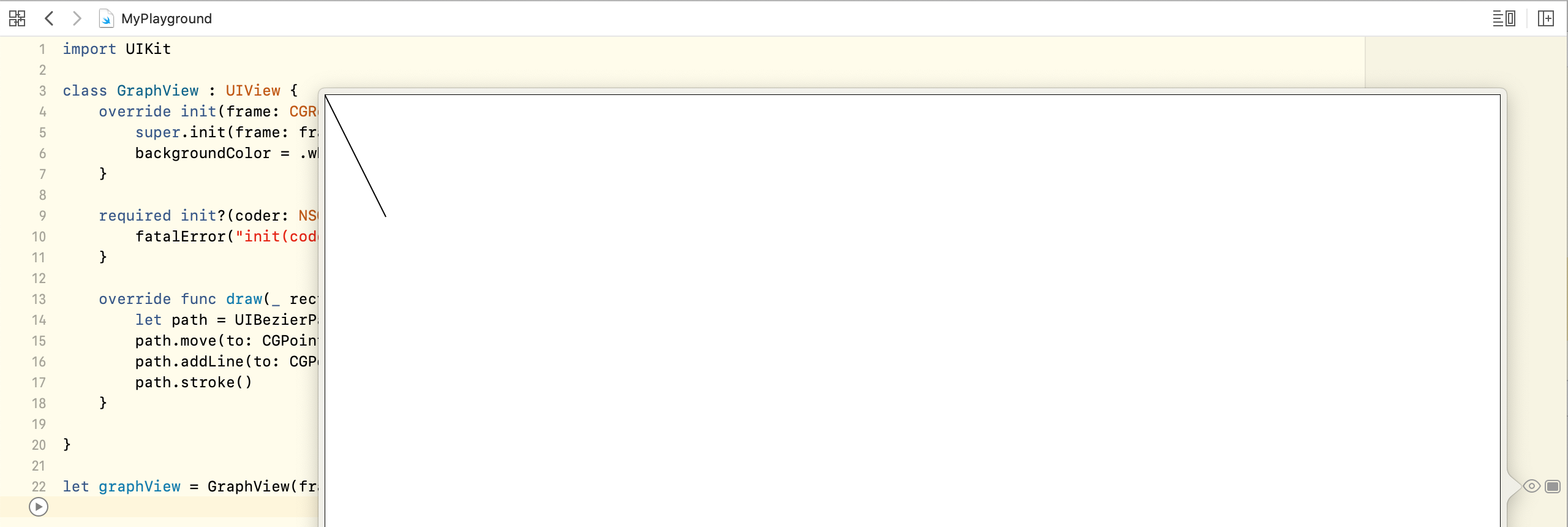
Swift 5.2,Xcode 11.4
页面原文内容由Stack Overflow提供。腾讯云小微IT领域专用引擎提供翻译支持
原文链接:
https://stackoverflow.com/questions/36989336
复制相关文章
相似问题
腾讯云开发者

Copyright © 2013 - 2026 Tencent Cloud. All Rights Reserved. 腾讯云 版权所有
深圳市腾讯计算机系统有限公司 ICP备案/许可证号:粤B2-20090059  粤公网安备44030502008569号
腾讯云计算(北京)有限责任公司 京ICP证150476号 | 京ICP备11018762号