
使用@Html.EditorForModel的局限性
我正在开发一个asp.net mvc-5 web应用程序.我有以下的模型课程:-
public class Details4
    {
        [HiddenInput(DisplayValue=false)]
        public string RESOURCENAME { set; get; }
        [Display (Name="Account Name")]
        [Required]
        public string ACCOUNTNAME { set; get; }
        [Display(Name = "Resource type")]
        [Required]
        public string RESOURCETYPE { set; get; }
        [DataType(DataType.Password)]
        [Required]
        public string PASSWORD { set; get; }
        [Display(Name = "Description")]
        [DataType(DataType.MultilineText)]
        public string Description { set; get; }
        [Display(Name= "URL")]
        [Url]
        public string RESOURCEURL { set; get; }
        [Display(Name="Owner Name")]
        [Required]
        public string OWNERNAME { set; get; }
        [Display(Name = "Resource Group Nam")]
        public string RESOURCEGROUPNAME { set; get; }
        [JsonProperty("Domain")]
        public string DomainName { set; get; }
        [JsonProperty("DNSNAME")]
        public string DNSNAME { set; get; }
         [Display(Name = "Department")]
        public string DEPARTMENT { set; get; }
         [Display(Name = "Location")]
        public string LOCATION { set; get; }
        public List<RESOURCECUSTOMFIELD> RESOURCECUSTOMFIELD { set; get; }
    }

 public class RESOURCECUSTOMFIELD
    {
        public string CUSTOMLABEL { set; get; }
        public string CUSTOMVALUE { set; get; }
}现在,我通常在字段级别使用@Html.EditorFor()和LabelFor()。但是对于这个模型,我想开始使用@Html.EditorForModel,因为视图上的标记会更少:
@Html.EditorForModel()现在的结果并不是我所期望的100%:
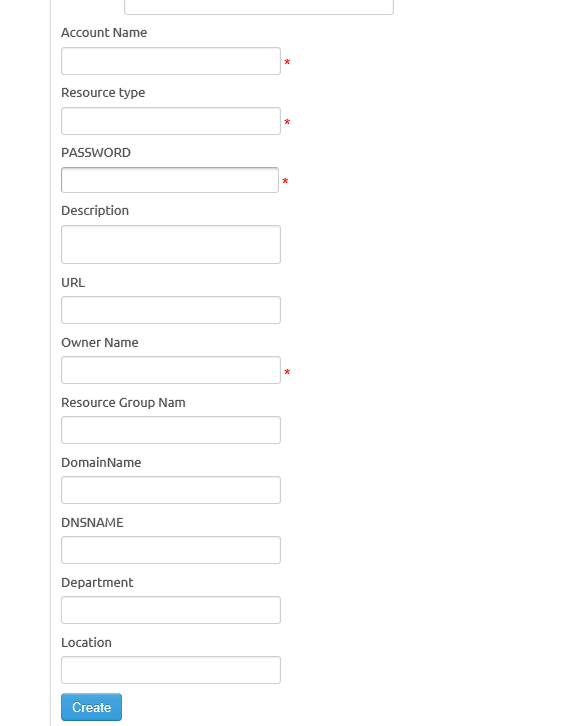
有谁能建议我如何克服这些限制呢?
- 有办法将ResourceType字段作为下拉列表吗?现在,如果我呈现的是单独的字段,我可以使用
@Html.DropDownlistFor。但不确定如何在使用@Html.EditorForModel时处理这个问题? - 是否有一种方法来修改生成的布局?,现在我的应用程序中的所有应用程序都是这样的->文本框:
其中标签&文本位于同一行,我用一个class=f包装标签,它将以粗体字体显示标签。因此,我是否可以修改EditorForModel生成的输出,使标签和文本框位于同一行,而不是放在两行上?
- 我是否能够强制EditorForModel呈现
RESOURCECUSTOMFIELD列表列?
回答 2
Stack Overflow用户
发布于 2016-05-06 06:21:42
EditorForModel默认模板不是高度可定制的。你应该写一个EditorTemplate来解决你所有的问题。您可以检查这个教程。您必须手动编写所有属性,但对于每个模型只需要编写一次。将模板放在EditorTemplates/文件夹中,整个应用程序都可以使用它。回答你的子弹:
- 现在您可以编写自己的模板了,您可以为属性使用任何类型的输入。
string类型的默认编辑器是一个文本框(enum类型的下拉列表)。 - 您必须在模板中编写自己的布局。这正是你想要的。
- 还可以为
RESOURCECUSTOMFIELD编写编辑器模板,并在模板中使用它。甚至可以为IEnumerable<RESOURCECUSTOMFIELD>编写模板: @model IEnumerable @foreach(var customModel in Model) { @Html.LabelFor(m => customModel.CUSTOMLABEL ) @Html.TextBoxFor(m => customModel.CUSTOMVALUE )}
并使用它(在您的主模板中):
@Html.EditorFor(m => m.RESOURCECUSTOMFIELD )如果您想要更改模型的DisplayFor工作方式,也有一种叫做DisplayFor的东西。
Stack Overflow用户
发布于 2016-05-12 05:07:09
1.您可以在模型字段上使用UIHint("custom_template")。例如:
public class Class1
    {
        public int id { get; set; }
        public string Name { get; set; }
        public string LastName { get; set; }

        [UIHint("gender_template")]
        public string Gender { get; set; }
    }
然后,您应该在Shared/EditorTemplate中创建gender_template.cshtml,如下所示。
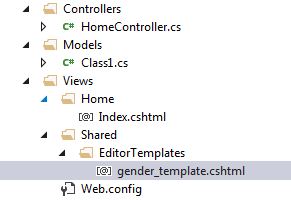
gender_template.cshtml文件中的示例代码。
@Html.DropDownList(
    "",
    new SelectList(
        new[]
        {
            new { Value = "Male", Text = "Male" },
            new { Value = "Female", Text = "Female" },
        },
        "Value",
        "Text",
        Model
    )
)
然后,在View页面中,代码是
@model MvcApplication2.Models.Class1
@{
    ViewBag.Title = "Index";
}


<h2>Index</h2>
@Html.EditorForModel()
运行视图页后的结果是
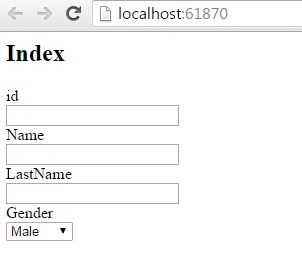
您可以根据需要制作更多自定义模板。
- 您可以像@html.EditorFor一样使用@Html.DisplayFor语法,您应该在Shared/DisplayTemplate中创建模板文件,可以在模板文件中编写/添加自己的html语法。
https://stackoverflow.com/questions/36927871
复制相似问题
腾讯云开发者

Copyright © 2013 - 2026 Tencent Cloud. All Rights Reserved. 腾讯云 版权所有
深圳市腾讯计算机系统有限公司 ICP备案/许可证号:粤B2-20090059  粤公网安备44030502008569号
腾讯云计算(北京)有限责任公司 京ICP证150476号 | 京ICP备11018762号