
角度2- Beta 16 @ViewChild,loadNextToLocation试图动态加载另一个组件吗?
角度2- Beta 16 @ViewChild,loadNextToLocation试图动态加载另一个组件吗?
提问于 2016-04-28 10:56:37
我正在尝试在另一个组件中动态加载组件,它以前是工作的,但是当更新到beta 16时,它停止了。我阅读了更改日志并更改了代码,但仍然没有成功。
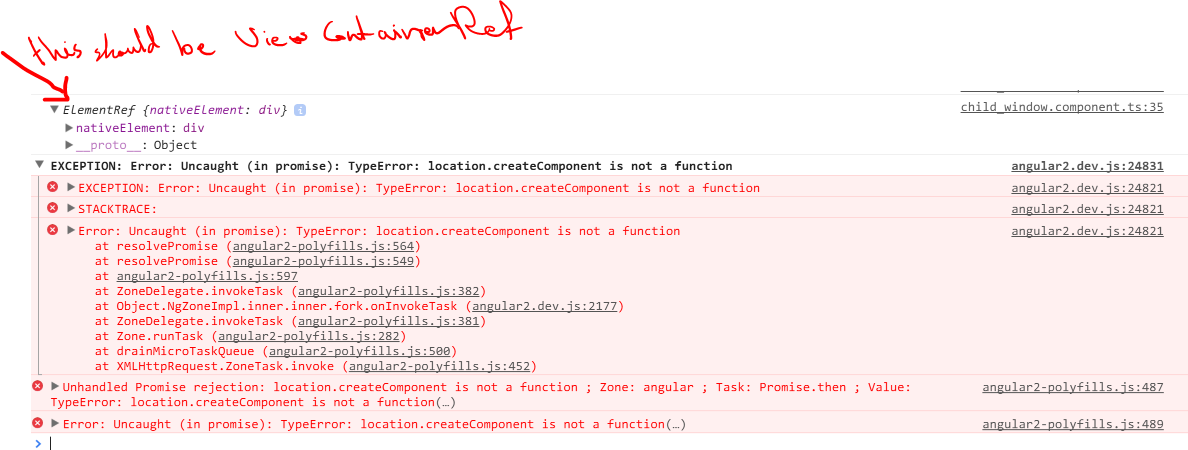
我登录到控制台我从@ViewChild得到了什么,我想得到一个ViewContainerRef,但是我得到了ElementRef,这会导致错误。如何解决这一问题
请查看我的控制台日志的代码和屏幕截图。
export class ChildWindowComponent implements OnInit{
public contentType: Type;
public childProps: ChildWindowVm;


@Output() okActionEvent = new EventEmitter<any>();
@Output() cancelActionEvent = new EventEmitter<any>();

@ViewChild('childContentPlace') childContentPlace: ViewContainerRef;
constructor(private dcl: DynamicComponentLoader) {
    console.log(this.childContentPlace);
}

ngAfterViewInit() {
    console.log(this.childContentPlace);

    this.dcl.loadNextToLocation(this.contentType, this.childContentPlace).then((tempComp) => {
        tempComp.instance.childVm = this.childProps.childContent;
    });
}

ngOnInit() {

}

okClicked(e:any) {
    this.okActionEvent.emit(null);

}
cancelClicked(e:any) {
    this.cancelActionEvent.emit(null);
}
}
HTML代码
<div>
<div class="child-window-block" >

</div>
<div class="child-window child-window-size" [style.width.px]="childProps.width" [style.height.px]="childProps.height" [style.top.px]="childProps.top" [style.left.px]="childProps.left">
    <div class="display-flex flex-direction-col fill-parent">
        <div [style.height.px]="childProps.titleHeight">
            <div class="child-window-header display-flex flex-item-center">
                <div class="flex-grow-1">
                    <h3>
                        {{childProps.title}}
                    </h3>
                </div>
            </div>
        </div>
        <div class="div-sep"></div>
        <div class="flex-grow-1 fill-parent" style="overflow-y: auto; overflow-x: hidden;">

                <div class="child-window-content flex-grow-1"  style="height: calc(100% - 42px);">
                    <div #childContentPlace></div>
                    <div>
                        <div class="text-right">
                            <input type="submit" value="Ok" class="child-window-btn" (click)="okClicked()" />
                            <input type="button" value="Cancel" class="child-window-btn" (click)="cancelClicked()" />
                        </div>
                    </div>
                </div>
        </div>

    </div>

</div>
<div class="child-window-back child-window-size" [style.width.px]="childProps.width" [style.height.px]="childProps.height" [style.top.px]="childProps.top" [style.left.px]="childProps.left">

</div>
回答 1
Stack Overflow用户
回答已采纳
发布于 2016-04-28 10:57:36
你需要告诉@ViewChild()该返回什么
@ViewChild('childContentPlace',
{read: ViewContainerRef}) childContentPlace: ViewContainerRef;页面原文内容由Stack Overflow提供。腾讯云小微IT领域专用引擎提供翻译支持
原文链接:
https://stackoverflow.com/questions/36912608
复制相关文章
相似问题
腾讯云开发者

Copyright © 2013 - 2026 Tencent Cloud. All Rights Reserved. 腾讯云 版权所有
深圳市腾讯计算机系统有限公司 ICP备案/许可证号:粤B2-20090059  粤公网安备44030502008569号
腾讯云计算(北京)有限责任公司 京ICP证150476号 | 京ICP备11018762号