
两个独立的脚本混在一起,并提供意外的输出。
我试着在同一个页面上提供两个测试,但是当我点击Get Score按钮时,第一个就不起作用了。我把这两个Javascripts放在脑中:
<script language="JavaScript">
    var q1numQues = 5;
    var q1numChoi = 4;

    var q1answers = new Array(5);
    q1answers[0] = "11";
    q1answers[1] = "3";
    q1answers[2] = "8";
    q1answers[3] = "15";
    q1answers[4] = "4";

    function getQuiz1Score(form) {
        var score = 0;
        var currElt;
        var currSelection;

        for (i = 0; i < q1numQues; i++) {
            currElt = i * q1numChoi;
            for (j = 0; j < q1numChoi; j++) {
                currSelection = form.elements[currElt + j];
                if (currSelection.checked) {
                    if (currSelection.value == q1answers[i]) {
                        score++;
                        break;
                    }
                }
            }
        }

        score = Math.round(score / q1numQues * 100);
        form.percentage.value = score + "%";

        var correctAnswers = "";
        for (i = 1; i <= q1numQues; i++) {
            correctAnswers += i + ". " + q1answers[i - 1] + "\r\n";
        }
        form.solutions.value = correctAnswers;
        break;

    }
</script>


<script language="JavaScript">
    var q2numQues = 4;
    var q2numChoi = 3;

    var q2answers = new Array(4);
    q2answers[0] = "UK";
    q2answers[1] = "USA";
    q2answers[2] = "Mexico";
    q2answers[3] = "Canada";

    function getQuiz2Score(form) {
        var score = 0;
        var currElt;
        var currSelection;

        for (i = 0; i < q2numQues; i++) {
            currElt = i * q2numChoi;
            for (j = 0; j < q2numChoi; j++) {
                currSelection = form.elements[currElt + j];
                if (currSelection.checked) {
                    if (currSelection.value == q2answers[i]) {
                        score++;
                        break;
                    }
                }
            }
        }

        score = Math.round(score / q2numQues * 100);
        form.percentage.value = score + "%";

        var correctAnswers = "";
        for (i = 1; i <= q2numQues; i++) {
            correctAnswers += i + ". " + q2answers[i - 1] + "\r\n";
        }
        form.solutions.value = correctAnswers;

    }
</script>
这些是我的小测验:
   <div class="container" id="pill">

            <ul class="nav nav-pills">
                <li class="active"><a data-toggle="tab" href="#mathquiz">Maths Quiz</a></li>
                <li><a data-toggle="tab" href="#geographyquiz">Geography Quiz</a></li>


            </ul>

            <div class="tab-content">
                <div id="mathquiz" class="tab-pane fade in active">
                    <div class="image-container">
                        <img src="images/math.png" class="img-responsive" alt="Our Values Banner">
                    </div>
                    <br>
                    <h4 align="center">Maths Quiz - Please click Get Score after completing to get your score</h4>

                    <form name="quiz" align="center"> <b>
1. What is 4+7?<br>
<input type="radio" name="q1" value="5">5<br>
<input type="radio" name="q1" value="10">10<br>
<input type="radio" name="q1" value="11">11<br>
<input type="radio" name="q1" value="20">20<br>


2. What is 5-2?<br>
<input type="radio" name="q2" value="0">0<br>
<input type="radio" name="q2" value="5">5<br>
<input type="radio" name="q2" value="3">3<br>
<input type="radio" name="q2" value="8">8<br>


3. What is 4*2?<br>
<input type="radio" name="q3" value="33">33<br>
<input type="radio" name="q3" value="20">20<br>
<input type="radio" name="q3" value="1">1<br>
<input type="radio" name="q3" value="8">8<br>


4. What is 3+12?<br>
<input type="radio" name="q4" value="15">15<br>
<input type="radio" name="q4" value="4">4<br>
<input type="radio" name="q4" value="78">78<br>
<input type="radio" name="q4" value="1">1<br>


5. What is 8/2?<br>
<input type="radio" name="q5" value="4">4<br>
<input type="radio" name="q5" value="7">7<br>
<input type="radio" name="q5" value="9">9<br>
<input type="radio" name="q5" value="8">8<br>


<input type="button" value="Get score" onClick="getQuiz1Score(this.form)">
<input type="reset" value="Clear">
Score = <input type=text size=15 name="percentage"><br>
Correct answers:<br>
<textarea name="solutions" wrap="virtual" rows="4" cols="40"></textarea> </b>
                    </form>
                </div>


                <div id="geographyquiz" class="tab-pane fade">
                    <div class="image-container">
                        <img src="images/geography.jpg" class="img-responsive" alt="Geography Quiz">
                    </div>

                    <h4 align="center">Geography Quiz</h4>


                    <form name="quiz" align="center"> <b>
Identify the country the flag belongs to! <br><br>
1. <div class="image-container">
                    <img src="images/britishflag.png" class="img-responsive" alt="British Flag">
                </div><br>
<input type="radio" name="q1" value="UK">UK<br>
<input type="radio" name="q1" value="Germany">Germany<br>
<input type="radio" name="q1" value="Italy">Italy<br><br>


2. <div class="image-container">
                    <img src="images/usaflag.png" class="img-responsive" alt="USA Flag">
                </div><br>
<input type="radio" name="q2" value="Ireland">Ireland<br>
<input type="radio" name="q2" value="Belgium">Belgium<br>
<input type="radio" name="q2" value="USA">USA<br><br>


3. <div class="image-container">
                    <img src="images/mexicoflag.png" class="img-responsive" alt="Mexican Flag">
                </div><br>
<input type="radio" name="q3" value="Brazil">Brazil<br>
<input type="radio" name="q3" value="Mexico">Mexico<br>
<input type="radio" name="q3" value="Chile">Chile<br><br>


4. <div class="image-container">
                    <img src="images/canadaflag.png" class="img-responsive" alt="Canadian Flag">
                </div><br>
<input type="radio" name="q4" value="Japan">Japan<br>
<input type="radio" name="q4" value="Portugal">Portugal<br>
<input type="radio" name="q4" value="Canada">Canada<br>


<input type="button" value="Get score" onClick="getQuiz2Score(this.form)">
<input type="reset" value="Clear">
Score = <input type=text size=15 name="percentage"><br>
Correct answers:<br>
<textarea name="solutions" wrap="virtual" rows="4" cols="40"></textarea> </b>
                    </form>


                </div>
请帮助我使Get得分按钮工作。
回答 2
Stack Overflow用户
发布于 2016-04-27 16:52:36
注意:在OP进行编辑以实现下面建议的更改之前,以下内容是相关的。如“break Rion Williams的回答.”中所指出的,对OP的修正归结为多余的。
第一个脚本以
 <script language="JavaScript">
<!--

var numQues = 5;
var numChoi = 4;那个<!--在那里做什么?稍后在脚本中对此注释进行分隔,但通过编写// -->来注释掉该注释。
不管怎样,您的第二个脚本以
<script language="JavaScript">

var numQues = 4;
var numChoi = 3;您需要了解的是,您正在全局声明这些变量;在任何给定的时间点,脚本A中的numQuest与脚本B中的numQuest完全相同(反之亦然)。由于在JavaScript中全局声明变量的性质,当您编写
var numQuest = 5;你实际上是在写
window.numQuest = 5;它将变量numQuest设置为跨整个浏览器对象模型(BOM)定义和访问的变量。读取此资源 on window和BOM。
您需要重命名变量或调整变量的范围,如下所示:
<script language="JavaScript">
    (function() {
        var numQues = 5;
        var numChoi = 4;
        ... rest of code ...
     })();
</script>
我建议你仔细阅读以下内容:
Stack Overflow用户
发布于 2016-04-27 16:45:23
作用域和函数覆盖问题
目前,函数的名称是相同的getScore(name),所以第二个声明实际上是覆盖第一个声明,变量也是这样做的。
考虑将它们分别更改为getQ1Score()和getQ2Score(),以及调用它们的位置,并将q1和q2附加到变量及其声明中:
// Quiz 1 variables
var q1numQues = 5;
var q1numChoi = 4;
var q1answers = ["11", "3", "8", "15", "4"];
// Quiz 1 score function
function getQ1Score(form) {
    /* Omitted for brevity (but ensure you update your variable names too) */
}
连同:
<!-- This will explicitly call your Q1 score calculation -->
<input type="button" value="Get score" onclick="getQ1Score(this.form)">这些是break;**s**
此外,在您的break;中,有一个不稳定的getQuiz1Score()语句,这会使事情变得异常:
// Remove this to get things up and running
break;
考虑重构一点
总之,您可能需要考虑8质子响应中提到的关于函数范围的一些要点,这样您就不必担心重新命名所有内容(特别是如果您打算在将来添加一些额外的测试)。
示例输出和带更新更改的代码段
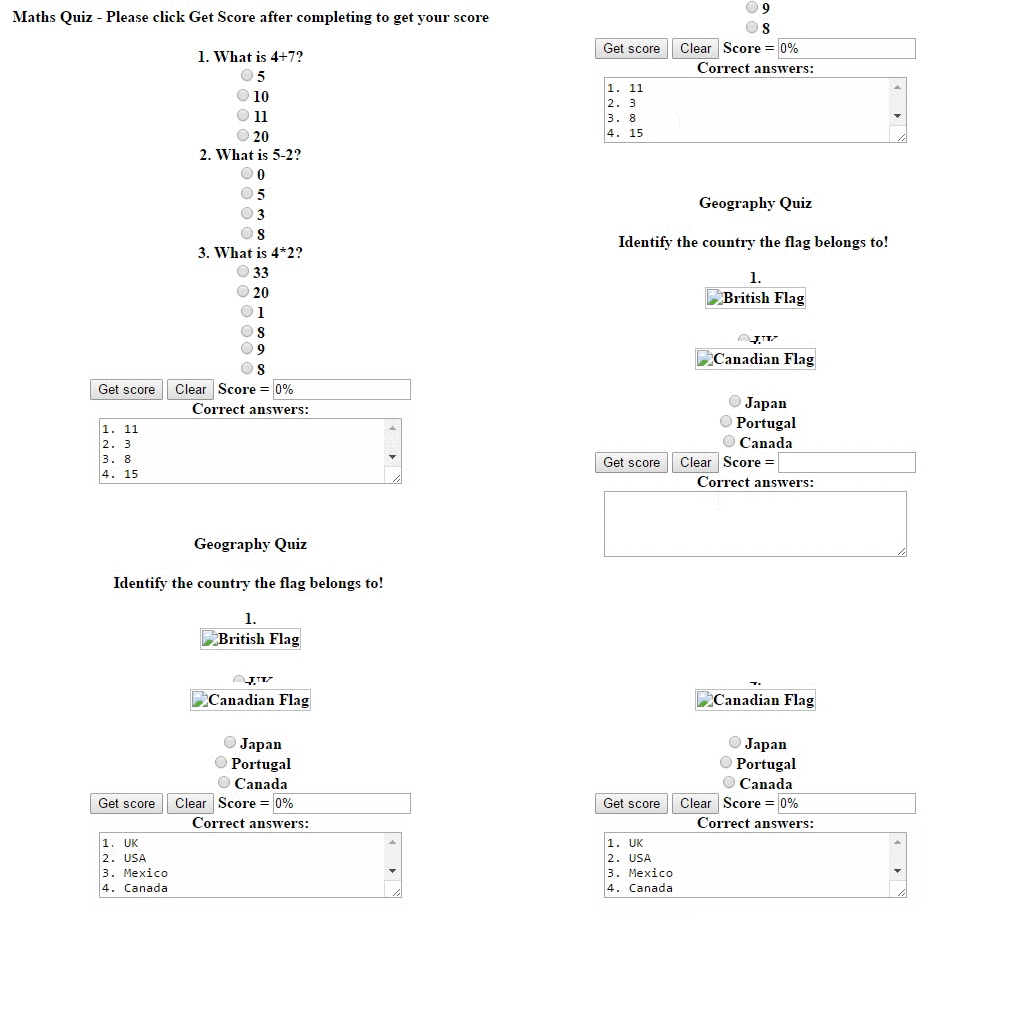
// Quiz 1 variables
var q1numQues = 5;
var q1numChoi = 4;
var q1answers = ["11", "3", "8", "15", "4"];
// Quiz 1 score function
function getQ1Score(form) {
  var score = 0;
  var currElt;
  var currSelection;

  for (i = 0; i < q1numQues; i++) {
    currElt = i * q1numChoi;
    for (j = 0; j < q1numChoi; j++) {
      currSelection = form.elements[currElt + j];
      if (currSelection.checked) {
        if (currSelection.value == answers[i]) {
          score++;
          break;
        }
      }
    }
  }

  score = Math.round(score / q1numQues * 100);
  form.percentage.value = score + "%";

  var correctAnswers = "";
  for (i = 1; i <= q1numQues; i++) {
    correctAnswers += i + ". " + q1answers[i - 1] + "\r\n";
  }
  form.solutions.value = correctAnswers;

}

// -->


// Quiz 2 variables
var q2numQues = 4;
var q2numChoi = 3;
var q2answers = ["UK", "USA", "Mexico", "Canada"];
// Quiz 2 score function
function getQ2Score(form) {
  var score = 0;
  var currElt;
  var currSelection;

  for (i = 0; i < q2numQues; i++) {
    currElt = i * q2numChoi;
    for (j = 0; j < q2numChoi; j++) {
      currSelection = form.elements[currElt + j];
      if (currSelection.checked) {
        if (currSelection.value == q2answers[i]) {
          score++;
          break;
        }
      }
    }
  }

  score = Math.round(score / q2numQues * 100);
  form.percentage.value = score + "%";

  var correctAnswers = "";
  for (i = 1; i <= q2numQues; i++) {
    correctAnswers += i + ". " + q2answers[i - 1] + "\r\n";
  }
  form.solutions.value = correctAnswers;

}<!DOCTYPE html>
<html>
<head>
<meta charset="utf-8">
<meta name="viewport" content="width=device-width">
<title>JS Bin</title>
</head>
<body>
<div class="tab-content">
<div id="mathquiz" class="tab-pane fade in active">
<div class="image-container">
<img src="images/math.png" class="img-responsive" alt="Our Values Banner">
</div>
<br>
<h4 align="center">Maths Quiz - Please click Get Score after completing to get your score</h4>
<form name="quiz1" align="center"> <b>
1. What is 4+7?<br>
<input type="radio" name="q1" value="5">5<br>
<input type="radio" name="q1" value="10">10<br>
<input type="radio" name="q1" value="11">11<br>
<input type="radio" name="q1" value="20">20<br>
2. What is 5-2?<br>
<input type="radio" name="q2" value="0">0<br>
<input type="radio" name="q2" value="5">5<br>
<input type="radio" name="q2" value="3">3<br>
<input type="radio" name="q2" value="8">8<br>
3. What is 4*2?<br>
<input type="radio" name="q3" value="33">33<br>
<input type="radio" name="q3" value="20">20<br>
<input type="radio" name="q3" value="1">1<br>
<input type="radio" name="q3" value="8">8<br>
4. What is 3+12?<br>
<input type="radio" name="q4" value="15">15<br>
<input type="radio" name="q4" value="4">4<br>
<input type="radio" name="q4" value="78">78<br>
<input type="radio" name="q4" value="1">1<br>
5. What is 8/2?<br>
<input type="radio" name="q5" value="4">4<br>
<input type="radio" name="q5" value="7">7<br>
<input type="radio" name="q5" value="9">9<br>
<input type="radio" name="q5" value="8">8<br>
<input type="button" value="Get score" onclick="getQ1Score(this.form)">
<input type="reset" value="Clear">
Score = <input type=text size=15 name="percentage"><br>
Correct answers:<br>
<textarea name="solutions" wrap="virtual" rows="4" cols="40"></textarea> </b>
</form>
</div>
<div id="geographyquiz" class="tab-pane fade">
<div class="image-container">
<img src="images/geography.jpg" class="img-responsive" alt="Geography Quiz">
</div>
<h4 align="center">Geography Quiz</h4>
<form name="quiz2" align="center"> <b>
Identify the country the flag belongs to! <br><br>
1. <div class="image-container">
<img src="images/britishflag.png" class="img-responsive" alt="British Flag">
</div><br>
<input type="radio" name="q1" value="UK">UK<br>
<input type="radio" name="q1" value="Germany">Germany<br>
<input type="radio" name="q1" value="Italy">Italy<br><br>
2. <div class="image-container">
<img src="images/usaflag.png" class="img-responsive" alt="USA Flag">
</div><br>
<input type="radio" name="q2" value="Ireland">Ireland<br>
<input type="radio" name="q2" value="Belgium">Belgium<br>
<input type="radio" name="q2" value="USA">USA<br><br>
3. <div class="image-container">
<img src="images/mexicoflag.png" class="img-responsive" alt="Mexican Flag">
</div><br>
<input type="radio" name="q3" value="Brazil">Brazil<br>
<input type="radio" name="q3" value="Mexico">Mexico<br>
<input type="radio" name="q3" value="Chile">Chile<br><br>
4. <div class="image-container">
<img src="images/canadaflag.png" class="img-responsive" alt="Canadian Flag">
</div><br>
<input type="radio" name="q4" value="Japan">Japan<br>
<input type="radio" name="q4" value="Portugal">Portugal<br>
<input type="radio" name="q4" value="Canada">Canada<br>
<input type="button" value="Get score" onClick="getQ2Score(this.form)">
<input type="reset" value="Clear">
Score = <input type=text size=15 name="percentage"><br>
Correct answers:<br>
<textarea name="solutions" wrap="virtual" rows="4" cols="40"></textarea> </b>
</form>
</body>
</html>
https://stackoverflow.com/questions/36895807
复制相似问题
腾讯云开发者

Copyright © 2013 - 2026 Tencent Cloud. All Rights Reserved. 腾讯云 版权所有
深圳市腾讯计算机系统有限公司 ICP备案/许可证号:粤B2-20090059  粤公网安备44030502008569号
腾讯云计算(北京)有限责任公司 京ICP证150476号 | 京ICP备11018762号