
JUNIT测试报告
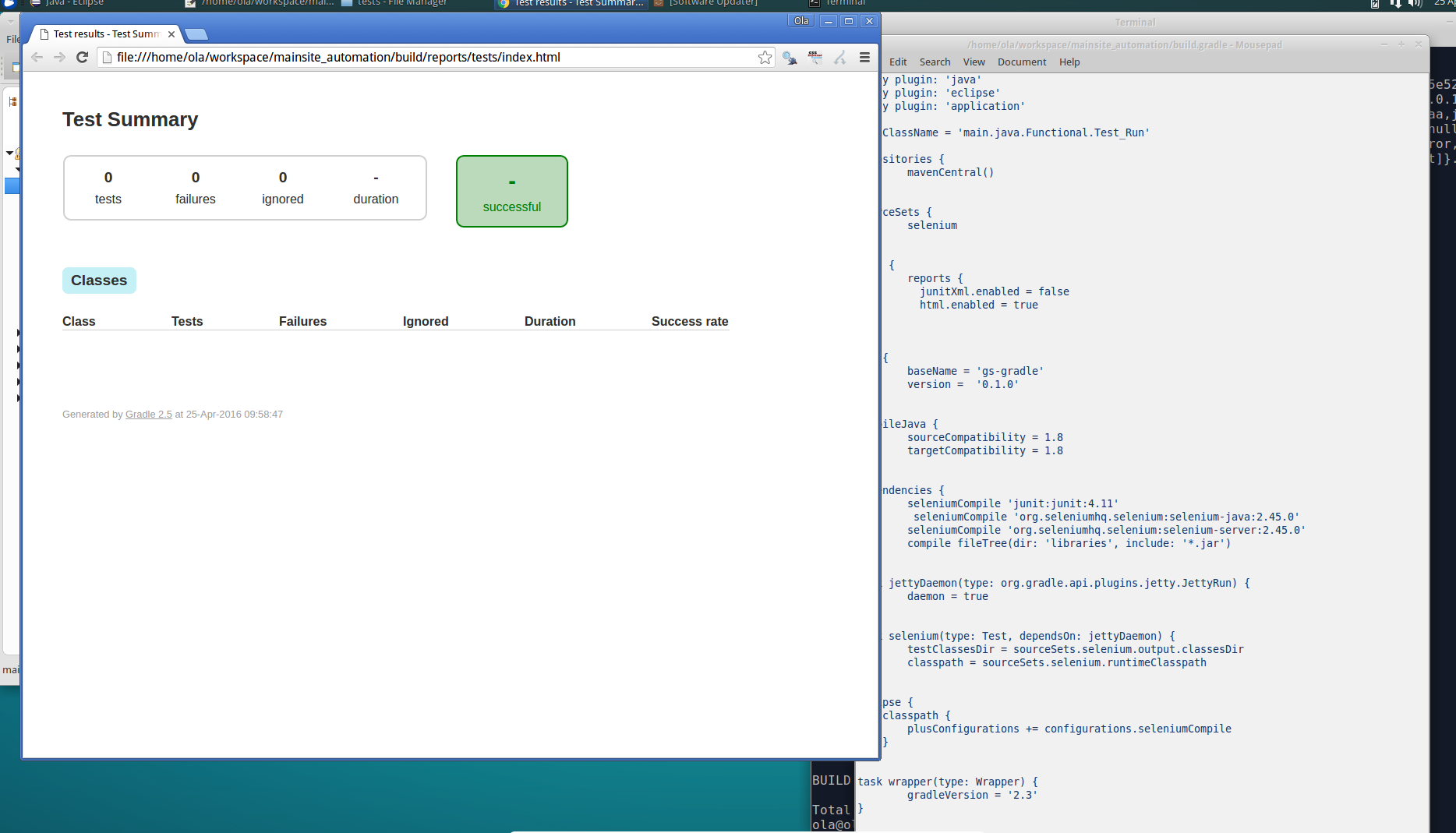
请问我的gradle.build文件有什么问题吗?我试图生成html测试报告,但是在运行gradle.test之后,我的reports/ test /index.html有0测试,0失败,0被-duration忽略,成功也是-(负)。我相信我应该看到有多少测试运行是100%成功的,因为当我使用./gradlew运行或gradle测试(构建成功)时,我的测试运行非常好。检查之前的问题,但似乎没有一个问题有此错误。请你困惑一下。:(下面是我的build.gradle文件
    apply plugin: 'java'
    apply plugin: 'eclipse'
    apply plugin: 'application'

    mainClassName = 'main.java.Functional.Test_Run'

    repositories {
        mavenCentral()
    }

    sourceSets {
        selenium
    }

    test {
        reports {
          junitXml.enabled = false
          html.enabled = true
        }
    }

    jar {
        baseName = 'gs-gradle'
        version =  '0.1.0'
    }

    compileJava {
        sourceCompatibility = 1.8
        targetCompatibility = 1.8
    }

    dependencies {
        seleniumCompile 'junit:junit:4.11'
        seleniumCompile 'org.seleniumhq.selenium:selenium-java:2.45.0'
        seleniumCompile 'org.seleniumhq.selenium:selenium-server:2.45.0'
        compile fileTree(dir: 'libraries', include: '*.jar')
    }

    task jettyDaemon(type: org.gradle.api.plugins.jetty.JettyRun) {
        daemon = true
    }

    task selenium(type: Test, dependsOn: jettyDaemon) {
        testClassesDir = sourceSets.selenium.output.classesDir
        classpath = sourceSets.selenium.runtimeClasspath
    }

    eclipse {
        classpath {
            plusConfigurations += configurations.seleniumCompile
        }
    }

    task wrapper(type: Wrapper) {
        gradleVersion = '2.3'
   }
我的项目结构:
main.java.xyz
main.java.xyzz
sourceSet.java.xyz
sourceSet.java.xyzz
sourceSet.resources.xxx
test.java.xyz
test.java.xyzz
test.resources.xxx
要求的课程如下:
package main.java.Functional;
import static org.junit.Assert.assertTrue;
import org.openqa.selenium.By;
import org.openqa.selenium.WebDriver;
import main.java.Functional.Testcase.performAction;

/**


* This class is used for testing all the indo functionalities.
 * @author Ola
 */

public class Test_Run {
    /**
     * Variables to set up driver and browser.
     */
    public static AllMethods callMethod;
    public static WebDriver driver;
    public static String ID;
    public static String filePath = "C:\\Users\\Ola\\workspace\\Config.properties";
    /**
     * Setup method to run chrome browser
     * @param args
     * @throws Exception
     */

    public static void setup(String[] args) throws Exception {

        callMethod = new AllMethods();
        callMethod.setup();
        callMethod.driver.get("http://independent.ie");
        // Maximize browser window
        callMethod.driver.manage().window().maximize();
        // store current url in a string
        String site = callMethod.driver.getCurrentUrl();
        // print out the URL in the console
        System.out.println("The current Url IS: " + site);
        // Get the OS on which the driver is running.......
        String detectOS = log.DetectOS();
        log.log(detectOS);
        Thread.sleep(7000);
    }
    /**
     * Main Method to start the browser and run all necessary testcases.
     * @param args
     * @throws Exception
     */

    public static void main(String[] args) throws Exception {

        // specify the Test to Run.........
        performAction tc = performAction.acct_Profile;
        try {
            setup(args);
        } catch (Exception e) {
            log.log("Error while setting up the driver.");
            }
        try {
            switch (tc) {
            case acct_Profile:
                verifyAcct_ProfileUpdated();
                break;
                }
        } catch (Exception e) {
            log.log("There was an Exception while running the test: "
                    + e.getMessage());
        }
        callMethod.close();
    }

    /**
     *  Verifies my profile updated NATIVELY
     * @throws Exception
     * @author Ola
     */
    public static void verifyAcct_ProfileUpdated() throws Exception {
        log.header("........ Verify MY ACCOUNT PROFILE section ........");
        String finalResponse = callMethod.profileSection(
                callMethod.parseConf_File("EMAIL_ADDRESS"),
                callMethod.parseConf_File("NATIVE_PASSWORD"),
                callMethod.parseConf_File("DISPLAY_NAME"),
                callMethod.parseConf_File("FIRST_NAME"),
                callMethod.parseConf_File("LAST_NAME"),
                callMethod.parseConf_File("ADDRESS_1"),
                callMethod.parseConf_File("ADDRESS_2"),
                callMethod.parseConf_File("CITY"),
                callMethod.parseConf_File("COUNTRY"),
                callMethod.parseConf_File("COUNTRY_2"),
                callMethod.parseConf_File("COUNTY"),
                callMethod.parseConf_File("COUNTY_2"),
                callMethod.parseConf_File("POSTCODE"),
                callMethod.parseConf_File("TELEPHONE"));

        if (finalResponse.contains("DOES NOT Exist")) {
            log.log("User DOES NOT Exist in Database.... You will have to Sign Up.");

        } else if (finalResponse.contains("FACEBOOK")) {
            log.log("User Exist in Database with FACEBOOK Social Account and "
                    + "Cannot Sign Up Natively......Open My Acct process terminated!........");
        } else if (finalResponse.contains("GOOGLE")) {
            log.log("User Exist in Database with GOOGLE Social Account and "
                    + "Cannot Sign Up Natively......Open My Acct process terminated!........");
        }else if (finalResponse.contains("STILL DOES NOT EXIS")){
            log.log("CANNOT continue process as COUNTRY or COUNTY specified STILL DO NOT exist on list, ..pls contact Customer support");
        }else if (finalResponse.contains("Disabled state")) {
            log.log("Button is in Disabled state.....Profile was "
                    + "NOT updated as NO Update was made.....");
        } else if (finalResponse.contains("Successfully")) {
            log.log("Profile was Successfully updated");
        } else if (finalResponse.contains("NOT updated")) {
            log.log("Profile was NOT updated.... pls contact Gigya customer service......");
        } else if (finalResponse.contains("MY ACCOUNT page")) {
            log.log("MY ACCOUNT page Successfully Opened and updated as expected.......");
        }
        callMethod.close();
    }
分级测试输出
ola@ola-VirtualBox:~/workspace/mainsite_automation$分级试验
:compileJava UP-TO-DATE
:processResources UP-TO-DATE
:classes UP-TO-DATE
:compileTestJava UP-TO-DATE
:processTestResources UP-TO-DATE
:testClasses UP-TO-DATE
:test UP-TO-DATE

BUILD SUCCESSFUL

Total time: 2.252 secs
./gradlew运行输出:
ola@ola-VirtualBox:~/workspace/mainsite_automation$ ./gradlew run
:compileJava UP-TO-DATE
:processResources UP-TO-DATE
:classes UP-TO-DATE
:run
Starting ChromeDriver 2.21.371461 (633e689b520b25f3e264a2ede6b74ccc23cb636a) on port 30326
Only local connections are allowed.
The current Url IS: http://www.independent.ie/
This driver is running on Linux System...@Current TIME and DATE: 12:22:43 25/04/2016
----------------------------------------------------------------------------------------------------
--........ Verify MY ACCOUNT PROFILE section ........-----------------------------------------------
----------------------------------------------------------------------------------------------------
----------------------------------------------------------------------------------------------------
--Click on My Account page to Open page ........ pls wait-------------------------------------------
----------------------------------------------------------------------------------------------------
-- Sign in to OPEN MY ACCOUNT PAGE ....... pls wait.------------------------------------------------
----------------------------------------------------------------------------------------------------
--......USER SIGN IN NATIVELY..............---------------------------------------------------------
----------------------------------------------------------------------------------------------------
[Step 1] Click the Sign In Link
SIGN IN :Link Exist, ..... and Successfully clicked......
[Step 2] Fill in the SIGN IN_FORM ........ pls wait to complete process....
email:
Element Present WITH empty value...JOE.ARPPEVM.MARK@GMAIL.COM: entered.
password: :
Element Present WITH empty value...QWERTY@123: entered.
[Step 3] Click Sign In Button.... pls wait...
----------------------------------------------------------------------------------------------------
--Check if SIGN IN is Present or Not......----------------------------------------------------------
----------------------------------------------------------------------------------------------------
SIGN IN :Button IS present..performing click action .....pls wait.
SIGN IN :Button clicked...... continue.
--Verify Successfully Sign In or NOT......... pls wait.---------------------------------------------
Verify: MY ACCOUNT element isPresent........pls wait......
MY ACCOUNT element PRESENT.....continue..
User Successfully signed in NATIVELY, Opening MY ACCOUNT page..... pls wait.
MY ACCOUNT :Link Exist, ..... and Successfully clicked......
----------------------------------------------------------------------------------------------------
--Select My Profile Section FROM My Account Page.... -----------------------------------------------
----------------------------------------------------------------------------------------------------
My Profile :Link Exist, ..... and Successfully clicked......
--Looping through all Elements and sendKeys.......pls wait...---------------------------------------
[Step 1]
Element Present WITH empty value...JOE_MARK: entered.
[Step 2]
TextBox field is write-protected..... therefore is in Disabled state.
Text box is disabled..... move to next step
[Step 3]
Element Present WITH empty value...JOE: entered.
[Step 4]
Element Present WITH empty value...ARPPEVM: entered.
[Step 5]
Element Present WITH empty value...10 PIMP RD: entered.
[Step 6]
Element Present WITH empty value...ESTATE CLOSE: entered.
[Step 7]
Element Present WITH empty value...DUBLIN: entered.
[Step 8]
empty country.......
3
Country specified DOES NOT EXIST ......please make another selection
CANNOT continue process as COUNTRY or COUNTY specified STILL DO NOT exist on list, ..pls contact Customer support

BUILD SUCCESSFUL

Total time: 1 mins 45.796 secs
下面是更新的代码.当手动运行时,代码工作并成功运行。
package main.java.Functional;

import static org.junit.Assert.assertTrue;
import org.openqa.selenium.By;
import org.openqa.selenium.WebDriver;
import main.java.Functional.AllMethodsTestcases.performAction;
import org.junit.After;
import org.junit.Before;
import org.junit.Test;


/**
 * This class is used for testing all the indo functionalities.
 *
 * @author Ola
 */
public class AllMethodsTest {

    /**
     * Variables to set up driver and browser.
     */
    public static AllMethods callMethod;
    public static WebDriver driver;
    public static String ID;
    public static String filePath = "C:\\Users\\Ola\\workspace\\Config.properties";

    /**
     * Setup method to run chrome browser
     * @param args
     * @throws Exception
     */
    @Before
    public static void setup(String[] args) throws Exception {
        callMethod = new AllMethods();
        callMethod.setup();
        callMethod.driver.get("http://independent.ie");
        // Maximize browser window
        callMethod.driver.manage().window().maximize();
        // store current url in a string
        String site = callMethod.driver.getCurrentUrl();
        // print out the URL in the console
        System.out.println("The current Url IS: " + site);
        // Get the OS on which the driver is running.......
        String detectOS = log.DetectOS();
        log.log(detectOS);
        Thread.sleep(7000);
    }

    /**
     * Main Method to start the browser and run all necessary testcases.     *
     * @param args
     * @throws Exception
     */
    @Before
    public static void main(String[] args) throws Exception {

        // specify the Test to Run.........
        performAction tc = performAction.acct_Profile;
        try {
            setup(args);

        } catch (Exception e) {
            log.log("Error while setting up the driver.");
        }

        try {

            switch (tc) {
            case testMouseOverJobs:
                testVerifyJobsLink();
                break;
            case testMouseOverCars:
                testVerifyCarsLink();
                break;
            case testMouseOverDating:
                testVerifyDatingLink();
                break;
            case testMouseOverDeath:
                testVerifyDeathNoticesLink();
                break;
            case testMouseOverFitMag:
                testVerifyFitMagLink();
                break;
            case testMouseOverHotels:
                testVerifyHotelsLink();
                break;
            case click_subscribe:
                testVerifySubscribeLink();
                break;
            case click_SignInNative:
                testVerifySignIn_Native();
                break;
            case click_SignUpNative:
                testVerifySignUp_Native();
                break;
            case searchUser:
                testVerifySearchUser();
                break;
            case deleteUser:
                testVerifyDeleteUser();
                break;
            case click_SignInFB:
                testVerifySignInFB();
                break;
            case click_SignInFB_EditInfo:
                testVerifySignInFB_EditInfo();
                break;
            case click_SignInGoogle:
                testVerifySignInGoogle();
                break;
            case click_MyAcct_SS:
                testVerifyClick_MyAcctPage_forS_S_user();
                break;
            case click_MyAcct:
                testVerifyClick_MyAcct();
                break;
            case acct_Profile:
                testVerifyAcct_ProfileUpdated();
                break;
            case acct_Password:
                testVerifyAcct_PasswordChange();
                break;
            case acct_SocialAccts_FB:
                testVerifyAcct_SocialLink_FB();
                break;
            case acct_SocialAccts_Google:
                testVerifyAcct_SocialLink_Google();
                break;
                }
        } catch (Exception e) {
            log.log("There was an Exception while running the test: "
                    + e.getMessage());
        }
        tearDown();
    }


    /**
     * "C:\\Users\\Ola\\workspace\\Config.properties"
     * @throws Exception
     */
    @Test
    private static void testVerifyFileExist() throws Exception {
        boolean verify =callMethod.FileExist();
        if(verify)
        {
            log.log("File does exist");
        }else
        {
            log.log("File does not exist, .....");
        }
        tearDown();
    }

    @Test
    private static void testVerifyloadConfig_File() throws Exception {
        log.divider("Load Config file path specified");
        String response =callMethod.parseConf_File("NATIVE_PASSWORD");
        log.log(response);
        tearDown();
    }

    /**
     * Verifies JOB link on home page
     * @throws Exception
     * @author Ola
     */
    @Test
    public static void testVerifyJobsLink() throws Exception {
        log.header("....... Verify JOBS Link.........");
        callMethod.hoverAndClickOnce(By.cssSelector(AllMethodsCONSTANTElements.JOBS),
                By.cssSelector(AllMethodsCONSTANTElements.IRISHJOBS), "JOBS", "JOBS");
        tearDown();
    }
    /**
     * Verifies CARS link on home page
     * @throws Exception
     * @author Ola
     */
    @Test
    public static void testVerifyCarsLink() throws Exception {
        log.header("....... Verify CARS Link.........");
        String[] elementNames = new String[] { AllMethodsCONSTANTElements.CARSIRELAND,
                AllMethodsCONSTANTElements.USED_CARS_SEARCH, AllMethodsCONSTANTElements.CAR_DEALERS };
        for (String elementName : elementNames) {
            log.divider("1st Element ......'CarsIreland.ie'.....");
            if (callMethod.elementPresent(By.cssSelector(elementName),
                    "CARS_IRELAND")) {
                callMethod.hoverAndClickMultiple(
                        By.cssSelector(AllMethodsCONSTANTElements.CARS),
                        By.cssSelector(AllMethodsCONSTANTElements.CARSIRELAND), "CARS",
                        "CarsIreland.ie");
                Thread.sleep(3000);
                log.header2("");
            }
            log.divider("2nd Element .......'Used Car Search.....'");
            log.step("");
            if (callMethod.elementPresent(By.cssSelector(elementName),
                    "USED CAR SEARCH")) {
                log.log("Open Used Car Search link.....");
                callMethod.hoverAndClickMultiple(
                        By.cssSelector(AllMethodsCONSTANTElements.CARS),
                        By.cssSelector(AllMethodsCONSTANTElements.USED_CARS_SEARCH),
                        "CARS", "USED CAR SEARCH");
                Thread.sleep(3000);
                log.header2("");
            }
            log.divider("3rd Element .......'Car Dealers'..........");
            log.step("");
            if (callMethod.elementPresent(By.cssSelector(elementName),
                    "CAR DEALERS")) {
                log.log("Open Cars Dealers Link........");
                callMethod.hoverAndClickMultiple(
                        By.cssSelector(AllMethodsCONSTANTElements.CARS),
                        By.cssSelector(AllMethodsCONSTANTElements.CAR_DEALERS), "CARS",
                        "CAR DEALERS");
                break;
            }
        }
        tearDown();
    }
    /**
     *  Verifies my profile updated NATIVELY
     * @throws Exception
     * @author Ola
     */
    @Test
    public static void testVerifyAcct_ProfileUpdated() throws Exception {
        log.header("........ Verify MY ACCOUNT PROFILE section ........");
        String finalResponse = callMethod.profileSection(
                callMethod.parseConf_File("EMAIL_ADDRESS"),
                callMethod.parseConf_File("NATIVE_PASSWORD"),
                callMethod.parseConf_File("DISPLAY_NAME"),
                callMethod.parseConf_File("FIRST_NAME"),
                callMethod.parseConf_File("LAST_NAME"),
                callMethod.parseConf_File("ADDRESS_1"),
                callMethod.parseConf_File("ADDRESS_2"),
                callMethod.parseConf_File("CITY"),
                callMethod.parseConf_File("COUNTRY"),
                callMethod.parseConf_File("COUNTRY_2"),
                callMethod.parseConf_File("COUNTY"),
                callMethod.parseConf_File("COUNTY_2"),
                callMethod.parseConf_File("POSTCODE"),
                callMethod.parseConf_File("TELEPHONE"));

        if (finalResponse.contains("DOES NOT Exist")) {
            log.log("User DOES NOT Exist in Database.... You will have to Sign Up.");

        } else if (finalResponse.contains("FACEBOOK")) {
            log.log("User Exist in Database with FACEBOOK Social Account and "
                    + "Cannot Sign Up Natively......Open My Acct process terminated!........");
        } else if (finalResponse.contains("GOOGLE")) {
            log.log("User Exist in Database with GOOGLE Social Account and "
                    + "Cannot Sign Up Natively......Open My Acct process terminated!........");
        }else if (finalResponse.contains("STILL DOES NOT EXIS")){
            log.log("CANNOT continue process as COUNTRY or COUNTY specified STILL DO NOT exist on list, ..pls contact Customer support");
        }else if (finalResponse.contains("Disabled state")) {
            log.log("Button is in Disabled state.....Profile was "
                    + "NOT updated as NO Update was made.....");
        } else if (finalResponse.contains("Successfully")) {
            log.log("Profile was Successfully updated");
        } else if (finalResponse.contains("NOT updated")) {
            log.log("Profile was NOT updated.... pls contact Gigya customer service......");
        } else if (finalResponse.contains("MY ACCOUNT page")) {
            log.log("MY ACCOUNT page Successfully Opened and updated as expected.......");
        }
        tearDown();
    }

    @After
    public static void tearDown(){
        callMethod.close();
    }
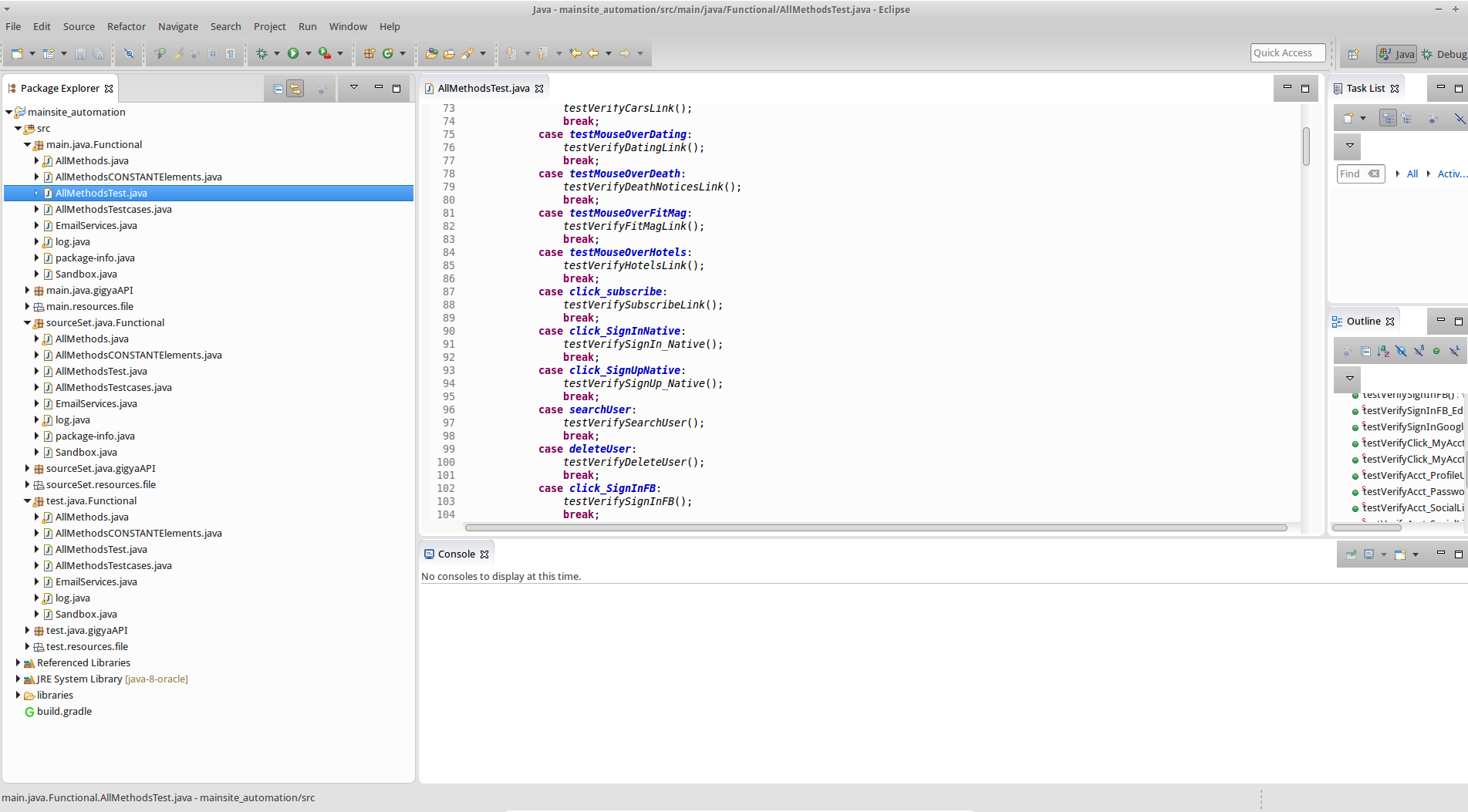
但是index.html文件仍然是空的
回答 1
Stack Overflow用户
发布于 2016-04-25 11:36:19
仅仅因为执行了测试目标,并不意味着其中有任何测试。您没有得到测试报告的问题是,您的类不是JUnit测试。
要启用类作为JUnit测试的执行,您需要使用JUnit的注释org.junit.Test、org.junit.Before和org.junit.After。也就是说,您需要将类重构为这样的内容(而不一定要完成.):
package main.java.Functional;

import org.junit.After;
import org.junit.Before;
import org.junit.Test;

/**
 *
 *
 * This class is used for testing all the indo functionalities.
 *
 * @author Ola
 */

public class Test_Run {
    /**
     * Variables to set up driver and browser.
     */
    public static AllMethods callMethod;
    public static WebDriver driver;
    public static String ID;
    public static String filePath = "C:\\Users\\Ola\\workspace\\Config.properties";

    /**
     * Setup method to run chrome browser
     *
     * @param args
     * @throws Exception
     */
    @Before
    public void setup() throws Exception {

        callMethod = new AllMethods();
        callMethod.setup();
        callMethod.driver.get("http://independent.ie");
        // Maximize browser window
        callMethod.driver.manage().window().maximize();
        // store current url in a string
        String site = callMethod.driver.getCurrentUrl();
        // print out the URL in the console
        System.out.println("The current Url IS: " + site);
        // Get the OS on which the driver is running.......
        String detectOS = log.DetectOS();
        log.log(detectOS);
        Thread.sleep(7000);
    }

    @After
    public void tearDown() {
        callMethod.close();
    }

    /**
     * Verifies my profile updated NATIVELY
     *
     * @throws Exception
     * @author Ola
     */
    @Test
    public void verifyAcct_ProfileUpdated() throws Exception {
        log.header("........ Verify MY ACCOUNT PROFILE section ........");
        String finalResponse = callMethod.profileSection(
                callMethod.parseConf_File("EMAIL_ADDRESS"),
                callMethod.parseConf_File("NATIVE_PASSWORD"),
                callMethod.parseConf_File("DISPLAY_NAME"),
                callMethod.parseConf_File("FIRST_NAME"),
                callMethod.parseConf_File("LAST_NAME"),
                callMethod.parseConf_File("ADDRESS_1"),
                callMethod.parseConf_File("ADDRESS_2"),
                callMethod.parseConf_File("CITY"),
                callMethod.parseConf_File("COUNTRY"),
                callMethod.parseConf_File("COUNTRY_2"),
                callMethod.parseConf_File("COUNTY"),
                callMethod.parseConf_File("COUNTY_2"),
                callMethod.parseConf_File("POSTCODE"),
                callMethod.parseConf_File("TELEPHONE"));

        if (finalResponse.contains("DOES NOT Exist")) {
            log.log("User DOES NOT Exist in Database.... You will have to Sign Up.");

        } else if (finalResponse.contains("FACEBOOK")) {
            log.log("User Exist in Database with FACEBOOK Social Account and "
                    + "Cannot Sign Up Natively......Open My Acct process terminated!........");
        } else if (finalResponse.contains("GOOGLE")) {
            log.log("User Exist in Database with GOOGLE Social Account and "
                    + "Cannot Sign Up Natively......Open My Acct process terminated!........");
        } else if (finalResponse.contains("STILL DOES NOT EXIS")) {
            log.log("CANNOT continue process as COUNTRY or COUNTY specified STILL DO NOT exist on list, ..pls contact Customer support");
        } else if (finalResponse.contains("Disabled state")) {
            log.log("Button is in Disabled state.....Profile was "
                    + "NOT updated as NO Update was made.....");
        } else if (finalResponse.contains("Successfully")) {
            log.log("Profile was Successfully updated");
        } else if (finalResponse.contains("NOT updated")) {
            log.log("Profile was NOT updated.... pls contact Gigya customer service......");
        } else if (finalResponse.contains("MY ACCOUNT page")) {
            log.log("MY ACCOUNT page Successfully Opened and updated as expected.......");
        }
        callMethod.close();
    }
}一般来说,遵循测试类的通用命名约定是一种很好的风格。也就是说,您的测试类应该命名为类似于AllMethodsTest的名称,这表明它包含类AllMethods的测试用例。您的测试方法应该命名为testVerifyAcct_ProfileUpdated,以便很容易地将它们与类中的其他助手方法区分开来。
此外,您在测试中没有断言任何内容。您只需将某些内容写入输出或日志文件。这样,你的测试总是会成功的(当然,除非有例外)。您应该考虑将预期输出的假设指定为断言,如下面的测试示例所示:
@Test
public void testCanConstructAPersonWithAName() {
    String firstName = "Larry";
    Person person = new Person(firstName);
    // the person's name attribute is expected to be firstName
    assertEquals(firstName , person.getName());
}
更新:
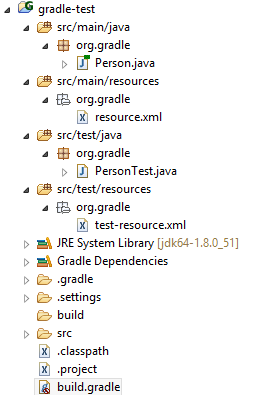
基本Java项目的结构应该如下所示:
https://stackoverflow.com/questions/36836238
复制相似问题
腾讯云开发者

Copyright © 2013 - 2026 Tencent Cloud. All Rights Reserved. 腾讯云 版权所有
深圳市腾讯计算机系统有限公司 ICP备案/许可证号:粤B2-20090059  粤公网安备44030502008569号
腾讯云计算(北京)有限责任公司 京ICP证150476号 | 京ICP备11018762号