
Chrome和FF中span内部输入的不同显示
Chrome和FF中span内部输入的不同显示
提问于 2016-04-24 20:37:03
我有span内部的输入和一些HTML代码。
<div class="SCnField">
<div class="SCnFieldMarker">
    ⇒
</div>
<div class="SCnFieldValue">
    <span class="scAttribute selectedSCnNode">
        <span class="twitter-typeahead" style="position: relative; display: inline-block;">
            <input type="text" data-name="true" class="typeahead scn-input tt-hint"
                   disabled="" autocomplete="off"
                   spellcheck="false"
                   style="position: absolute; top: 0px; left: 0px; border-color: transparent; box-shadow: none;">
            <input type="text" data-name="true" class="typeahead scn-input tt-input" autocomplete="off"
                   spellcheck="true" dir="auto"
                   style="position: relative; vertical-align: top; background-color: transparent;">
            <pre aria-hidden="true" style="position: absolute; visibility: hidden; white-space: nowrap;"></pre>
            <span class="tt-dropdown-menu"
                  style="position: absolute; top: 100%; left: 0px; z-index: 100; display: none;">
            <div class="tt-dataset-idtf">

            </div>
        </span>
        </span>
        <div class="atrribute-colon">:</div>
    </span>
</div>
摆弄风格:https://jsfiddle.net/bq7Lsw2L/
FF和Chrome显示器的差异:
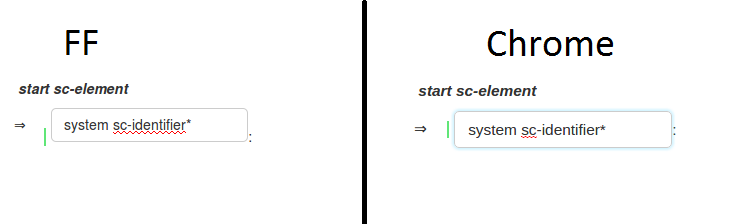
我试过垂直对齐,显示,边距,垫子等等.但是没有结果,我怎样才能修正FF中的垂直对齐?谢谢。
回答 3
Stack Overflow用户
回答已采纳
发布于 2016-04-24 20:43:32
As per the OP,我要添加这个作为一个答案。在CSS中有这段代码,需要vertical-align: middle。
.twitter-typeahead {
  vertical-align: middle;
}Stack Overflow用户
发布于 2016-04-24 20:41:36
不知道为什么Chrome会自动垂直居中,但您应该使用
.twitter-typeahead {
  vertical-align: middle;
}
.SCnField {
  min-height: 40px;
}
.SCnFieldMarker {
  width: 30px;
  display: inline-block;
  vertical-align: top;
  margin-top: 7px;
  margin-left: -32px;
}
.SCnFieldValue {
  display: inline-block;
}
.selectedSCnNode {
  border-left: 2px solid rgb(96, 230, 119) !important;
  padding-left: 5px;
}
.scn-input {
  display: block;
  width: 100%;
  height: 34px;
  padding: 6px 12px;
  border-radius: 5px;
  border: 1px solid #ccc;
  background-color: white;
}
.twitter-typeahead {
  vertical-align: middle;
}<div class="SCnField"><div class="SCnFieldMarker">⇒</div><div class="SCnFieldValue"><span class="scAttribute selectedSCnNode"><span class="twitter-typeahead" style="position: relative; display: inline-block;"><input type="text" data-name="true" class="typeahead scn-input tt-hint" disabled="" autocomplete="off" spellcheck="false" style="position: absolute; top: 0px; left: 0px; border-color: transparent; box-shadow: none;"><input type="text" data-name="true" class="typeahead scn-input tt-input" autocomplete="off" spellcheck="true" dir="auto" style="position: relative; vertical-align: top; background-color: transparent;"><pre aria-hidden="true" style="position: absolute; visibility: hidden; white-space: nowrap;"></pre><span class="tt-dropdown-menu" style="position: absolute; top: 100%; left: 0px; z-index: 100; display: none;"><div class="tt-dataset-idtf"></div></span></span><div class="atrribute-colon">:</div></span></div></div>
Stack Overflow用户
发布于 2016-04-24 20:44:00
我有一些很好的东西可以用下面的代码来修复,您可以为FF编写特定的样式
@-moz-document url-prefix() {
// css code for FF
}页面原文内容由Stack Overflow提供。腾讯云小微IT领域专用引擎提供翻译支持
原文链接:
https://stackoverflow.com/questions/36828640
复制相关文章
相似问题
腾讯云开发者

Copyright © 2013 - 2026 Tencent Cloud. All Rights Reserved. 腾讯云 版权所有
深圳市腾讯计算机系统有限公司 ICP备案/许可证号:粤B2-20090059  粤公网安备44030502008569号
腾讯云计算(北京)有限责任公司 京ICP证150476号 | 京ICP备11018762号