
显示数据的可扩展UITableView单元
显示数据的可扩展UITableView单元
提问于 2016-04-24 16:57:11
我有一些按年度分类的体育比赛,每一场比赛我都有最终结果,比赛日期和得分手。
我在“表视图”中显示了这些匹配,如下所示:
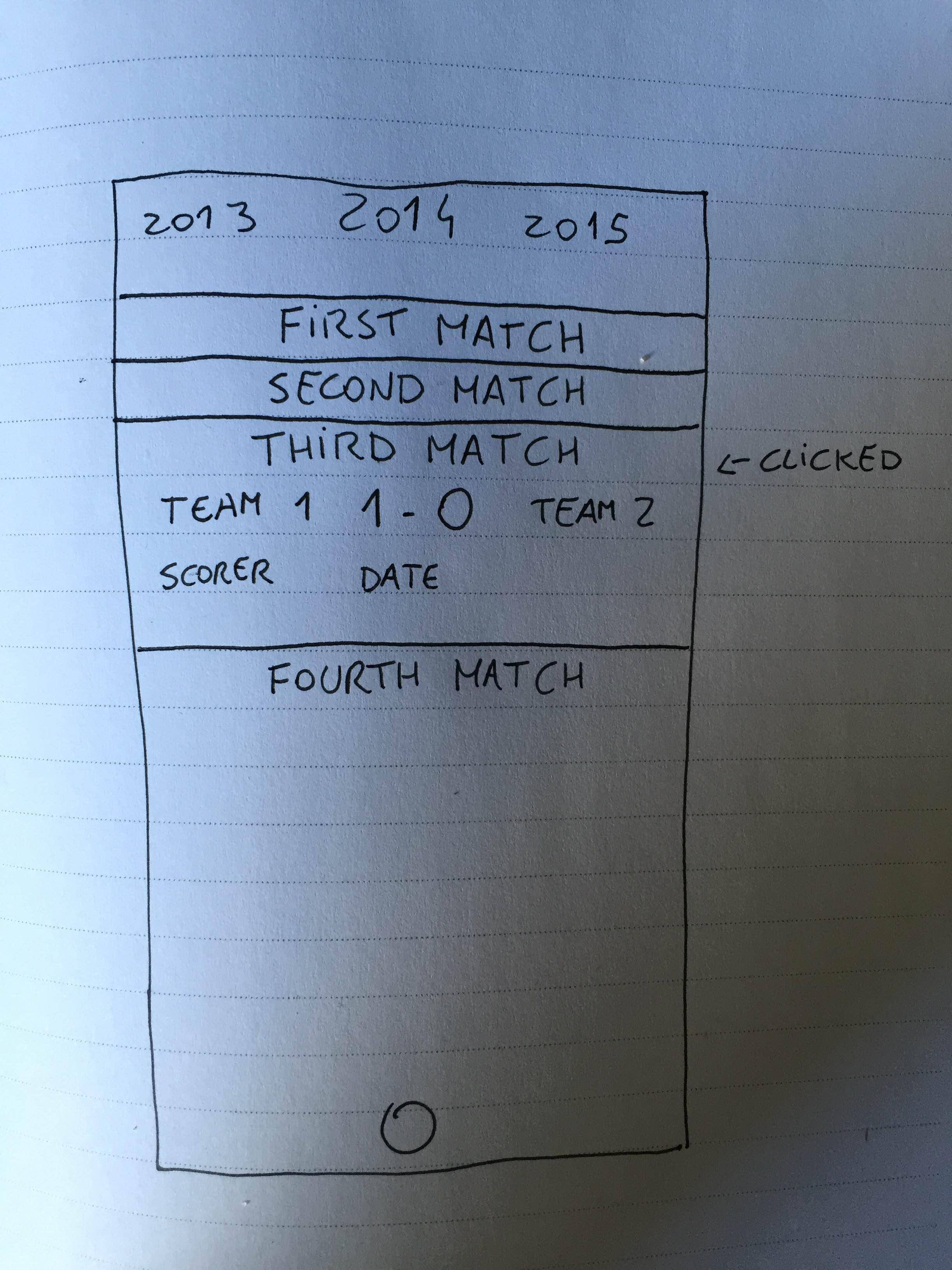
因此,我想要实现的是:当单击一个单元格时,显示匹配细节,如图片所示。
我也找到了一些图书馆来实现手风琴/可扩展的风格,但没有人做这项工作。它们只会膨胀细胞并显示另一个细胞。
回答 3
Stack Overflow用户
回答已采纳
发布于 2016-04-24 17:11:25
在这种情况下,您甚至不需要使用可扩展/手风琴。这是你能解决这个问题的方法。让我们说你的细胞大小,当正常是40,当特别点击是100。在heightForRowAtIndexPath中,您可以检查选择了哪个单元格并返回更多的高度。
if(selectedRow == indexPath.row) {
    return 100;
} else {
    return 40;
}
那么您可以做的是使用didSelectRowAtIndexPath或clickEvent方法
[self.tableView beginUpdates];
[[self tableView] reloadRowsAtIndexPaths:@[[NSIndexPath indexPathForItem: selectedRow inSection:0]] withRowAnimation:UITableViewRowAnimationAutomatic];
[self.tableView endUpdates];
因此,它将是您的单元格将呈现全部,但根据高度,您正在隐藏或显示内容。
使用输入源更新答复
ViewController.m
- (NSInteger)tableView:(UITableView *)tableView numberOfRowsInSection:(NSInteger)section {
if(selectedIndex == indexPath.row)
    return 100;
else
    return 40;
}

- (UITableViewCell *)tableView:(UITableView *)tableView cellForRowAtIndexPath:(NSIndexPath *)indexPath
{
    customCell *cell = (UITableViewCell*)[tableView dequeueReusableCellWithIdentifier:@"Cell"];
    NSDictionary *matches = self.dataArray[indexPath.row];
    cell.matchName.text = [matches objectForKey@"MatchName"];
    if() {
        cell.heightConstraintSecondView.constant = 0;
    } else {
        cell.heightConstraintSecondView.constant = 59;
        cell.team1.text = [matches objectForKey@"Team1"];
        cell.team2.text = [matches objectForKey@"Team2"];
        cell.score.text = [matches objectForKey@"Score"];
    }
    return cell;
}

- (void)tableView:(UITableView *)tableView didSelectRowAtIndexPath:(NSIndexPath *)indexPath {
    selectedIndex = indexPath.row;
    [self.tableView beginUpdates];
    [[self tableView] reloadRowsAtIndexPaths:@[indexPath] withRowAnimation:UITableViewRowAnimationAutomatic];
    [self.tableView endUpdates];
    }
}Stack Overflow用户
发布于 2016-04-24 23:02:16
更简洁的方法是使用不同的标识符创建2个单元格,并在运行时单击单元格时对其进行更改。检查这个问题:UITableView中的iOS下拉列表
Stack Overflow用户
发布于 2016-09-02 18:09:26
试一试其中一种:
页面原文内容由Stack Overflow提供。腾讯云小微IT领域专用引擎提供翻译支持
原文链接:
https://stackoverflow.com/questions/36826163
复制相关文章
相似问题
腾讯云开发者

Copyright © 2013 - 2026 Tencent Cloud. All Rights Reserved. 腾讯云 版权所有
深圳市腾讯计算机系统有限公司 ICP备案/许可证号:粤B2-20090059  粤公网安备44030502008569号
腾讯云计算(北京)有限责任公司 京ICP证150476号 | 京ICP备11018762号