
在Wordpress admin中使用引导程序-- Rush Frisby的一个黑客攻击
构建我的第一个插件到Wordpress,我遇到Rush的引导黑客,这样你就可以在管理面板中使用Bootstrap,而不会与Wordpress的管理核心风格发生冲突。你可以在这里找到它:https://rushfrisby.com/using-bootstrap-in-wordpress-admin-panel/
我用他解释的方式在我的插件中实现了它。您可以在dev在线查看我的代码
这部分只有一个问题:
.bootstrap-wrapper {
    @import (less) url('bootstrap.min.css');
}
如果我从上面的代码中删除(更少的),下面的错误就会消失,但是黑客并没有像预期的那样工作--引导程序没有加载在引导包装器中。
首先,我从来没有真正用过更少的东西,但是我知道“更少”的基本概念,以及它如何简化您的CSS工作。
不过,在运行我的插件并进入Settings - Custom时,我会看到以下错误:
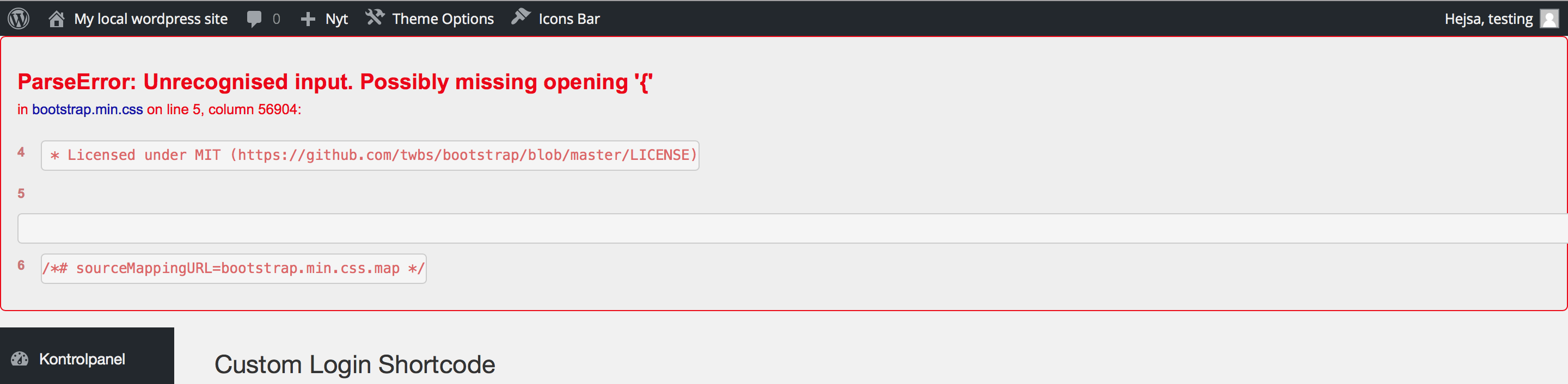
我不知道该怎么办。我在网上搜索过答案,但我真的找不到解决办法,也找不到解决办法。
有没有人知道如何解决这个问题?-以及对.map文件的简要解释?
提前谢谢大家!
对于那些不想去Github的家伙,请参阅下面用于管理页面的代码。
<?php

// Meaning of abbreviations:
// clsc = Custom login shortcode

// Runs when plugin is activated
register_activation_hook( PLUGIN_MAIN_FILE, 'clsc_install');
// Create new database fields
function clsc_install() {
    $clsc_options = array(

        'Login_link'        => 'log-in/',
        'Login_string'      => 'Log in',
        'Login_class'       => '', // Default is empty to inherit theme styles
        'Logout_link'       => wp_logout_url( home_url()),
        'Logout_string'     => 'Log out',
        'Logout_class'      => '', // Default is empty to inherit theme styles
        'Account_link'      => 'my-account/',
        'Account_string'    => 'My Account',
        'Account_class'     => '' // Default is empty to inherit theme styles

    );
    add_option('clsc_options_array', $clsc_options, '', 'yes');
}

// Register settings for wordpress to handle all values
function admin_init_register_setting()
{
    register_setting('wp_plugin_template-group', 'clsc_options_array');

}
add_action('admin_init','admin_init_register_setting');


// Create admin option page
function add_clsc_option_page() {
    add_options_page(
        'Custom Login',             // The text to be displayed in the title tag
        'Custom Login',             // The text to be used for the menu
        'administrator',            // The capability required to display this menu
        'custom-login-shortcodes',  // The unique slug name to refer to this menu
        'clsc_html_page');          // The function to output the page content
}
/* Call the html code */
add_action('admin_menu', 'add_clsc_option_page');

// Enqueue admin styles and scripts
function clsc_enqueue_scripts() {
    global $wpdb;
    $screen = get_current_screen();

    if ( $screen->id != 'settings_page_custom-login-shortcodes' ) {
        return; // exit if incorrect screen id
    }

        wp_enqueue_style( 'custom-shortcodes-styles', plugins_url( 'admin/css/admin_styles.css', dirname(__FILE__) ) );
        wp_enqueue_style( 'bootstrap', plugins_url('admin/css/bootstrap.css', dirname(__FILE__) ) );
        wp_enqueue_script('admin_js_bootstrap_hack', plugins_url('admin/scripts/bootstrap-hack.js', dirname(__FILE__) ) );
        wp_enqueue_script('jquery', plugins_url('admin/scripts/jquery.min.js', dirname(__FILE__) ) );

}
add_action('admin_enqueue_scripts', 'clsc_enqueue_scripts' );

function clsc_html_page()
{
    if(!current_user_can('manage_options'))
    {
        wp_die( __('You do not have sufficient permissions to access this page.','clsc') );
    }

    ?>

    <script type="text/javascript">

        var default_logout = <?php echo json_encode( wp_logout_url( home_url()) ); ?>;

        $(document).ready(function(){
            $("#logout-default").click(function(){
                $("#logout-field").val(default_logout);
            });
        });
    </script>

    <div class="wrap">

        <form method="post" action="options.php">
            <?php

            $options = get_option('clsc_options_array');
            settings_fields('wp_plugin_template-group');
            do_settings_fields('wp_plugin_template-group');

            ?>
            <div class="bootstrap-wrapper">
                <div class="row">
                    <div class="col-md-12">
                        <h1><?php _e('Custom Login Shortcode','clsc'); ?></h1>
                        <p><?php _e('To use for shortcode:','clsc'); ?><br/><span class="shortcode-preview">[custom_login]</span></p>
                    </div>
                </div>
                <div class="row" id="login-content">
                    <div class="col-md-4">
                        <h5><?php _e('Log in link:','clsc'); ?></h5>
                        <input name="clsc_options_array[Login_link]" placeholder="<?php _e('Example: log-in/', 'clsc') ?>" class="form-control" type="text" value="<?php echo $options['Login_link']; ?>" />
                    </div>
                    <div class="col-md-4">
                        <h5><?php _e('Log in string:','clsc'); ?></h5>
                        <input name="clsc_options_array[Login_string]" placeholder="<?php _e('Example: Log in', 'clsc') ?>" class="form-control" type="text" value="<?php echo $options['Login_string']; ?>" />
                    </div>
                    <div class="col-md-4">
                        <h5><?php _e('Log in class:','clsc'); ?></h5>
                        <input name="clsc_options_array[Login_class]"  placeholder="<?php _e('Example: login_style', 'clsc') ?>" class="form-control" type="text" value="<?php echo $options['Login_class']; ?>" />
                    </div>
                </div>
                <div class="row top-buffer" id="logout-content">
                    <div class="col-md-4">
                        <h5><?php _e('Log out link:','clsc'); ?></h5>
                        <input id="logout-field" name="clsc_options_array[Logout_link]" placeholder="<?php _e('Example: log-out/', 'clsc') ?>" class="form-control" type="text" value="<?php echo $options['Logout_link']; ?>" />
                        <input class="btn btn-default btn-xs" type="button" name="logout-default" id="logout-default" value="<?php _e('Use default logout link','clsc') ?>"/>
                    </div>
                    <div class="col-md-4">
                        <h5><?php _e('Log out string:','clsc'); ?></h5>
                        <input name="clsc_options_array[Logout_string]" placeholder="<?php _e('Example: Log out', 'clsc') ?>" class="form-control" type="text" value="<?php echo $options['Logout_string']; ?>" />
                    </div>
                    <div class="col-md-4">
                        <h5><?php _e('Log out class:','clsc'); ?></h5>
                        <input name="clsc_options_array[Logout_class]" placeholder="<?php _e('Example: logout_style', 'clsc') ?>" class="form-control" type="text" value="<?php echo $options['Logout_class']; ?>" />
                    </div>
                </div>
                <div class="row top-buffer" id="account-content">
                    <div class="col-md-4">
                        <h5><?php _e('Account link:','clsc'); ?></h5>
                        <input name="clsc_options_array[Account_link]" placeholder="<?php _e('Example: my-account/', 'clsc') ?>" class="form-control" type="text" value="<?php echo $options['Account_link']; ?>" />
                    </div>
                    <div class="col-md-4">
                        <h5><?php _e('Account string:','clsc'); ?></h5>
                        <input name="clsc_options_array[Account_string]" placeholder="<?php _e('Example: My Account', 'clsc') ?>" class="form-control" type="text" value="<?php echo $options['Account_string']; ?>" />
                    </div>
                    <div class="col-md-4">
                        <h5><?php _e('Account class:','clsc'); ?></h5>
                        <input name="clsc_options_array[Account_class]" placeholder="<?php _e('Example: account_style', 'clsc') ?>" class="form-control" type="text" value="<?php echo $options['Account_class']; ?>" />
                    </div>
                </div>
            </div>

            <?php submit_button( __('Save Changes', 'clsc') ); ?>

        </form>

    </div>

    <?php
}
?>回答 1
Stack Overflow用户
发布于 2016-04-22 07:37:14
建议:用于开发目的并不是一个好主意,而且当您的CSS代码中有错误时也很难调试&更有可能的是,由于整个代码被转换成一行,而这一行似乎没有结束,所以有时可能会出现解析错误。
问题:无法编译LESS的小型化版本的Bootstrap是一个已知的问题:http://github.com/less/less.js/issues/2207。
解析器可能会在某些不符合CSS的浏览器特定的黑客上失败(错误消息可能因引导程序和/或更少版本的不同而有所不同)。通常的解决方法是编译非缩小版本(请注意,编译小型化版本没有太大的意义,因为编译的结果并不是压缩的CSS )。
@Credit转到seven-phases-max以获取引用URL
解决方案:,问题似乎与您缩小的bootstrap.min.css文件有关,请尝试使用无限制版本bootstrap.css,这样您就不会有问题了。
https://stackoverflow.com/questions/36776119
复制相似问题
腾讯云开发者

Copyright © 2013 - 2026 Tencent Cloud. All Rights Reserved. 腾讯云 版权所有
深圳市腾讯计算机系统有限公司 ICP备案/许可证号:粤B2-20090059  粤公网安备44030502008569号
腾讯云计算(北京)有限责任公司 京ICP证150476号 | 京ICP备11018762号