
JRXML -消除底部重复的标头
JRXML -消除底部重复的标头
提问于 2016-04-20 09:58:09
我们在使用JasperReports打印一些PDF报告时遇到了问题。这些报告基本上是在过去几年中向某一特定客户所作的所有销售的细分。
我们从DB中获取信息,使用Java对其进行转换,并以PDF格式打印报表。问题是,在一些罕见的情况下,有些标题出现在每个页面的底部:
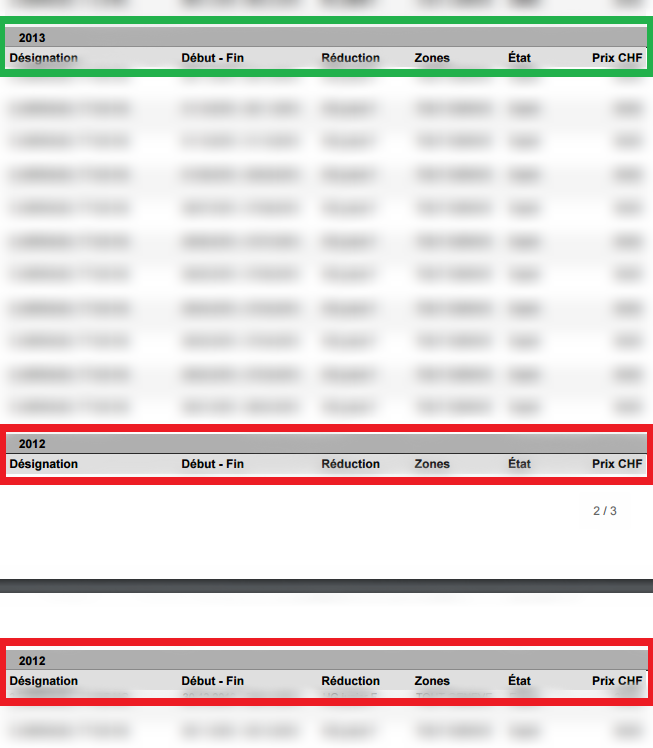
理想情况下,我们应该能够省略这个松散的标题,只保留一个在新的页面上,但我似乎做不到,至少通过TIBCO Jaspersoft Studio。
我其实对这些报告不太了解,但是任何你需要帮助的信息,都可以随意询问。
提前谢谢。
编辑:以下是Petter Friberg的评论,下面是在本报告中使用的JRXML的部分内容。我省略了一些遵循相同属性的部分,但我认为这一点应该足够清楚。
    <jasperReport xmlns="http://jasperreports.sourceforge.net/jasperreports" xmlns:xsi="http://www.w3.org/2001/XMLSchema-instance" xsi:schemaLocation="http://jasperreports.sourceforge.net/jasperreports http://jasperreports.sourceforge.net/xsd/jasperreport.xsd" name="Historique" language="groovy" pageWidth="595" pageHeight="842" columnWidth="483" leftMargin="56" rightMargin="56" topMargin="43" bottomMargin="43" isSummaryWithPageHeaderAndFooter="true" resourceBundle="reportLabels" whenResourceMissingType="Empty" uuid="80db05e1-8ca3-483d-86cc-5947dc62296b">
    <property name="ireport.zoom" value="1.0"/>
    <property name="ireport.x" value="0"/>
    <property name="ireport.y" value="0"/>
    <property name="com.jaspersoft.studio.unit." value="pixel"/>
    <property name="com.jaspersoft.studio.layout" value="com.jaspersoft.studio.editor.layout.VerticalRowLayout"/>
    <property name="com.jaspersoft.studio.unit.topMargin" value="mm"/>
    <property name="com.jaspersoft.studio.unit.bottomMargin" value="mm"/>
    <property name="com.jaspersoft.studio.unit.leftMargin" value="mm"/>
    <property name="com.jaspersoft.studio.unit.rightMargin" value="mm"/>
    <property name="com.jaspersoft.studio.unit.pageHeight" value="pixel"/>
    <property name="com.jaspersoft.studio.unit.pageWidth" value="pixel"/>
    <property name="com.jaspersoft.studio.unit.columnWidth" value="pixel"/>
    <property name="com.jaspersoft.studio.unit.columnSpacing" value="pixel"/>
    <template><![CDATA["/jasper/styles_letter.jrtx"]]></template>
    <style name="Table Group Header" mode="Opaque" forecolor="#000000" backcolor="#99CCFF" vTextAlign="Middle" fontName="Arial" fontSize="10" isBold="true" pdfFontName="Helvetica-Bold"/>
    <!-- ... multiple styles -->
    <parameter name="title" class="java.lang.String"/>
        <!-- ... multiple parameters-->
    <parameter name="addressCity" class="java.lang.String"/>
    <field name="reduction" class="java.lang.String">
        <fieldDescription><![CDATA[reduction]]></fieldDescription>
    </field>
        <!-- ... multiple fields -->
    <field name="year" class="java.lang.String"/>
    <group name="DescriptionGroup">
        <groupExpression><![CDATA[$F{year}]]></groupExpression>
        <groupHeader>
            <band height="30">
                <property name="com.jaspersoft.studio.unit.height" value="pixel"/>
                <textField evaluationTime="Group" evaluationGroup="DescriptionGroup" bookmarkLevel="2">
                    <reportElement style="Table Group Header" mode="Opaque" x="0" y="0" width="483" height="15" printWhenGroupChanges="DescriptionGroup" backcolor="#B0B0B0" uuid="f626bb36-a919-48b9-98b3-756d1ce9812b">
                        <property name="local_mesure_unitx" value="pixel"/>
                        <property name="com.jaspersoft.studio.unit.x" value="px"/>
                        <property name="com.jaspersoft.studio.unit.height" value="pixel"/>
                        <printWhenExpression><![CDATA[new Boolean($P{emptyList} != true)]]></printWhenExpression>
                    </reportElement>
                    <box leftPadding="10">
                        <topPen lineWidth="0.0" lineStyle="Solid" lineColor="#000000"/>
                        <leftPen lineWidth="0.0" lineStyle="Solid" lineColor="#000000"/>
                        <bottomPen lineWidth="0.5" lineStyle="Solid" lineColor="#000000"/>
                        <rightPen lineWidth="0.0" lineStyle="Solid" lineColor="#000000"/>
                    </box>
                    <textElement markup="none">
                        <font size="9" isBold="true"/>
                    </textElement>
                    <textFieldExpression><![CDATA[$F{year}]]></textFieldExpression>
                </textField>
                <!-- ... multiple text fields following the same principle -->
            </band>
        </groupHeader>
    </group>
    <background>
        <band splitType="Stretch"/>
    </background>
    <title>
        <!-- this only appears in the first page, has all the customer info -->
    </title>
    <columnHeader>
        <band splitType="Stretch"/>
    </columnHeader>
    <detail>
        <band height="25" splitType="Stretch">
            <property name="com.jaspersoft.studio.layout" value="com.jaspersoft.studio.editor.layout.HorizontalRowLayout"/>
            <property name="com.jaspersoft.studio.unit.height" value="pixel"/>
            <textField pattern="" isBlankWhenNull="true">
                <reportElement style="Zebra" mode="Opaque" x="0" y="0" width="130" height="25" uuid="234d3832-bd30-40a0-b8e5-eac964158000">
                    <property name="local_mesure_unitheight" value="pixel"/>
                    <property name="local_mesure_unitx" value="pixel"/>
                    <property name="com.jaspersoft.studio.unit.x" value="px"/>
                    <property name="com.jaspersoft.studio.unit.height" value="pixel"/>
                    <printWhenExpression><![CDATA[new Boolean($P{emptyList} != true)]]></printWhenExpression>
                </reportElement>
                <textElement>
                    <font size="8" isBold="false"/>
                    <paragraph leftIndent="3"/>
                </textElement>
                <textFieldExpression><![CDATA[$F{article}]]></textFieldExpression>
            </textField>
            <!-- ... multiple fields following the same principle. this is the body of each sub-table, showing the info for each year -->
        </band>
    </detail>
    <pageFooter>
        <band height="25" splitType="Stretch">
            <!-- ... -->
        </band>
    </pageFooter>
    <summary>
        <band height="40" splitType="Stretch">
            <!-- ... shows a summary of all the info shown on each table -->
        </band>
    </summary>
</jasperReport>
提前谢谢。
回答 1
Stack Overflow用户
回答已采纳
发布于 2016-04-24 13:13:24
您正在使用一个组( generate ),因此您可以使用这个属性minHeightToStartNewPage来确定需要保留多少空间,否则会中断到新页面。
<group name="DescriptionGroup" minHeightToStartNewPage="60">或者如果您想强迫它总是从新页面开始的话。
<group name="DescriptionGroup" isStartNewPage="true">页面原文内容由Stack Overflow提供。腾讯云小微IT领域专用引擎提供翻译支持
原文链接:
https://stackoverflow.com/questions/36740220
复制相关文章
相似问题
腾讯云开发者

Copyright © 2013 - 2026 Tencent Cloud. All Rights Reserved. 腾讯云 版权所有
深圳市腾讯计算机系统有限公司 ICP备案/许可证号:粤B2-20090059  粤公网安备44030502008569号
腾讯云计算(北京)有限责任公司 京ICP证150476号 | 京ICP备11018762号