
德尔福-拖放+ MouseDown + MouseUp
我正在开发一个拖放应用程序,当将一个项目作为默认的DragCursor列表拖放时,我感到很困扰默认的DragCursors
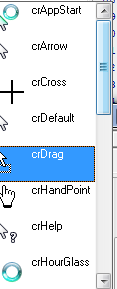
因此,我正在尝试开发一种新的方式,让用户看到像GMAIL这样的拖放运动:

我的问题是:在Delphi 7中是否有可能将鼠标事件拖放到一起?
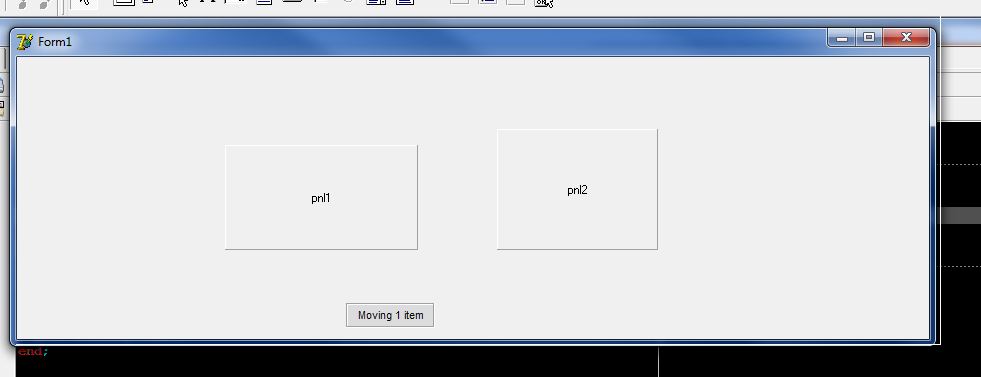
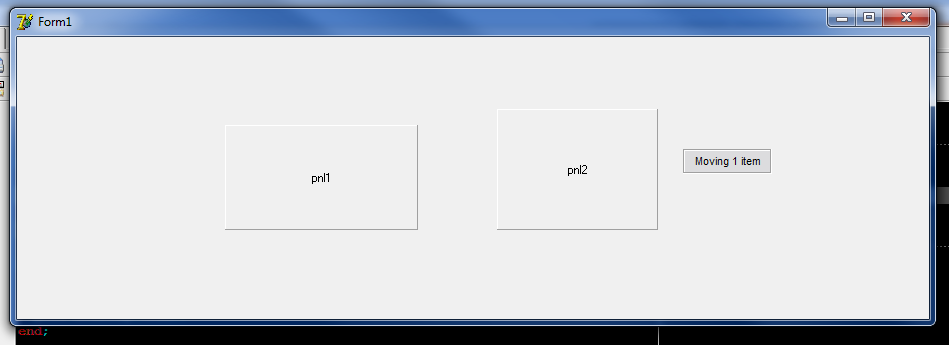
如果我将dmAutomatic放入DragMode中,则MouseDown事件不能工作,如果将dmManual放在DragMode中,MouseDown可以正常工作,但DragDrop事件不能工作。
下面是我的代码:
type
  TForm1 = class(TForm)
    pnlInformacaoDragDrop: TPanel;
    pnl1: TPanel;
    pnl2: TPanel;
    procedure FormMouseMove(Sender: TObject; Shift: TShiftState; X, Y: Integer);
    procedure FormMouseDown(Sender: TObject; Button: TMouseButton; Shift: TShiftState; X, Y: Integer);
    procedure FormMouseUp(Sender: TObject; Button: TMouseButton; Shift: TShiftState; X, Y: Integer);
    procedure pnl1DragDrop(Sender, Source: TObject; X, Y: Integer);
    procedure pnl2DragDrop(Sender, Source: TObject; X, Y: Integer);
    procedure pnl2DragOver(Sender, Source: TObject; X, Y: Integer;
      State: TDragState; var Accept: Boolean);
    procedure pnl1DragOver(Sender, Source: TObject; X, Y: Integer;
      State: TDragState; var Accept: Boolean);
    procedure pnl1MouseDown(Sender: TObject; Button: TMouseButton;
      Shift: TShiftState; X, Y: Integer);
    procedure pnl1MouseUp(Sender: TObject; Button: TMouseButton;
      Shift: TShiftState; X, Y: Integer);
  private
    { Private declarations }
  public
  end;

var
  Form1: TForm1;

implementation

{$R *.dfm}

{ TForm1 }

procedure TForm1.FormMouseMove(Sender: TObject; Shift: TShiftState; X, Y: Integer);
begin
  if Assigned(Self) then
  begin
    if pnlInformacaoDragDrop.Visible then
    begin
      pnlInformacaoDragDrop.Left :=X + 10;
      pnlInformacaoDragDrop.Top := Y + 10;
    end;
  end;
end;

procedure TForm1.FormMouseDown(Sender: TObject; Button: TMouseButton; Shift: TShiftState; X, Y: Integer);
begin
  if Assigned(Self) then
  begin
    if not pnlInformacaoDragDrop.Visible then
      pnlInformacaoDragDrop.Visible := True;

//    img1.BeginDrag(True);
  end;
end;

procedure TForm1.FormMouseUp(Sender: TObject; Button: TMouseButton; Shift: TShiftState; X, Y: Integer);
begin
  if Assigned(Self) then
  begin
    if pnlInformacaoDragDrop.Visible then
      pnlInformacaoDragDrop.Visible := False;
  end;
end;

procedure TForm1.pnl1DragDrop(Sender, Source: TObject; X, Y: Integer);
begin
  TPanel(Sender).Caption := TPanel(Sender).Caption + ' - ' + TPanel(Source).Caption;
end;

procedure TForm1.pnl2DragDrop(Sender, Source: TObject; X, Y: Integer);
begin
  TPanel(Sender).Caption := TPanel(Sender).Caption + ' - ' + TPanel(Source).Caption;
end;

procedure TForm1.pnl2DragOver(Sender, Source: TObject; X, Y: Integer;
  State: TDragState; var Accept: Boolean);
begin
  Accept := true;
end;

procedure TForm1.pnl1DragOver(Sender, Source: TObject; X, Y: Integer;
  State: TDragState; var Accept: Boolean);
begin
  Accept := true;
end;
抱歉,我的问题很简单,但我不知道该怎么做.
非常感谢!
回答 2
Stack Overflow用户
发布于 2016-04-19 16:50:42
您可以使用dmAutomatic并为OnStartDrag事件编写处理程序,而不是试图使用的鼠标事件。
来自D7文档:
描述 当用户开始拖动控件或包含的对象时,使用OnStartDrag事件处理程序实现特殊处理。只有当OnStartDrag是DragKind时才会发生dkDrag。 ..。 OnStartDrag事件处理程序可以为DragObject参数创建一个TDragControlObjectEx实例,以指定拖动游标,或者(可选)拖动图像列表。
Stack Overflow用户
发布于 2016-04-19 14:47:29
拖放是一种模态操作。当按钮关闭时,它必然会与鼠标事件一起潜逃,以便为拖动操作服务。
在cmAutomatic中,您告诉组件在左键向下自动启动拖放操作。在dmManual中,您负责通过从BeginDrag事件中调用MouseDown事件来启动拖动操作。
IOW,在不抓取实际的Windows鼠标事件(WM_LBUTTONDOWN、WM_MOUSEMOVE、WM_LBUTTONUP等)的情况下,VCL拖放机制将掩盖更高级的鼠标事件。但是,如果您决定直接处理这些消息,也会破坏拖放机制。如果不仔细管理事件和拖放子系统,就可以很容易地使事情变得非常糟糕。
https://stackoverflow.com/questions/36720166
复制相似问题
腾讯云开发者

Copyright © 2013 - 2026 Tencent Cloud. All Rights Reserved. 腾讯云 版权所有
深圳市腾讯计算机系统有限公司 ICP备案/许可证号:粤B2-20090059  粤公网安备44030502008569号
腾讯云计算(北京)有限责任公司 京ICP证150476号 | 京ICP备11018762号