
如何在右侧显示SlidingPaneLayout?
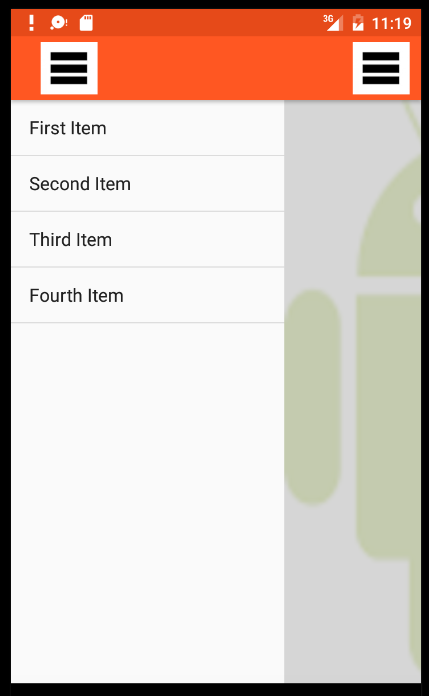
嗨,我是安卓的初学者,在我的应用程序中,我必须在右边显示SlidingPaneLayout,但是用我下面的代码,它是从左边来的。
请帮帮我。
我怎么才能让它在右边呢?
第二,我的要求是,我的SlidingPaneLayout必须在操作栏上重叠,但是使用下面的xml代码SlidingPaneLayout显示,就像我下面的图像
请建议我如何解决这两个问题。
工具栏布局:-
<?xml version="1.0" encoding="utf-8"?>
<android.support.v7.widget.Toolbar
    xmlns:android="http://schemas.android.com/apk/res/android"
    android:layout_width="match_parent"
    android:layout_height="wrap_content"
    android:background="@color/ColorPrimary"
    android:elevation="4dp"
    >

</android.support.v7.widget.Toolbar>
活动滑动:-
<android.support.v4.widget.SlidingPaneLayout xmlns:android="http://schemas.android.com/apk/res/android"
    android:id="@+id/SlidingPanel"
    android:layout_width="match_parent"
    android:layout_height="match_parent" >

    <LinearLayout
        android:layout_width="240dp"
        android:layout_height="match_parent"
        android:layout_gravity="right">

        <ListView
            android:id="@+id/MenuList"
            android:layout_width="match_parent"
            android:layout_height="match_parent" >
        </ListView>

    </LinearLayout>

    <LinearLayout
        android:layout_width="match_parent"
        android:layout_height="match_parent"
        android:layout_gravity="right"
        android:background="#101010"
        android:orientation="vertical" >

        <ImageView
            android:layout_width="match_parent"
            android:layout_height="match_parent"
            android:background="@drawable/android_robot" />
    </LinearLayout>

</android.support.v4.widget.SlidingPaneLayout>
主要布局:-
<?xml version="1.0" encoding="utf-8"?>
<LinearLayout xmlns:android="http://schemas.android.com/apk/res/android"
    android:orientation="vertical"
    android:layout_width="match_parent"
    android:layout_height="match_parent">

    <include
        android:id="@+id/tool_bar"
        layout="@layout/toolbar_layout">
    </include>

    <include
        android:id="@+id/SlidingPanel"
        layout="@layout/activity_sliding">
    </include>

</LinearLayout>
回答 1
Stack Overflow用户
发布于 2016-04-16 06:52:30
在清单中,向开头的<application>标记添加以下属性。
android:supportsRtl="true"然后将此属性添加到布局中的开始SlidingPaneLayout标记中。
android:layoutDirection="rtl"最后,将tool_bar <include>元素移动到SlidingPaneLayout中的主要内容LinearLayout中,并调整ImageView的高度和权重。
<LinearLayout
    android:layout_width="match_parent"
    android:layout_height="match_parent"
    android:background="#101010"
    android:orientation="vertical">

    <include
        android:id="@+id/tool_bar"
        layout="@layout/toolbar_layout">
    </include>

    <ImageView
        android:layout_width="match_parent"
        android:layout_height="0dp"
        android:layout_weight="1"
        android:background="@drawable/android_robot" />

</LinearLayout>请注意,View的子SlidingPaneLayout将继承rtl layoutDirection。如果子View的布局行为受到方向的影响,则可能会造成问题。例如,面向水平的LinearLayout将从右开始布局它的子级。这很容易通过在受影响的View上设置View来补救。
还要注意,此示例对布局中的方向进行了硬编码。如果您需要同时支持LTR和RTL布局应用程序,则需要以编程的方式完成这一任务,同时考虑到设备的默认方向。
https://stackoverflow.com/questions/36660629
复制相似问题
腾讯云开发者

Copyright © 2013 - 2026 Tencent Cloud. All Rights Reserved. 腾讯云 版权所有
深圳市腾讯计算机系统有限公司 ICP备案/许可证号:粤B2-20090059  粤公网安备44030502008569号
腾讯云计算(北京)有限责任公司 京ICP证150476号 | 京ICP备11018762号