
AzureB2C身份提供程序登录失败: AADB2C99002: User不存在
我正在尝试Azure B2C,我已经通过Azure添加了谷歌和微软的身份提供者。
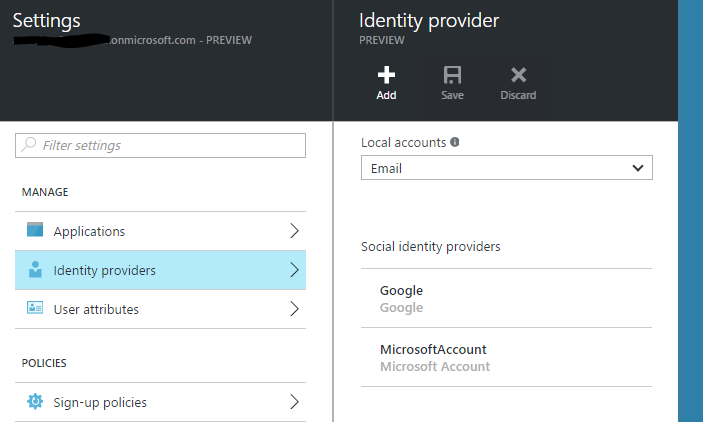
当我尝试使用Microsoft或Google登录时,我总是在OnAuthenticationFailed中收到以下错误消息:
AADB2C99002:用户不存在。请在您登记前注册。
但是当我使用Azure B2C提供的“本地帐户B2C”时,一切都很好。我的配置中遗漏了什么吗?
下面的代码片段显示了我自己的配置。
   private void ConfigureAuthentication(IAppBuilder app)
    {
        app.SetDefaultSignInAsAuthenticationType(CookieAuthenticationDefaults.AuthenticationType);

        app.UseCookieAuthentication(new CookieAuthenticationOptions());

        OpenIdConnectAuthenticationOptions options = new OpenIdConnectAuthenticationOptions
        {
            // These are standard OpenID Connect parameters, with values pulled from web.config
            ClientId = clientId,
            RedirectUri = redirectUri,
            PostLogoutRedirectUri = redirectUri,
            Notifications = new OpenIdConnectAuthenticationNotifications
            {
                AuthenticationFailed = OnAuthenticationFailed,
                RedirectToIdentityProvider = OnRedirectToIdentityProvider,
                AuthorizationCodeReceived = OnAuthorizationCodeReceived,
                SecurityTokenValidated = context => {
                    return null;
                    }
                },

            Scope = "openid offline_access",

            // The PolicyConfigurationManager takes care of getting the correct Azure AD authentication
            // endpoints from the OpenID Connect metadata endpoint.  It is included in the PolicyAuthHelpers folder.
            ConfigurationManager = new PolicyConfigurationManager(
                String.Format(CultureInfo.InvariantCulture, aadInstance, tenant, "/v2.0", OIDCMetadataSuffix),
                new string[] { SignUpPolicyId, SignInPolicyId, ProfilePolicyId }),

            // This piece is optional - it is used for displaying the user's name in the navigation bar.
            TokenValidationParameters = new System.IdentityModel.Tokens.TokenValidationParameters
            {
                NameClaimType = "name",
            },
        };

        app.UseOpenIdConnectAuthentication(options);
    }

    // This notification can be used to manipulate the OIDC request before it is sent.  Here we use it to send the correct policy.
    private async Task OnRedirectToIdentityProvider(RedirectToIdentityProviderNotification<OpenIdConnectMessage, OpenIdConnectAuthenticationOptions> notification)
    {
        PolicyConfigurationManager mgr = notification.Options.ConfigurationManager as PolicyConfigurationManager;
        if (notification.ProtocolMessage.RequestType == OpenIdConnectRequestType.LogoutRequest)
        {
            OpenIdConnectConfiguration config = await mgr.GetConfigurationByPolicyAsync(CancellationToken.None, notification.OwinContext.Authentication.AuthenticationResponseRevoke.Properties.Dictionary[AzureB2C.PolicyKey]);
            notification.ProtocolMessage.IssuerAddress = config.EndSessionEndpoint;
        }
        else
        {
            OpenIdConnectConfiguration config = await mgr.GetConfigurationByPolicyAsync(CancellationToken.None, notification.OwinContext.Authentication.AuthenticationResponseChallenge.Properties.Dictionary[AzureB2C.PolicyKey]);
            notification.ProtocolMessage.IssuerAddress = config.AuthorizationEndpoint;
        }
    }

    private async Task OnAuthorizationCodeReceived(AuthorizationCodeReceivedNotification notification)
    {
        // The user's objectId is extracted from the claims provided in the id_token, and used to cache tokens in ADAL
        // The authority is constructed by appending your B2C directory's name to "https://login.microsoftonline.com/"
        // The client credential is where you provide your application secret, and is used to authenticate the application to Azure AD
        string userObjectID = notification.AuthenticationTicket.Identity.FindFirst("http://schemas.microsoft.com/identity/claims/objectidentifier").Value;
        string authority = String.Format(CultureInfo.InvariantCulture, aadInstance, tenant, string.Empty, string.Empty);
        ClientCredential credential = new ClientCredential(clientId, clientSecret);

        // We don't care which policy is used to access the TaskService, so let's use the most recent policy
        string mostRecentPolicy = notification.AuthenticationTicket.Identity.FindFirst(AzureB2C.AcrClaimType).Value;

        // The Authentication Context is ADAL's primary class, which represents your connection to your B2C directory
        // ADAL uses an in-memory token cache by default.  In this case, we've extended the default cache to use a simple per-user session cache
        AuthenticationContext authContext = new AuthenticationContext(authority, new NaiveSessionCache(userObjectID));

        // Here you ask for a token using the web app's clientId as the scope, since the web app and service share the same clientId.
        // The token will be stored in the ADAL token cache, for use in our controllers
        AuthenticationResult result = await authContext.AcquireTokenByAuthorizationCodeAsync(notification.Code, new Uri(redirectUri), credential, new string[] { clientId }, mostRecentPolicy);
    }

    // Used for avoiding yellow-screen-of-death
    private Task OnAuthenticationFailed(AuthenticationFailedNotification<OpenIdConnectMessage, OpenIdConnectAuthenticationOptions> notification)
    {
        _log.Error("AuthenticationFailed!\r\nError={0}\r\nErrorDescription={1}\r\n{0}",
            notification.ProtocolMessage.Error,
             notification.ProtocolMessage.ErrorDescription,
            notification.Exception.ToString());

        notification.HandleResponse();
        notification.Response.Redirect("/Home/OpenIdError?message=" + notification.ProtocolMessage.ErrorDescription);
        return Task.FromResult(0);
    }
}回答 2
Stack Overflow用户
发布于 2016-04-16 12:07:55
在注册前,外部身份首先需要“注册”。在注册过程中,外部标识被链接到B2C。
在注册页面中,您可以为您的用户询问其他属性,比如客户编号。对于外部标识和B2C中的B2C用户,您都需要这样做,两者之间没有区别。
这与在没有B2C的情况下添加身份提供程序不同,因为每个登录都能正常工作。
编辑:就像提到的康斯坦丁一样,新的组合sign-up or sign-in policy解决了这个问题:https://azure.microsoft.com/en-us/documentation/articles/active-directory-b2c-reference-policies/#create-a-sign-up-or-sign-in-policy
Stack Overflow用户
发布于 2022-09-12 21:29:16
我遇到了同样的问题,但是在用户插入后,我能够绕过用户的“注册”。问题是,要实现适当的联合,就必须建立适当的价值观。
 "identities": [
    {
      "signInType": "federated",
      "issuer": "https://login.microsoftonline.com/XXXXXXX-XXXX-XXXX-XXXX-XXXXXXXXXXX/v2.0",
"issuerAssignedId": "YYYYYYYYY-YYYY-YYYY-YYYY-YYYYYYYYYYYY"正在发生的情况是,我使用的是"issuer": "myDomain.com",它没有正确地解决登录问题;用户随后不得不通过联邦IP "SignUp“登录。
通过将其从DNS可读的名称更改为带有我的AD目录ID的MS登录(在Azure,XXXX-XXX .和适当的issuerAssignedId,从最初的AD发行者,它的工作,并添加了用户。
https://stackoverflow.com/questions/36656777
复制相似问题
腾讯云开发者

Copyright © 2013 - 2026 Tencent Cloud. All Rights Reserved. 腾讯云 版权所有
深圳市腾讯计算机系统有限公司 ICP备案/许可证号:粤B2-20090059  粤公网安备44030502008569号
腾讯云计算(北京)有限责任公司 京ICP证150476号 | 京ICP备11018762号