
计数充色细胞数
计数充色细胞数
提问于 2016-04-15 16:03:19
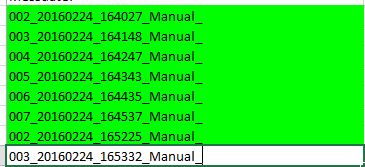
我想找出B色的填充细胞的数目。我要计数和显示填充的颜色的数量。
但我错了:
Dim sum As Long
Dim count As Long
     sum = 0
count = 0
    strFileName = Application.GetOpenFilename("Excel files (*.xls*),*.xl*", Title:="Open data")
    Set Target = Workbooks.Open(strFileName)
    Set tabWS = Target.Worksheets("Tabelle1")

    ' lastrow = tabWS.Range("D" & tabWS.Rows.count).End(xlUp).Row  'Trigger Description starts from 2 row A coloumn
        lastrow = tabWS.Range("B" & tabWS.Rows.count).End(xlUp).Row  'Trigger Description starts from 2 row A coloumn
        For j = 2 To lastrow
        If tabWS.Cells(j, 2).Interior.ColorIndex = 4 Then
        sum = sum + tabWS.Cells(j, 8).value
        count = count + 1
        End If
        Next j

        MsgBox ("the value is" & sum)
        End sub
和=和+tabs.cell(j,8).value的误差
我搞不懂whyI是怎么得到这个错误的。有人能给我一个建议吗?
回答 1
Stack Overflow用户
回答已采纳
发布于 2016-04-15 16:14:38
在我看来,每次在tabWS上使用方法时,您都会打开工作簿。尝试将tabWS设置为等于以下内容:
tabWS = Worksheets("Tabelle1")现在,当您在代码的后面部分设置最后一行和和变量时,您将不会一次又一次地打开工作簿。
编辑(以下评论继续)*
    lastrow = Worksheets("Tabelle1").Range("B" & Worksheets("Tabelle1").Rows.count).End(xlUp).Row
    For j = 2 To lastrow
    If Worksheets("Tabelle1").Cells(j, 2).Interior.ColorIndex = 4 Then
    sum = sum + Worksheets("Tabelle1").Cells(j, 8).value
    count = count + 1
    End If
    Next j

    MsgBox ("the value is" & sum)
End sub页面原文内容由Stack Overflow提供。腾讯云小微IT领域专用引擎提供翻译支持
原文链接:
https://stackoverflow.com/questions/36651905
复制相关文章
相似问题
腾讯云开发者

Copyright © 2013 - 2026 Tencent Cloud. All Rights Reserved. 腾讯云 版权所有
深圳市腾讯计算机系统有限公司 ICP备案/许可证号:粤B2-20090059  粤公网安备44030502008569号
腾讯云计算(北京)有限责任公司 京ICP证150476号 | 京ICP备11018762号