
将图像视图的一部分覆盖在工具栏上
将图像视图的一部分覆盖在工具栏上
提问于 2016-04-14 22:41:30
我试图在工具栏上覆盖图像视图的一部分,如下面的图像所示。
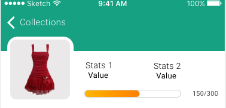
我尝试使用Sanjeet here描述的自定义浮动动作按钮(使用矩形画布)。但是,与浮动操作按钮不同,我只希望图像的一部分在工具栏上。
使用对话框也不起作用。我希望图像成为布局的一部分。
任何开始的想法都会有帮助。
回答 1
Stack Overflow用户
回答已采纳
发布于 2016-04-14 22:50:11
这很简单,您只需使用NoActionBar样式,然后使用类似于下面的伪XML的布局:
<FrameLayout>
   <Toolbar height="60dp" paddingBottom="12dp"> // here is the Toolbar
   <ImageView marginTop="48dp" /> // marging top = 60-12=48
   <FrameLayout marginTop="60dp">
        // add here the rest of your layout
   </FrameLayout>
</FrameLayout>页面原文内容由Stack Overflow提供。腾讯云小微IT领域专用引擎提供翻译支持
原文链接:
https://stackoverflow.com/questions/36635258
复制相关文章
相似问题
腾讯云开发者

Copyright © 2013 - 2026 Tencent Cloud. All Rights Reserved. 腾讯云 版权所有
深圳市腾讯计算机系统有限公司 ICP备案/许可证号:粤B2-20090059  粤公网安备44030502008569号
腾讯云计算(北京)有限责任公司 京ICP证150476号 | 京ICP备11018762号