
生成条形码-应用程序运行无错误,但不生成条形码。
生成条形码-应用程序运行无错误,但不生成条形码。
提问于 2016-04-13 20:53:02
最近,我设法使应用程序正常工作,没有任何错误。
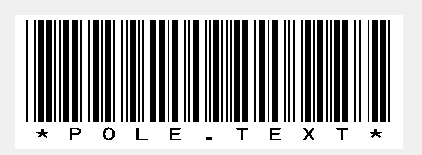
问题是,它应该生成一个条形码,下面有文本;它所做的是,它只生成带有文本的图像,而不是条形码。
我正在使用字体IDAutomationHC39M。应用程序应该将文本转换成条形码。
请参阅以下代码:
using System;
using System.Collections.Generic;
using System.ComponentModel;
using System.Data;
using System.Drawing;
using System.Linq;
using System.Text;
using System.Windows.Forms;
using System.IO;
using System.Drawing.Imaging;

namespace WindowsFormsApplication2
{
    public partial class Form1 : Form
    {
        public Form1()
        {
            InitializeComponent();
        }

        private void button1_Click(object sender, EventArgs e)
        {
            String barcode = pole.Text;
            Bitmap bitmap = new Bitmap(barcode.Length * 40, 150);
            using (Graphics graphics = Graphics.FromImage(bitmap))
            {
                Font ofont = new System.Drawing.Font("IDAutomationHC39M", 20);
                PointF point = new PointF(2f, 2f);
                SolidBrush black = new SolidBrush(Color.Black);
                SolidBrush White = new SolidBrush(Color.White);
                graphics.FillRectangle(White, 0, 0, bitmap.Width, bitmap.Height);
                graphics.DrawString("*" + barcode + "*", ofont, black, point);
            }
            using (MemoryStream ms = new MemoryStream())
            {
                bitmap.Save(ms, ImageFormat.Png);
                box.Image = bitmap;
                box.Height = bitmap.Height;
                box.Width = bitmap.Width;
            }
        }

        private void pole_TextChanged(object sender, EventArgs e)
        {

        }
    }
} 回答 1
Stack Overflow用户
回答已采纳
发布于 2016-04-14 08:27:31
您的代码中有一些小问题,即GDI资源的泄漏和您创建的位图的不精确测量。
下面是一个解决这些问题的版本:
    String barcode = "*" + pole.Text + "*";
    PointF point = new PointF(5f, 5f);
    float fontHeight = 20f;
    Bitmap bitmap = new Bitmap(123,123);
    using (Font ofont = new System.Drawing.Font("IDAutomationHC39M", fontHeight))
    {    // create a Graphics object to measure the barcode
        using (Graphics graphics = Graphics.FromImage(bitmap))
        {
            Size sz = Size.Round(graphics.MeasureString( barcode, ofont));
            bitmap = new Bitmap(sz.Width + 10, sz.Height + 10);
        } // create a new one with the right size to work on
        using (Graphics graphics = Graphics.FromImage(bitmap))
        {
            graphics.Clear(Color.White);
            graphics.DrawString(barcode, ofont, Brushes.Black, point);
        }
    }
    box.Image = bitmap;
    box.ClientSize = bitmap.Size;

// bitmap.Save(fileName, ImageFormat.Png);,但是您的主要问题很可能来自于使用不完全兼容的字体。有许多免费字体在那里,并不是所有的工作一样好。
我发现这种字体工作得很好,但无法得到这个要直接工作,尽管我的一个较早的程序,它列举了已安装的字体,确实可以使用它。但即使是设计师也拒绝使用它,所以这不仅仅是名字。
以下是一个示例:
页面原文内容由Stack Overflow提供。腾讯云小微IT领域专用引擎提供翻译支持
原文链接:
https://stackoverflow.com/questions/36609361
复制相关文章
相似问题
腾讯云开发者

Copyright © 2013 - 2026 Tencent Cloud. All Rights Reserved. 腾讯云 版权所有
深圳市腾讯计算机系统有限公司 ICP备案/许可证号:粤B2-20090059  粤公网安备44030502008569号
腾讯云计算(北京)有限责任公司 京ICP证150476号 | 京ICP备11018762号