
MahApps DataGridCell风格
MahApps DataGridCell风格
提问于 2016-04-07 21:14:59
我在我的应用程序中使用MahApps库,数据单元格的默认样式没有任何边框:
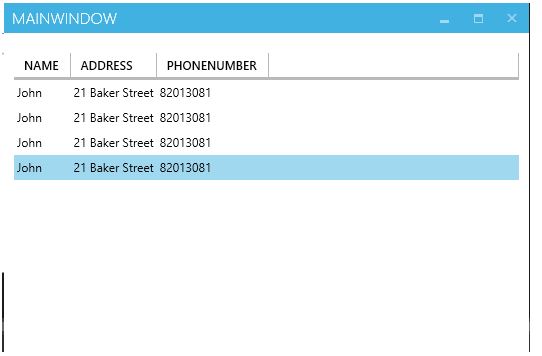
但我希望DataGrid看起来像这样:

所以我开始说:
<Style TargetType="{x:Type DataGridCell}">
    <Setter Property="Height"
            Value="33" />
    <Setter Property="Background"
            Value="Transparent" />
    <Setter Property="Padding"
            Value="5,0" />
    <Setter Property="Template">
        <Setter.Value>
            <ControlTemplate TargetType="{x:Type DataGridCell}">
                <Border x:Name="border"
                        Background="Transparent"
                        BorderBrush="Black"
                        BorderThickness="1"
                        Padding="0,10,0,10"
                        SnapsToDevicePixels="True">
                    <ContentPresenter SnapsToDevicePixels="{TemplateBinding SnapsToDevicePixels}" />
                </Border>
            </ControlTemplate>
        </Setter.Value>
    </Setter>
    <Setter Property="Template">
        <Setter.Value>
            <ControlTemplate TargetType="{x:Type DataGridCell}">
                <Grid Background="{TemplateBinding Background}">
                    <ContentPresenter VerticalAlignment="Center" />
                </Grid>
            </ControlTemplate>
        </Setter.Value>
    </Setter>
</Style>
但是没有什么变化,所以我假设我丢失了基于On={}属性,但我没有任何线索,我已经请求帮助MathApps团队,但没有帮助.
回答 1
Stack Overflow用户
回答已采纳
发布于 2016-04-07 21:27:05
在GridLinesVisibility="All"控件本身上设置DataGrid将为您提供内部边框。
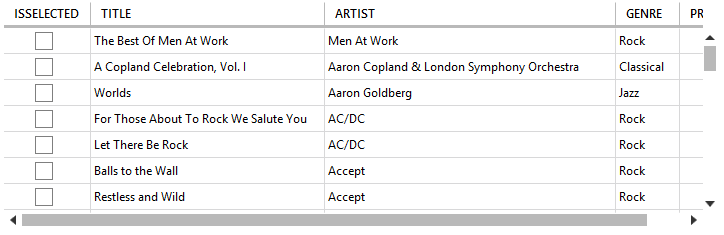
注意,它并没有为您提供外部边框,但它比编辑默认模板容易得多。
如果您确实希望获得外部边框,则需要重写默认模板。
MahApps默认的DataGridCell模板键是MetroDataGridCell,因此您需要使用<Style TargetType="{x:Type DataGridCell}" BasedOn="{StaticResource MetroDataGridCell}">
页面原文内容由Stack Overflow提供。腾讯云小微IT领域专用引擎提供翻译支持
原文链接:
https://stackoverflow.com/questions/36487354
复制相关文章
相似问题
腾讯云开发者

Copyright © 2013 - 2026 Tencent Cloud. All Rights Reserved. 腾讯云 版权所有
深圳市腾讯计算机系统有限公司 ICP备案/许可证号:粤B2-20090059  粤公网安备44030502008569号
腾讯云计算(北京)有限责任公司 京ICP证150476号 | 京ICP备11018762号