
使用iTextSharp的标签打印
使用iTextSharp的标签打印
提问于 2016-04-06 02:38:28
我有一个逻辑导出avery标签pdf。逻辑用标签正确地导出pdf,但当我打印该pdf时,我传递的页面大小度量(Page属性)与打印的页面不匹配。
页面属性
Width="48.5" Height="25.4" HorizontalGapWidth="0" VerticalGapHeight="0" PageMarginTop="21" PageMarginBottom="21" PageMarginLeft="8" PageMarginRight="8" PageSize="A4" LabelsPerRow="4" LabelRowsPerPage="10"上述属性值首先转换为point值,然后再应用。
转换为点
    private float mmToPoint(double mm)
    {
        return (float)((mm / 25.4) * 72);
    }
逻辑
    public Stream SecLabelType(LabelProp _label)
    {
        List<LabelModelClass> Model = new List<LabelModelClass>();
        Model = RetModel(_label);
        bool IncludeLabelBorders = false;
        FontFactory.RegisterDirectories();
        Rectangle pageSize;
        switch (_label.PageSize)
        {
            case "A4":
                pageSize = iTextSharp.text.PageSize.A4;
                break;
            default:
                pageSize = iTextSharp.text.PageSize.A4;
                break;
        }

        var doc = new Document(pageSize,
                               _label.PageMarginLeft,
                               _label.PageMarginRight,
                               _label.PageMarginTop,
                               _label.PageMarginBottom);

        var output = new MemoryStream();

        var writer = PdfWriter.GetInstance(doc, output);

        writer.CloseStream = false;
        doc.Open();
        var numOfCols = _label.LabelsPerRow + (_label.LabelsPerRow - 1);
        var tbl = new PdfPTable(numOfCols);
        var colWidths = new List<float>();
        for (int i = 1; i <= numOfCols; i++)
        {
            if (i % 2 > 0)
            {
                colWidths.Add(_label.Width);
            }
            else
            {
                colWidths.Add(_label.HorizontalGapWidth);
            }
        }

        var w = iTextSharp.text.PageSize.A4.Width - (doc.LeftMargin + doc.RightMargin);
        var h = iTextSharp.text.PageSize.A4.Height - (doc.TopMargin + doc.BottomMargin);
        var size = new iTextSharp.text.Rectangle(w, h);
        tbl.SetWidthPercentage(colWidths.ToArray(), size);
        //var val = System.IO.File.ReadLines("C:\\Users\\lenovo\\Desktop\\test stock\\testing3.txt").ToArray();
        //var ItemNoArr = Model.Select(ds => ds.ItemNo).ToArray();
        //string Header = Model.Select(ds => ds.Header).FirstOrDefault();
        int cnt = 0;
        bool b = false;
        int iAddRows = 1;
        for (int iRow = 0; iRow < ((Model.Count() / _label.LabelsPerRow) + iAddRows); iRow++)
        {
            var rowCells = new List<PdfPCell>();
            for (int iCol = 1; iCol <= numOfCols; iCol++)
            {
                if (Model.Count() > cnt)
                {
                    if (iCol % 2 > 0)
                    {
                        var cellContent = new Phrase();
                        if (((iRow + 1) >= _label.StartRow && (iCol) >= (_label.StartColumn + (_label.StartColumn - 1))) || b)
                        {
                            b = true;

                            try
                            {
                                var StrArr = _label.SpineLblFormat.Split('|');

                                foreach (var x in StrArr)
                                {
                                    string Value = "";
                                    if (x.Contains(","))
                                    {
                                        var StrCommaArr = x.Split(',');
                                        foreach (var y in StrCommaArr)
                                        {
                                            if (y != "")
                                            {

                                                Value = ChunckText(cnt, Model, y, Value);

                                            }
                                        }
                                        if (Value != null && Value.Replace(" ", "") != "")
                                        {
                                            cellContent.Add(new Paragraph(Value));
                                            cellContent.Add(new Paragraph("\n"));
                                        }
                                    }
                                    else
                                    {
                                        Value = ChunckText(cnt, Model, x, Value);
                                        if (Value != null && Value.Replace(" ", "") != "")
                                        {
                                            cellContent.Add(new Paragraph(Value));
                                            cellContent.Add(new Paragraph("\n"));
                                        }
                                    }
                                }
                            }
                            catch (Exception e)
                            {
                                var fontHeader1 = FontFactory.GetFont("Verdana", BaseFont.CP1250, true, 6, 0);
                                cellContent.Add(new Chunk("NA", fontHeader1));
                            }
                            cnt += 1;
                        }
                        else
                            iAddRows += 1;
                        var cell = new PdfPCell(cellContent);
                        cell.FixedHeight = _label.Height;
                        cell.HorizontalAlignment = Element.ALIGN_LEFT;
                        cell.Border = IncludeLabelBorders ? Rectangle.BOX : Rectangle.NO_BORDER;
                        rowCells.Add(cell);
                    }
                    else
                    {
                        var gapCell = new PdfPCell();
                        gapCell.FixedHeight = _label.Height;
                        gapCell.Border = Rectangle.NO_BORDER;
                        rowCells.Add(gapCell);
                    }
                }
                else
                {
                    var gapCell = new PdfPCell();
                    gapCell.FixedHeight = _label.Height;
                    gapCell.Border = Rectangle.NO_BORDER;
                    rowCells.Add(gapCell);
                }
            }
            tbl.Rows.Add(new PdfPRow(rowCells.ToArray()));
            _label.LabelRowsPerPage = _label.LabelRowsPerPage == null ? 0 : _label.LabelRowsPerPage;
            if ((iRow + 1) < _label.LabelRowsPerPage && _label.VerticalGapHeight > 0)
            {
                tbl.Rows.Add(CreateGapRow(numOfCols, _label));
            }

        }
        doc.Add(tbl);
        doc.Close();
        output.Position = 0;
        return output;

    }

private PdfPRow CreateGapRow(int numOfCols, LabelProp _label)
    {
        var cells = new List<PdfPCell>();

        for (int i = 0; i < numOfCols; i++)
        {
            var cell = new PdfPCell();
            cell.FixedHeight = _label.VerticalGapHeight;
            cell.Border = Rectangle.NO_BORDER;
            cells.Add(cell);
        }
        return new PdfPRow(cells.ToArray());
}回答 1
Stack Overflow用户
发布于 2016-04-06 08:01:23
PDF文档可能有非常精确的测量,但是这些测量结果会被搞砸,因为页面在打印过程中是缩放的。这是一个常见的问题:当您使用不同的打印机打印文档时,不同的打印机将使用不同的缩放因子,并具有不同的结果。
如何避免这种情况?
在Adobe的“打印”对话框中,可以选择打印机的行为方式:
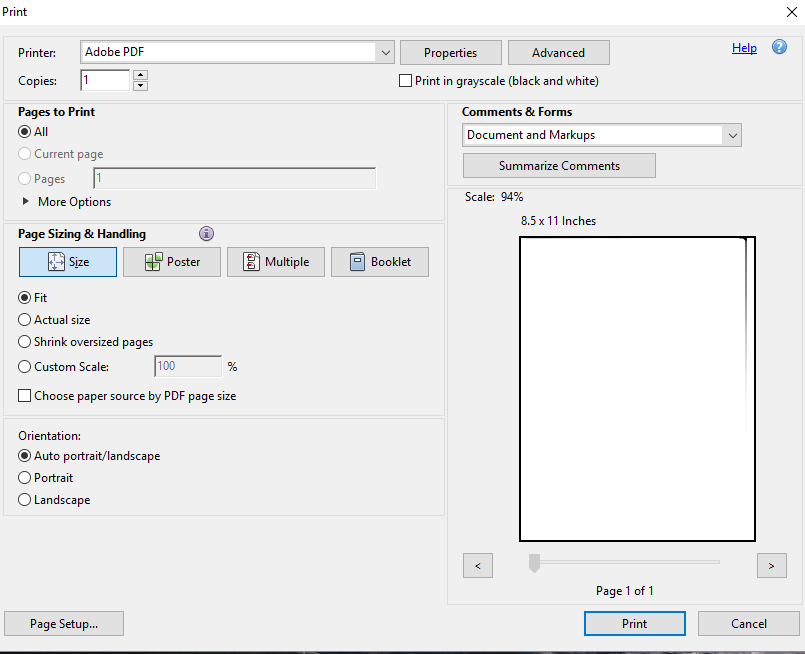
默认情况下,打印机将尝试“匹配”页面上的内容,但由于并非每台打印机都能实际使用整个页面大小(由于硬件限制),如果使用"Fit“,打印机很有可能缩小页面。
最好选择“实际尺寸”。使用此选项的缺点是,某些内容可能会丢失,因为它太靠近页面的边框,在打印机实际无法到达的区域,但优点是测量值将被保留。
您可以通过告诉文档不应该缩放,从而在文档中以编程方式设置此选项:
writer.AddViewerPreference(PdfName.PRINTSCALING, PdfName.NONE);有关查看器首选项的更多信息,请参见How to set initial view properties?。
页面原文内容由Stack Overflow提供。腾讯云小微IT领域专用引擎提供翻译支持
原文链接:
https://stackoverflow.com/questions/36440510
复制相关文章
相似问题
腾讯云开发者

Copyright © 2013 - 2026 Tencent Cloud. All Rights Reserved. 腾讯云 版权所有
深圳市腾讯计算机系统有限公司 ICP备案/许可证号:粤B2-20090059  粤公网安备44030502008569号
腾讯云计算(北京)有限责任公司 京ICP证150476号 | 京ICP备11018762号