
Android上的libGDX/Box2DLights彩色显带
我在我的一个项目中使用Box2DLights。我在这个项目上工作了几个月,我只是试着把它移植到Android上,看看它的外观。虽然在桌面版的游戏中光线效果看起来很不错,但在Android版本上它看起来真的很难看。光的梯度一点也不平滑,有一种彩色条带的效果。以下是桌面和android版本的屏幕截图:
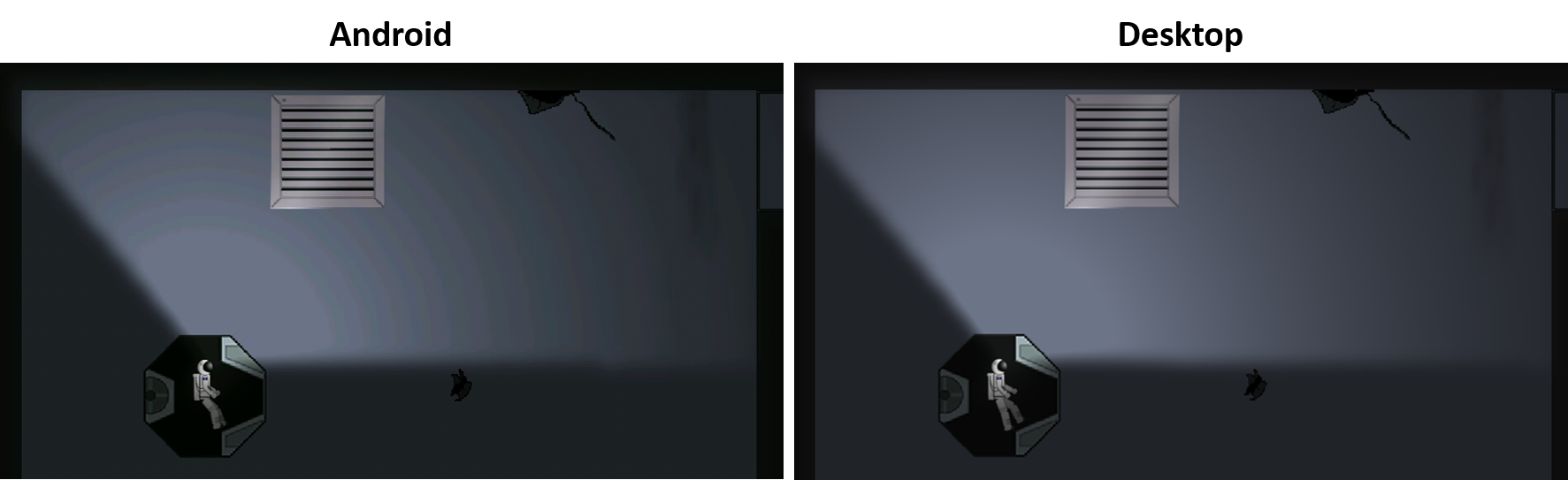
要在我的游戏中使用Box2DLights,我在GameScreen中使用以下代码:
RayHandler.useDiffuseLight(true);
rayHandler = new RayHandler(world);
rayHandler.resizeFBO(Gdx.graphics.getWidth()/5, Gdx.graphics.getHeight()/5);
rayHandler.setBlur(true);
rayHandler.setAmbientLight(new Color(0.15f, 0.15f, 0.15f, 0.1f));
我还尝试使用不同的参数,例如:
rayHandler.diffuseBlendFunc.set(GL20.GL_DST_COLOR, GL20.GL_SRC_COLOR);或
rayHandler.shadowBlendFunc.set(GL20.GL_DST_COLOR, GL20.GL_SRC_COLOR);或
Gdx.gl.glEnable(GL20.GL_DITHER);我不知道有什么用,但这里还有其他精确性:
- 我的tileset是在Photoshop上制作的,并以RGB模式(8位/通道)记录为PNG文件。
- 这一效果在我的两个Android设备上被观察到:。
- 带有Android4.2.1的平板变压器主TF701
- LG G Stylo与Android 5.0.2
谢谢你的帮助!
回答 1
Stack Overflow用户
发布于 2016-04-03 16:31:10
以下是解决办法:
这个问题与Android的低比特深度有关。如果您查看AndroidApplicationConfiguration.java的代码,您将在第30和第31行注意到以下代码:
/** number of bits per color channel **/
public int r = 5, g = 6, b = 5, a = 0;因此,带有libGDX的安卓应用程序在默认情况下呈现低位图像。这可以在应用程序的AndroidLauncher.java中很容易地修改。
应用程序的默认AndroidLauncher.java如下所示:
public class AndroidLauncher extends AndroidApplication {
    @Override
    protected void onCreate (Bundle savedInstanceState) {
        super.onCreate(savedInstanceState);
        AndroidApplicationConfiguration config = new AndroidApplicationConfiguration();
        initialize(new MyGdxGame(), config);
    }
}
要为你的安卓应用程序提供RGBA8888的渲染格式,你需要做的就是:
public class AndroidLauncher extends AndroidApplication {
    @Override
    protected void onCreate (Bundle savedInstanceState) {
        super.onCreate(savedInstanceState);
        AndroidApplicationConfiguration config = new AndroidApplicationConfiguration();
        config.r = 8;
        config.g = 8;
        config.b = 8;
        config.a = 8;
        initialize(new MyGdxGame(), config);
    }
}
等等!以下是Android RGB565与Android RGBA8888 VS桌面的比较屏幕截图:
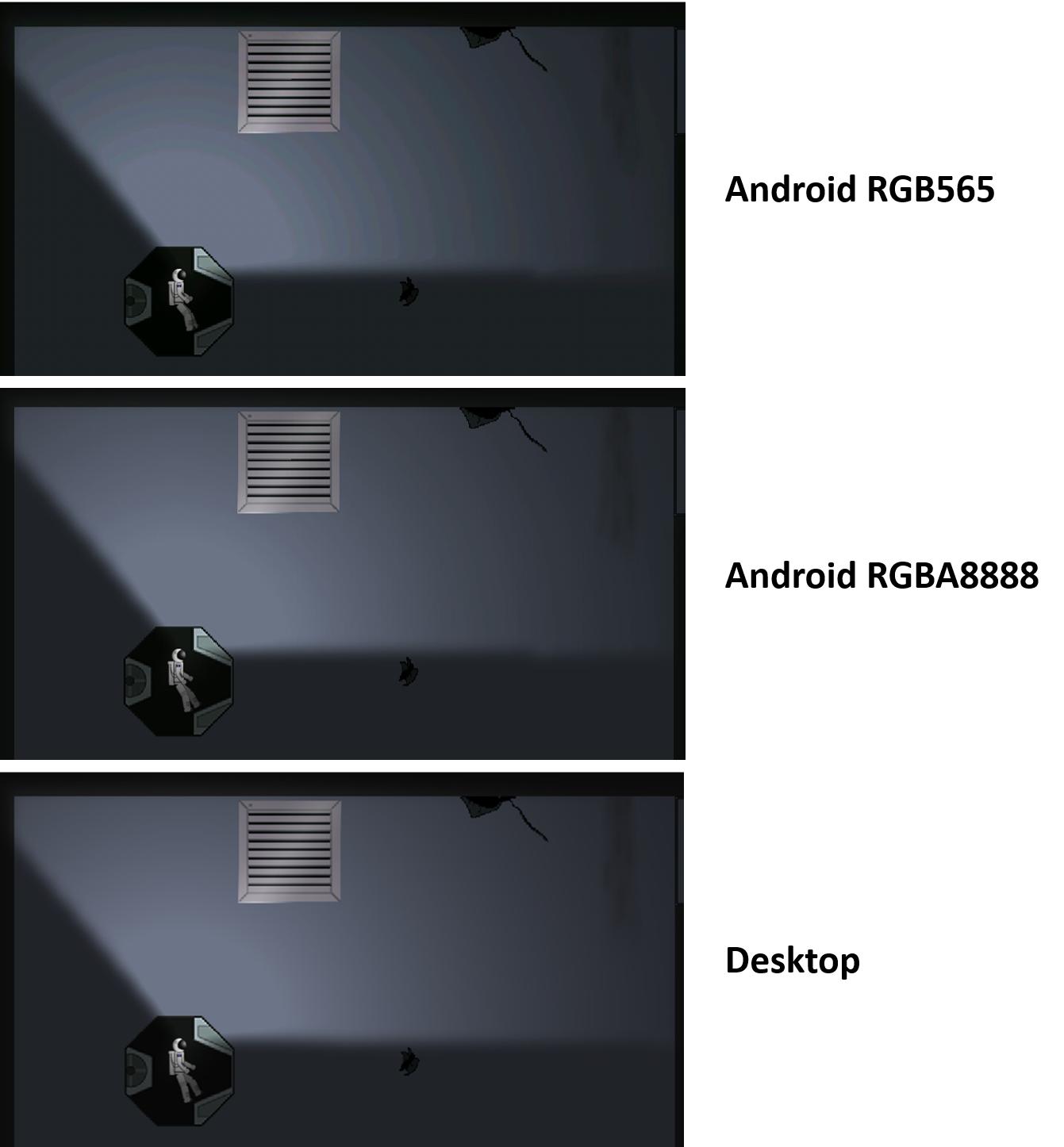
您可以看到,Android RGBA8888非常接近桌面版本。
https://stackoverflow.com/questions/36369481
复制相似问题
腾讯云开发者

Copyright © 2013 - 2026 Tencent Cloud. All Rights Reserved. 腾讯云 版权所有
深圳市腾讯计算机系统有限公司 ICP备案/许可证号:粤B2-20090059  粤公网安备44030502008569号
腾讯云计算(北京)有限责任公司 京ICP证150476号 | 京ICP备11018762号