
在Opencart 2.X中为开发添加虚拟客户
在Opencart 2.X中为开发添加虚拟客户
提问于 2016-03-31 07:01:31
不是问题,而是后人的笔记
作为开发人员,我们需要反复安装Opencart的不同版本,填充产品、客户等,这取决于特定开发任务的性质。我们经常使用DB工具(如PhpMyAdmin )来创建一些虚拟条目或从另一个数据库导入。
今天,我只需要创建20-30个客户的两个小组,一些是通讯订户,有些不是。我厌倦了在DB中这样做,所以我想出了另一个方法如下。
回答 1
Stack Overflow用户
发布于 2016-03-31 07:01:31
我使用JavaScript在Admin中的“Admin”页面上填充表单字段。
在JavaScript控制台中,粘贴以下内容(根据需要编辑):
$('#input-customer-group').val(2)
$('#input-firstname').val('D-' + Math.random().toString(36).replace(/[^a-z]+/g, '').substr(0, 4))
$('#input-lastname').val(Math.random().toString(36).replace(/[^a-z]+/g, '').substr(0, 5))
$('#input-email').val('D_' + Math.random().toString(36).replace(/[^a-z]+/g, '').substr(0, 4) +'@'+ Math.random().toString(36).replace(/[^a-z]+/g, '').substr(0, 5) +'.com')
$('#input-telephone').val(Math.random().toString(36).replace(/[^0-9]+/g, '').substr(0, 7))
$('#input-password').val('test')
$('#input-confirm').val('test')
$('#input-newsletter').val(0)
$('button[type="submit"]').click()命中Enter
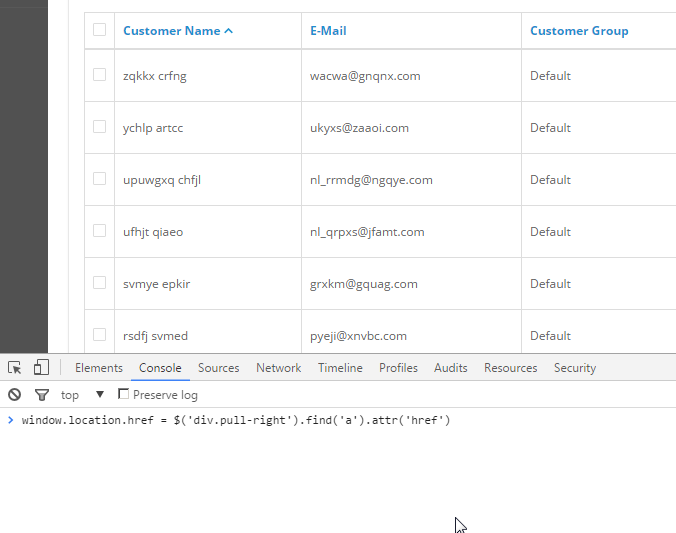
在重定向到的客户列表页面上,在JavaScript控制台中粘贴以下内容:
window.location.href = $('div.pull-right').find('a').attr('href')命中Enter
现在您将返回添加客户页面。
现在,您只需遍历前面的命令,按需要添加尽可能多的用户,并根据需要编辑代码。
UP ARROW + UP ARROW + ENTER
页面原文内容由Stack Overflow提供。腾讯云小微IT领域专用引擎提供翻译支持
原文链接:
https://stackoverflow.com/questions/36326304
复制相关文章
相似问题
腾讯云开发者

Copyright © 2013 - 2026 Tencent Cloud. All Rights Reserved. 腾讯云 版权所有
深圳市腾讯计算机系统有限公司 ICP备案/许可证号:粤B2-20090059  粤公网安备44030502008569号
腾讯云计算(北京)有限责任公司 京ICP证150476号 | 京ICP备11018762号