
Python相当于Matlab函数的“填充”来表示灰度?
是否有一个与Matlab的灰度图像、OpenCV填充函数(即灰度孔洞填充)等价的实现方法?
请参阅下面的链接中的灰度填充部分(I2=填充(I))。或见图:例如

下面是一个指向示例中轮胎图像的链接
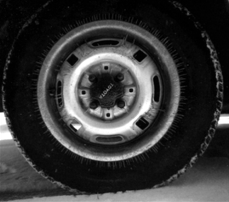
我一直试图通过改变大小参数来使用scipy.ndimage.grey_closing函数复制Matlab的输出,但没有成功。
我正在使用Python3.5。
回答 2
Stack Overflow用户
发布于 2016-03-31 12:34:23
在这里已经用Python实现了两个版本的洪水填充算法:
http://arcgisandpython.blogspot.de/2012/01/python-flood-fill-algorithm.html
第一个简单的变量包含两个未定义的变量,但下面是一个工作版本:
import numpy as np
import scipy as sp
import scipy.ndimage

def flood_fill(test_array,h_max=255):
    input_array = np.copy(test_array)
    el = sp.ndimage.generate_binary_structure(2,2).astype(np.int)
    inside_mask = sp.ndimage.binary_erosion(~np.isnan(input_array), structure=el)
    output_array = np.copy(input_array)
    output_array[inside_mask]=h_max
    output_old_array = np.copy(input_array)
    output_old_array.fill(0)
    el = sp.ndimage.generate_binary_structure(2,1).astype(np.int)
    while not np.array_equal(output_old_array, output_array):
        output_old_array = np.copy(output_array)
        output_array = np.maximum(input_array,sp.ndimage.grey_erosion(output_array, size=(3,3), footprint=el))
return output_arrayStack Overflow用户
发布于 2017-12-24 02:45:24
Matlab ()反过来使用一个函数IM =IM(标记,掩码)
科学图像有着相似的功能..。Skimage.morphology.reconstruction(种子,掩模,方法=‘膨胀’,selem=None,offset=None)
该算法详细载于Soille,P.,形态学图像分析:原理和应用,Springer-Ver剂,1999年,第208至209页。第6.3.7节“填充孔”
import numpy as np
from skimage.morphology import reconstruction
import matplotlib.pyplot as plt
from skimage.io import imread, imsave


# Use the matlab reference Soille, P., Morphological Image Analysis: Principles and Applications, Springer-Verlag, 1999, pp. 208-209.
#  6.3.7  Fillhole
# The holes of a binary image correspond to the set of its regional minima which
# are  not  connected  to  the image  border.  This  definition  holds  for  grey scale
# images.  Hence,  filling  the holes of a  grey scale image comes down  to remove
# all  minima  which  are  not  connected  to  the  image  border, or,  equivalently,
# impose  the  set  of minima  which  are  connected  to  the  image  border.  The
# marker image 1m  used  in  the morphological reconstruction by erosion is set
# to the maximum image value except along its border where the values of the
# original image are kept:

img = imread("tyre.jpg")

seed = np.ones_like(img)*255
img[ : ,0] = 0
img[ : ,-1] = 0
img[ 0 ,:] = 0
img[ -1 ,:] = 0
seed[ : ,0] = 0
seed[ : ,-1] = 0
seed[ 0 ,:] = 0
seed[ -1 ,:] = 0


fill = reconstruction(seed, img, method='erosion')

f, (ax0, ax1) = plt.subplots(1, 2,
    subplot_kw={'xticks': [], 'yticks': []},
    figsize=(12, 8))
ax0.imshow(img)
ax1.imshow(fill)
plt.show()
https://stackoverflow.com/questions/36294025
复制相似问题
腾讯云开发者

Copyright © 2013 - 2026 Tencent Cloud. All Rights Reserved. 腾讯云 版权所有
深圳市腾讯计算机系统有限公司 ICP备案/许可证号:粤B2-20090059  粤公网安备44030502008569号
腾讯云计算(北京)有限责任公司 京ICP证150476号 | 京ICP备11018762号