
工作台高度和宽度的完全不变
工作台高度和宽度的完全不变
提问于 2016-03-25 17:05:15
我想为我的表格单元格创建完全不变的高度和宽度。我只想使用HTML和CSS,而不是Javascript。我目前的设置如下:
<!DOCTYPE html>
<html>
  <head>
    {% load staticfiles %}
    {{ template_head |safe }}
    <link rel="stylesheet" type="text/css" href="{% static 'css/standard_report.css' %}">
    <style>
      {{ css_styles }}
    </style>
  </head>

  <body>
    {{ images |safe }}
    {{ template_body |safe }}
    <table id="report_table" class="reportTable">
      <tr>
        <th id="th_week_day" class="thWeekDay">Tag</th>
        <th id="th_completed_task" class="thCompletedTask">Verrichtete Arbeit</th>
        <th id="th_hours_worked" class="hoursWorked">Zeit</th>
        <th id="th_working_department" class="thWorkingDepartment">Abteilung</th>
      </tr>
      <tr>
        <td id="week_day" class="weekDay">Mo.</td>
        <td id="completed_task" class="completedTask">Foo foo foo foo fooo foo foo fooooo fooo foo fooo foooo fooo fooof ooo foo foo foo fo o foo fooo fooof oofo ofoo fooof oofo ofooo fooofoo ofooo fooofo ofoo fooo fooo fooof ooof ooofo oofooof oofoo fooofo oo fooo fooof oofo ofoo fooof oofo ofooo fooofoo ofooo fooofo ofoo fooo fooo fooof oo fooo fooof oofo ofoo fooof oofo ofooo fooofoo ofooo fooofo ofoo fooo fooo fooof oo fooo fooof oofo ofoo fooof oofo ofooo fooofoo ofooo fooofo ofoo fooo fooo fooof oo fooo fooof oofo ofoo fooof oofo ofooo fooofoo ofooo fooofo ofoo fooo fooo fooof oo</td>
        <td id="hours_worked" class="hoursWorked">2</td>
        <td id="working_department" class="workingDepartment">Forschung und Entwicklung</td>
      </tr>
      <tr>
        <td id="week_day" class="weekDay">Di.</td>
        <td id="completed_task" class="completedTask">Bar</td>
        <td id="hours_worked" class="hoursWorked">4</td>
        <td id="working_department" class="workingDepartment">Technik</td>
      </tr>
      <tr>
        <td id="week_day" class="weekDay">Mi.</td>
        <td id="completed_task" class="completedTask">Baz</td>
        <td id="hours_worked" class="hoursWorked">5</td>
        <td id="working_department" class="workingDepartment">Forschung und Entwicklung</td>
      </tr>
      <tr>
        <td id="week_day" class="weekDay">Do.</td>
        <td id="completed_task" class="completedTask">Lorem</td>
        <td id="hours_worked" class="hoursWorked">3</td>
        <td id="working_department" class="workingDepartment">Forschung und Entwicklung</td>
      </tr>
      <tr>
        <td id="week_day" class="weekDay">Fr.</td>
        <td id="completed_task" class="completedTask">Ipsum</td>
        <td id="hours_worked" class="hoursWorked">5</td>
        <td id="working_department" class="workingDepartment">Technik</td>
      </tr>
      <tr>
        <td id="week_day" class="weekDay">Sa.</td>
        <td id="completed_task" class="completedTask"></td>
        <td id="hours_worked" class="hoursWorked">5</td>
        <td id="working_department" class="workingDepartment">Technik</td>
      </tr>
    </table>
  </body>
</html>
CSS
body {
    width: 21cm;
    height: 29.7cm;
    border: 1px solid black;
    margin: 0 auto;
    font-size: 0.75em;
}

table.reportTable {
    border-collapse: collapse;
    overflow: hidden;
    table-layout: fixed;
}

table, th, td {
    border: 1px solid black;
}

#report_table {
    width: 16cm;
    margin: 0 auto;
}

#th_week_day {
    width: 1cm;
    max-width: 1cm;
}

#week_day {
    width: 1cm;
    max-width: 1cm;
    height: 2.5cm;
    max-height: 2.5cm;
    text-align: center;
}

#completed_task {
    width: 7cm;
    max-width: 7cm;
    height: 2.5cm;
    max-height: 2.5cm;
    text-align: justify;
    vertical-align:top;
}

#hours_worked {
    width: 0.5cm;
    max-width: 0.5cm;
    height: 2.5cm;
    max-height: 2.5cm;
    text-align: center;
}

#working_department {
    width: 1.5cm;
    max-width: 1.5cm;
    height: 2.5cm;
    max-height: 2.5cm;
    text-align: center;
}
不幸的是,表格单元格的宽度和高度不再适用,当文本太长时会展开。我做了一个测试,插入了很多foos,然后这个单元就像这样扩展了:
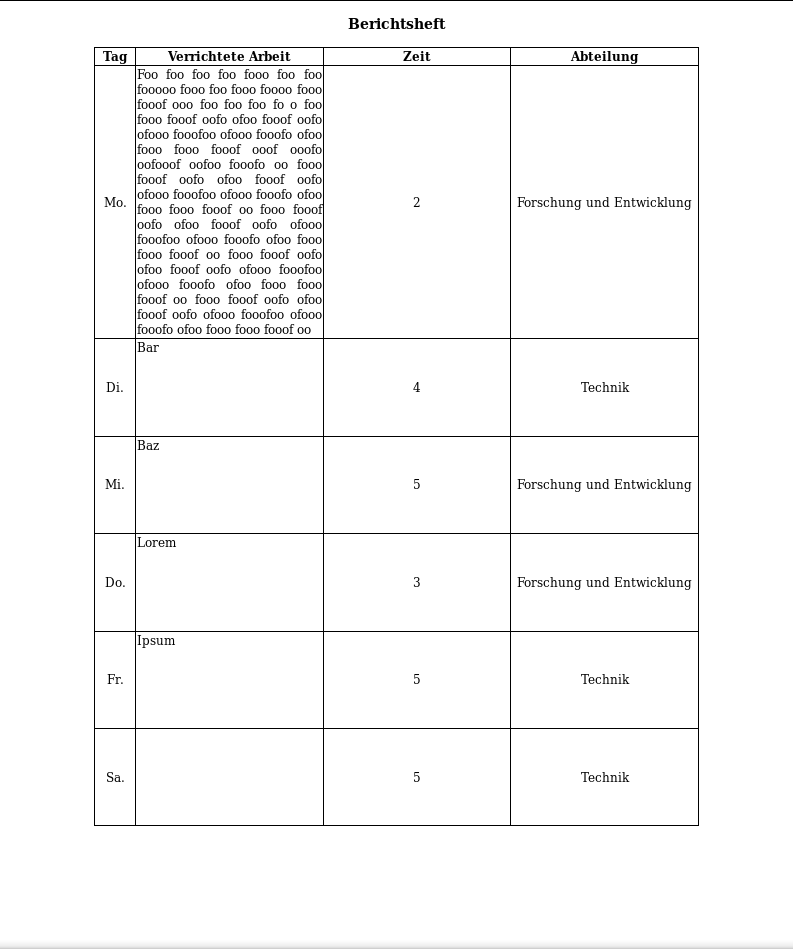
当我尝试inline=block时,所有的单元格都移动到文件中的另一个位置。你们能告诉我我那愚蠢的盒子是怎么保持我告诉他们的高度和宽度的吗?
回答 2
Stack Overflow用户
回答已采纳
发布于 2016-03-25 17:12:31
Stack Overflow用户
发布于 2016-03-25 17:17:29
请为您设置一个固定的高度td您不想展开和使用溢出-y:auto.以便如果内容增加滚动条将出现。
页面原文内容由Stack Overflow提供。腾讯云小微IT领域专用引擎提供翻译支持
原文链接:
https://stackoverflow.com/questions/36224486
复制相关文章
相似问题
腾讯云开发者

Copyright © 2013 - 2026 Tencent Cloud. All Rights Reserved. 腾讯云 版权所有
深圳市腾讯计算机系统有限公司 ICP备案/许可证号:粤B2-20090059  粤公网安备44030502008569号
腾讯云计算(北京)有限责任公司 京ICP证150476号 | 京ICP备11018762号