
如何改变CIDetector的方向?
如何改变CIDetector的方向?
提问于 2016-03-24 11:54:29
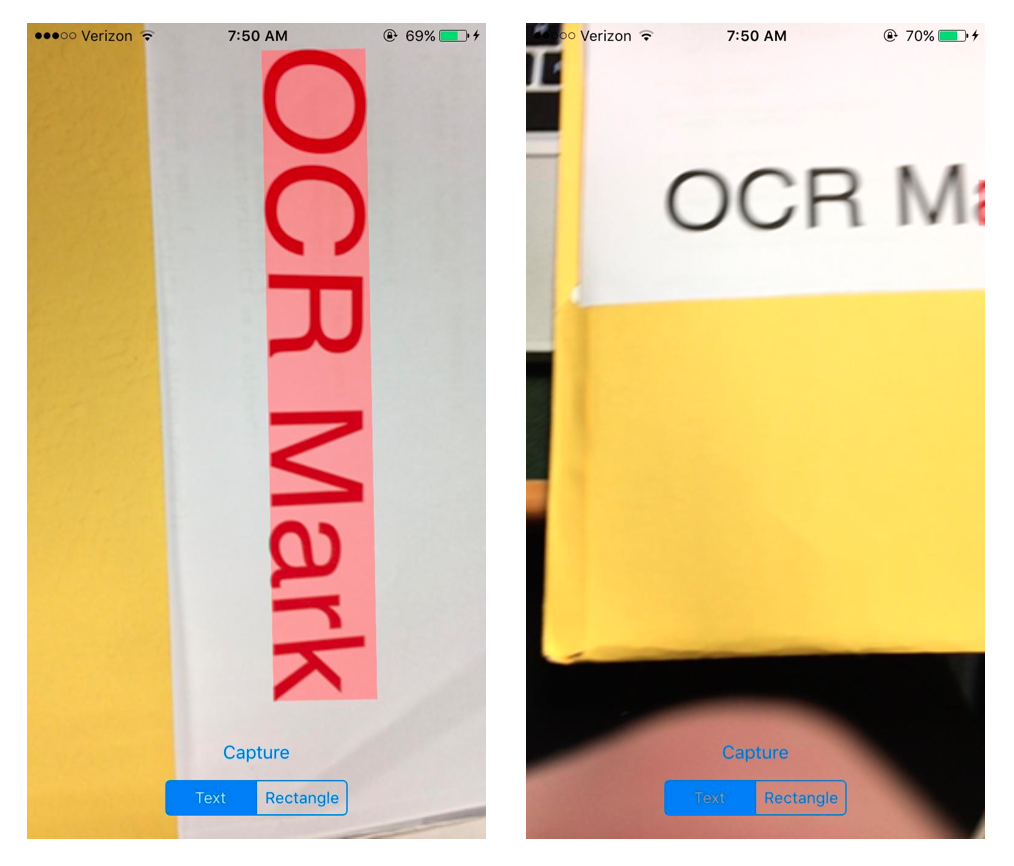
所以我试图用Swift中的CIDetector制作一个文本检测器。当我把手机指向一条短信时,它不会检测到。然而,如果我把我的手机转到一边,它就能工作,并检测到文本。我如何改变它,以便它检测到正确的相机方向的文本?这是我的代码:
准备文本检测器功能:
func prepareTextDetector() -> CIDetector {
    let options: [String: AnyObject] = [CIDetectorAccuracy: CIDetectorAccuracyHigh, CIDetectorAspectRatio: 1.0]
    return CIDetector(ofType: CIDetectorTypeText, context: nil, options: options)
}
文本检测功能:
func performTextDetection(image: CIImage) -> CIImage? {
    if let detector = detector {
        // Get the detections
        let features = detector.featuresInImage(image)
        for feature in features as! [CITextFeature] {
            resultImage = drawHighlightOverlayForPoints(image, topLeft: feature.topLeft, topRight: feature.topRight,
                                                        bottomLeft: feature.bottomLeft, bottomRight: feature.bottomRight)
            imagex = cropBusinessCardForPoints(resultImage!, topLeft: feature.topLeft, topRight: feature.topRight, bottomLeft: feature.bottomLeft, bottomRight: feature.bottomRight)
        }
    }
    return resultImage
}
它的工作方向类似于左边的,但不适合右边的:
回答 1
Stack Overflow用户
回答已采纳
发布于 2016-03-24 12:06:50
你必须使用CIDetectorImageOrientation,就像苹果在其 documentation中所说的
..。使用
CIDetectorImageOrientation选项指定查找直立文本所需的方向。
例如,你需要
let features = detector.featuresInImage(image, options: [CIDetectorImageOrientation : 1]) 其中,1是exif数,取决于方向,它可以计算如下
func imageOrientationToExif(image: UIImage) -> uint {
    switch image.imageOrientation {
    case UIImageOrientation.Up:
        return 1;
    case UIImageOrientation.Down:
        return 3;
    case UIImageOrientation.Left:
        return 8;
    case UIImageOrientation.Right:
        return 6;
    case UIImageOrientation.UpMirrored:
        return 2;
    case UIImageOrientation.DownMirrored:
        return 4;
    case UIImageOrientation.LeftMirrored:
        return 5;
    case UIImageOrientation.RightMirrored:
        return 7;
    }
}页面原文内容由Stack Overflow提供。腾讯云小微IT领域专用引擎提供翻译支持
原文链接:
https://stackoverflow.com/questions/36199572
复制相关文章
相似问题
腾讯云开发者

Copyright © 2013 - 2026 Tencent Cloud. All Rights Reserved. 腾讯云 版权所有
深圳市腾讯计算机系统有限公司 ICP备案/许可证号:粤B2-20090059  粤公网安备44030502008569号
腾讯云计算(北京)有限责任公司 京ICP证150476号 | 京ICP备11018762号