
在Swift中通过触摸检测应用程序活动或不活动的时间
什么代码可以用来检测用户何时与应用程序交互,以及用户何时未与应用程序交互?
目前,我有一个ViewController,它有一个UIView,它可以通过覆盖触摸来接收触摸,也可以接收摇摄手势和点击手势。解决这一问题的办法必须与目前的姿态分开,或置于这些姿态之上。
是否有一种手势识别器可以在我的应用程序接收到手势和没有收到手势时告诉我的应用程序?
当该应用程序处于活动状态时,是否有一种方法可以监视应用程序是否正在接收触摸,何时没有,并根据需要调用一个函数,例如:
func appActive(){
    print("App received input from a touch, tap, swipe, long press etc.")
}

func appInactive(){
    print("App stopped receiving any input.")
}
谢谢。
回答 2
Stack Overflow用户
发布于 2016-03-29 14:23:48
2. Xcode 7.2.在iOS 7-9上测试. 改编自:https://stackoverflow.com/questions/31642956/how-to-detect-all-touches-in-swift-2和https://stackoverflow.com/questions/24020000/subclass-uiapplication-with-swift
1-找到项目的Swift文件AppDelegate.swift,并注释掉@UIApplicationMain
//@UIApplicationMain2-向您的项目添加一个名为main.swift的新Swift文件,并添加以下代码:
import UIKit

UIApplicationMain(
CommandLine.argc, UnsafeMutableRawPointer(CommandLine.unsafeArgv)
    .bindMemory( to: UnsafeMutablePointer<Int8>.self,
capacity: Int(CommandLine.argc)), nil, NSStringFromClass(AppDelegate.self)) 3-向您的项目添加一个名为UIApplication.swift的新Swift文件,并添加以下代码:
import UIKit

@objc(MyApplication)

class MyApplication: UIApplication {

    override func sendEvent(event: UIEvent) {

        // Ignore .Motion and .RemoteControl event simply everything else then .Touches
        if event.type != .Touches {
            super.sendEvent(event)
            return
        }

        // .Touches only
        var restartTimer = true
        if let touches = event.allTouches() {
            // At least one touch in progress? Do not restart timer, just invalidate it
            for touch in touches.enumerate() {
                if touch.element.phase != .Cancelled && touch.element.phase != .Ended {
                    restartTimer = false
                    break
                }
            }
        }

        if restartTimer {
            // Touches ended || cancelled, restart timer
            print("Touches ended. Restart timer")
        } else {
            // Touches in progress - !ended, !cancelled, just invalidate it
            print("Touches in progress. Invalidate timer")
        }

        super.sendEvent(event)
    }
}4-找到项目的Info.plist文件,并添加一个新键(Xcode菜单:Editor > Add Item__),选择或键入键Principal class,其中包含字符串值MyApplication。
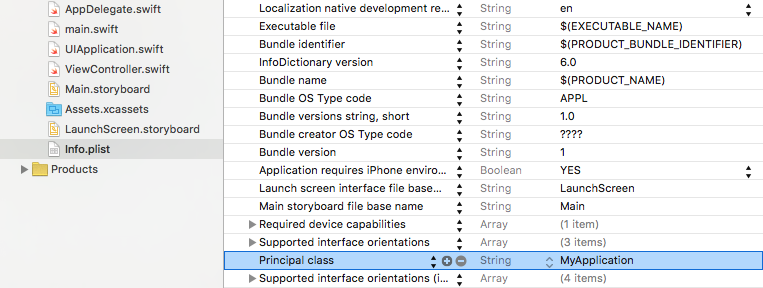
5-运行你的项目!
Stack Overflow用户
发布于 2016-03-23 17:06:21
拦截应用程序中任何触摸的一种方法是创建一个自定义UIWindow,它将捕获这些触摸而不取消它们。
class CustomWindow: UIWindow {

    override func pointInside(point: CGPoint, withEvent event: UIEvent?) -> Bool {
        // Do any action you would like to perform to indicate the application is active
        return false
    }

}
您必须在Application中添加此窗口,并将其级别设置在主窗口之上。
@UIApplicationMain
class AppDelegate: UIResponder, UIApplicationDelegate {

    var window: UIWindow?
    var topWindow: CustomWindow?


    func application(application: UIApplication, didFinishLaunchingWithOptions launchOptions: [NSObject: AnyObject]?) -> Bool
    {
        topWindow = CustomWindow(frame: UIScreen.mainScreen().bounds)
        topWindow?.rootViewController = UIViewController()
        topWindow?.windowLevel = UIWindowLevelNormal + 1
        topWindow?.hidden = false
        return true
}https://stackoverflow.com/questions/36183377
复制相似问题
腾讯云开发者

Copyright © 2013 - 2026 Tencent Cloud. All Rights Reserved. 腾讯云 版权所有
深圳市腾讯计算机系统有限公司 ICP备案/许可证号:粤B2-20090059  粤公网安备44030502008569号
腾讯云计算(北京)有限责任公司 京ICP证150476号 | 京ICP备11018762号