
SDK6中的汇流宏开发
我有点沮丧。我正试图开发一个简单的“你好世界”宏为汇合点。但是所有的教程都不再适用于实际的SDK6。
我试过这个教程:
但正如你所看到的文章所讨论的那样,它已经不能正常工作了。我认为有些元素已经用SDK6进行了修改,并且教程不再是最新的了。
我在汇合论坛上寻求帮助,但没有任何运气。围绕这个问题有几个帖子没有任何解决办法。
问题是,addon / plugin在系统管理面板中是可见的,但我不能在页面上使用宏,也无法在宏浏览器中看到宏。
现在起作用了-更新
我就是这样做的:
1)下载SDK
我下载了sdk-installer-6.2.4.exe并安装了它
2)创建新的插件
我通过输入创建了一个新的汇合插件。
atlas-create-confluence-plugin使用以下组和工件ids
groupid    : com.example.plugins.tutorial.confluence
artifactid : tutorial-confluence-macro-demo
version    : 1.0-SNAPSHOT
package    : package    com.example.plugins.tutorial.confluence
3)创建eclipse项目
然后,通过输入
atlas-mvn eclipse:eclipse4)修改pom.xml
我修改了pom.xml,就像ppasler在他的回答中解释的那样。我也修改了公司名称和版本,以检查汇合,如果修改将有影响。pom看起来是这样的:
<?xml version="1.0" encoding="UTF-8"?>

<project xmlns="http://maven.apache.org/POM/4.0.0"
         xmlns:xsi="http://www.w3.org/2001/XMLSchema-instance"
         xsi:schemaLocation="http://maven.apache.org/POM/4.0.0 http://maven.apache.org/maven-v4_0_0.xsd">

    <modelVersion>4.0.0</modelVersion>
    <groupId>com.example.plugins.tutorial.confluence</groupId>
    <artifactId>tutorial-confluence-macro-demo</artifactId>
    <version>4.4-SNAPSHOT</version>

    <organization>
        <name>Hauke Company</name>
        <url>http://www.example.com/</url>
    </organization>

    <name>tutorial-confluence-macro-demo</name>
    <description>This is the com.example.plugins.tutorial.confluence:tutorial-confluence-macro-demo plugin for Atlassian Confluence.</description>
    <packaging>atlassian-plugin</packaging>

    <dependencies>
        <dependency>
            <groupId>junit</groupId>
            <artifactId>junit</artifactId>
            <version>4.10</version>
            <scope>test</scope>
        </dependency>
        <dependency>
            <groupId>com.atlassian.confluence</groupId>
            <artifactId>confluence</artifactId>
            <version>${confluence.version}</version>
            <scope>provided</scope>
        </dependency>

        <dependency>
            <groupId>com.atlassian.plugin</groupId>
            <artifactId>atlassian-spring-scanner-annotation</artifactId>
            <version>${atlassian.spring.scanner.version}</version>
            <scope>compile</scope>
        </dependency>

        <dependency>
            <groupId>com.atlassian.plugin</groupId>
            <artifactId>atlassian-spring-scanner-runtime</artifactId>
            <version>${atlassian.spring.scanner.version}</version>
            <scope>runtime</scope>
        </dependency>

        <dependency>
            <groupId>javax.inject</groupId>
            <artifactId>javax.inject</artifactId>
            <version>1</version>
            <scope>provided</scope>
        </dependency>

        <!-- WIRED TEST RUNNER DEPENDENCIES -->
        <dependency>
            <groupId>com.atlassian.plugins</groupId>
            <artifactId>atlassian-plugins-osgi-testrunner</artifactId>
            <version>${plugin.testrunner.version}</version>
            <scope>test</scope>
        </dependency>
        <dependency>
            <groupId>javax.ws.rs</groupId>
            <artifactId>jsr311-api</artifactId>
            <version>1.1.1</version>
            <scope>provided</scope>
        </dependency>
        <dependency>
            <groupId>com.google.code.gson</groupId>
            <artifactId>gson</artifactId>
            <version>2.2.2-atlassian-1</version>
        </dependency>
    </dependencies>

    <build>
        <plugins>
            <plugin>
                <groupId>com.atlassian.maven.plugins</groupId>
                <artifactId>maven-confluence-plugin</artifactId>
                <version>${amps.version}</version>
                <extensions>true</extensions>
                <configuration>
                    <productVersion>${confluence.version}</productVersion>
                    <productDataVersion>${confluence.data.version}</productDataVersion>
                    <enableQuickReload>true</enableQuickReload>
                    <enableFastdev>false</enableFastdev>

                    <!-- See here for an explanation of default instructions: -->
                    <!-- https://developer.atlassian.com/docs/advanced-topics/configuration-of-instructions-in-atlassian-plugins -->
                    <instructions>
                        <Atlassian-Plugin-Key>${atlassian.plugin.key}</Atlassian-Plugin-Key>

                        <!-- Add package to export here -->
                        <Export-Package>
                            com.example.plugins.tutorial.confluence.api,
                        </Export-Package>

                        <!-- Add package import here -->
                        <Import-Package>
                            org.springframework.osgi.*;resolution:="optional",
                            org.eclipse.gemini.blueprint.*;resolution:="optional",
                            *
                        </Import-Package>

                        <!-- Ensure plugin is spring powered -->
                        <Spring-Context>*</Spring-Context>
                    </instructions>
                </configuration>
            </plugin>

            <plugin>
                <groupId>com.atlassian.plugin</groupId>
                <artifactId>atlassian-spring-scanner-maven-plugin</artifactId>
                <version>1.2.6</version>
                <executions>
                    <execution>
                        <goals>
                            <goal>atlassian-spring-scanner</goal>
                        </goals>
                        <phase>process-classes</phase>
                    </execution>
                </executions>
                <configuration>
                    <scannedDependencies>
                        <dependency>
                            <groupId>com.atlassian.plugin</groupId>
                            <artifactId>atlassian-spring-scanner-external-jar</artifactId>
                        </dependency>
                    </scannedDependencies>
                    <verbose>false</verbose>
                </configuration>
            </plugin>
        </plugins>
    </build>


    <properties>
    <confluence.version>5.9.7</confluence.version>
    <confluence.data.version>5.9.7</confluence.data.version>
    <amps.version>6.2.4</amps.version>
    <plugin.testrunner.version>1.1.1</plugin.testrunner.version>
     <atlassian.spring.scanner.version>1.2.6</atlassian.spring.scanner.version>
    </properties>
<!--
    <properties>
        <confluence.version>5.9.7</confluence.version>
        <confluence.data.version>5.9.7</confluence.data.version>
        <amps.version>6.2.3</amps.version>
        <plugin.testrunner.version>1.2.3</plugin.testrunner.version>
        <atlassian.spring.scanner.version>1.2.6</atlassian.spring.scanner.version>
        <atlassian.plugin.key>${project.groupId}.${project.artifactId}</atlassian.plugin.key>
    </properties>
-->
</project>
5)启动eclipse
我把这个项目导入了“启示录”
Version: Mars.1 Release (4.5.1)
Build id: 20150924-1200
Java JDK 1.8.0_606)创建的ExampleMacro类
我创建了类"ExampleMacro“
package com.example.plugins.tutorial.confluence;

import com.atlassian.confluence.content.render.xhtml.ConversionContext;
import com.atlassian.confluence.content.render.xhtml.XhtmlException;
import com.atlassian.confluence.macro.Macro;
import com.atlassian.confluence.macro.MacroExecutionException;
import com.atlassian.confluence.xhtml.api.MacroDefinition;
import com.atlassian.confluence.xhtml.api.MacroDefinitionHandler;
import com.atlassian.confluence.xhtml.api.XhtmlContent;

import java.util.ArrayList;
import java.util.List;
import java.util.Map;

public class ExampleMacro implements Macro
{
    private final XhtmlContent xhtmlUtils;

    public ExampleMacro(XhtmlContent xhtmlUtils)
    {
        this.xhtmlUtils = xhtmlUtils;
    }

    @Override
    public String execute(Map<String, String> parameters, String bodyContent, ConversionContext conversionContext) throws MacroExecutionException
    {
        String body = conversionContext.getEntity().getBodyAsString();

        final List<MacroDefinition> macros = new ArrayList<MacroDefinition>();

        try
        {
            xhtmlUtils.handleMacroDefinitions(body, conversionContext, new MacroDefinitionHandler()
            {
                @Override
                public void handle(MacroDefinition macroDefinition)
                {
                    macros.add(macroDefinition);
                }
            });
        }
        catch (XhtmlException e)
        {
            throw new MacroExecutionException(e);
        }

        StringBuilder builder = new StringBuilder();
        builder.append("<p>");
        if (!macros.isEmpty())
        {
            builder.append("<table width=\"50%\">");
            builder.append("<tr><th>Macro Name</th><th>Has Body?</th></tr>");
            for (MacroDefinition defn : macros)
            {
                builder.append("<tr>");
                builder.append("<td>").append(defn.getName()).append("</td><td>").append(defn.hasBody()).append("</td>");
                builder.append("</tr>");
            }
            builder.append("</table>");
        }
        else
        {
            builder.append("You've done built yourself a macro! Nice work.");
        }
        builder.append("</p>");

        return builder.toString();

    }

    @Override
    public BodyType getBodyType()
    {
        return BodyType.NONE;
    }

    @Override
    public OutputType getOutputType()
    {
        return OutputType.BLOCK;
    }
}修改了-plugin.xml文件
<atlassian-plugin key="${atlassian.plugin.key}" name="${project.name}" plugins-version="2">
    <plugin-info>
        <description>${project.description}</description>
        <version>${project.version}</version>
        <vendor name="${project.organization.name}" url="${project.organization.url}" />
        <param name="plugin-icon">images/pluginIcon.png</param>
        <param name="plugin-logo">images/pluginLogo.png</param>
    </plugin-info>

    <!-- add our i18n resource -->
    <resource type="i18n" name="i18n" location="tutorial-confluence-macro-demo"/>

    <xhtml-macro name="tutorial-confluence-macro-demo" class="com.example.plugins.tutorial.confluence.ExampleMacro" key="my-macro">
        <parameters/>
    </xhtml-macro>

    <!-- add our web resources -->
    <web-resource key="tutorial-confluence-macro-demo-resources" name="tutorial-confluence-macro-demo Web Resources">
        <dependency>com.atlassian.auiplugin:ajs</dependency>

        <resource type="download" name="tutorial-confluence-macro-demo.css" location="/css/tutorial-confluence-macro-demo.css"/>
        <resource type="download" name="tutorial-confluence-macro-demo.js" location="/js/tutorial-confluence-macro-demo.js"/>
        <resource type="download" name="images/" location="/images"/>

        <context>tutorial-confluence-macro-demo</context>
    </web-resource>

</atlassian-plugin>
8)启动汇流
atlas-clean
atlas-package
atlas-debug
9)登录到汇流
这里是汇流管理页面的结果。
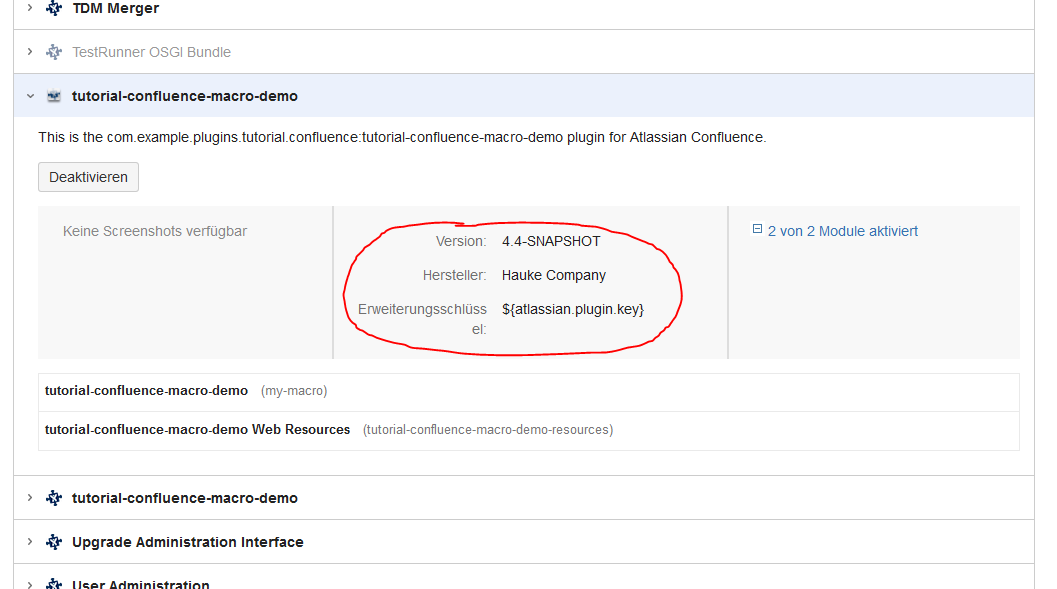
现在,我也可以在宏浏览器中找到它,它可以工作。
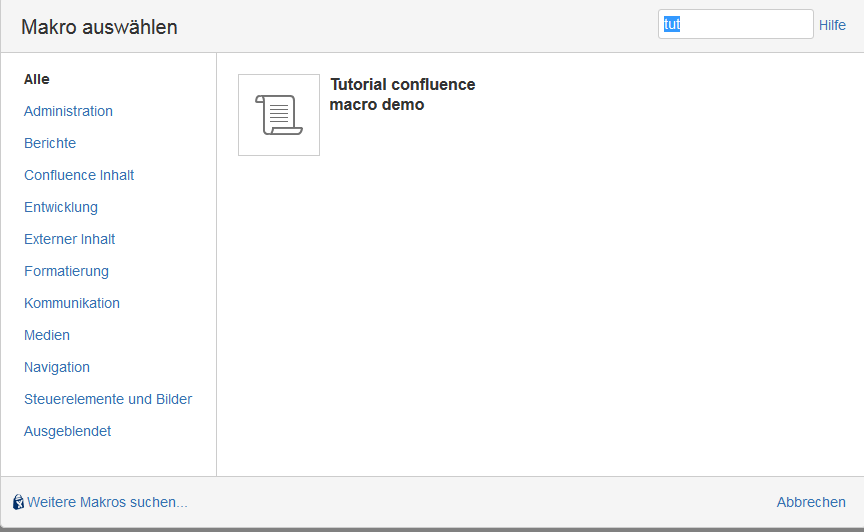
谢谢豪克
回答 2
Stack Overflow用户
发布于 2016-03-23 07:09:04
使用atlassian插件可能会非常令人沮丧:)
我签出了宏来自bitbucket的源代码,并在pom中做了以下更改
<properties>
    <confluence.version>5.9.7</confluence.version>
    <confluence.data.version>5.9.7</confluence.data.version>
    <amps.version>6.2.4</amps.version>
    <plugin.testrunner.version>1.1.1</plugin.testrunner.version>
</properties>
那就跑
atlas-clean
atlas-package
atlas-debug
之后,我可以使用宏浏览器添加宏(包含一个5.8.6个实例)。
不幸的是,我没有时间检查源代码和教程之间的差异,但我的解决方案将给您一个尝试新东西的工作状态。
Stack Overflow用户
发布于 2017-02-26 14:08:43
您的图像正在显示${atlassian.plugin.key}。你的宏附加功能是否正常工作。它显示在宏浏览器中,但可以在页面上使用吗?我还注意到您在atlassian.plugin.key中注释掉了pom.xml。
这里的使用告诉插件系统,您是一个没有变压器的插件,它应该跳过缓慢的转换步骤。这是非常重要的。如果您的报表中没有此条目,插件系统将尝试转换您的插件,您将失去加载时间速度的好处。您也可能会看到与Spring相关的错误。不要忘记指定此条目。
请参阅:亚特兰西安弹簧扫描仪
导入组件的新方法是使用Atlassian扫描仪。看起来,您可以通过注释掉atlassian.plugin.key来混合导入组件的新旧方式。
退房:构建一个宏插件
汇合点示例:合流附加开发示例
https://stackoverflow.com/questions/36171275
复制相似问题
腾讯云开发者

Copyright © 2013 - 2026 Tencent Cloud. All Rights Reserved. 腾讯云 版权所有
深圳市腾讯计算机系统有限公司 ICP备案/许可证号:粤B2-20090059  粤公网安备44030502008569号
腾讯云计算(北京)有限责任公司 京ICP证150476号 | 京ICP备11018762号