
在动画WKInterfaceImage上呈现为模板图像
我有一个160个框架的WKInterfaceImage动画。动画很棒。现在我想加点颜色。This SO question在检查器中提到了使用呈现作为模板图像选项的WatchKit tint方法,但它似乎只适用于单个静态映像。它只对最后一帧进行着色,并将最后一帧的颜色--我在检查器中的色调--而不是我的代码色调--进行着色。我试过只渲染第一个帧,并且渲染所有帧都没有效果。
我是否必须循环所有这些方法,或者设置一个范围,或者将setTint方法合并到startAnimatingWithImagesInRange方法中?
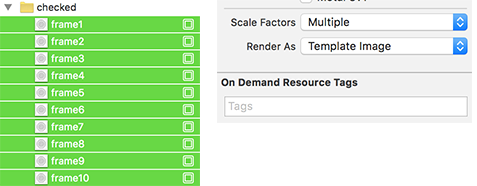
rotateButtonImage.setImageNamed("frame")

    rotateButtonImage.startAnimatingWithImagesInRange(NSRange(location: 0, length: 159), duration: 1, repeatCount: 1)
    rotateButtonImage.setTintColor(UIColor.redColor())
编辑:所以我所做的就是创建一个扩展。它看起来像这样。
WKImage+Tint.swift
extension UIImage {

func imageWithTintColor(colorTint : UIColor) -> UIImage {

    UIGraphicsBeginImageContextWithOptions(self.size, false, self.scale)
    colorTint.setFill()

    let context : CGContextRef = UIGraphicsGetCurrentContext()! as CGContextRef
    CGContextTranslateCTM(context, 0, self.size.height)
    CGContextScaleCTM(context, 1.0, -1.0)
    CGContextSetBlendMode(context, CGBlendMode.Normal)

    let rect : CGRect = CGRectMake(0, 0, self.size.width, self.size.height)
    CGContextClipToMask(context, rect, self.CGImage)
    CGContextFillRect(context, rect)

    let newImage : UIImage = UIGraphicsGetImageFromCurrentImageContext() as UIImage
    UIGraphicsEndImageContext()

    return newImage
}
}然后在awakeWithContext中的自定义VC中,我调用:
rotateButtonImage.image = rotateButtonImage.image.imageWithColor(UIColor.redColor())但出于某种原因,事情并不是自动完成的。我的WKInterfaceImage名为rotateButtonImage,我导入了基金会和WatchKit等。
我的扩展或函数返回类型应该改为WKInterfaceImage类型吗?我试着改变那些,但是有很多错误。
,所以我想我发现这个扩展不能在WatchKit lol中工作。
所以你必须使用检查方法。但这仍然是我的动画效果不佳的原因。我觉得这可能是个窃听器?即使代码是有效的,单个图像也可以使用浅色,但可能不能使用多个帧。
回答 1
Stack Overflow用户
发布于 2016-05-25 09:56:32
正如这里所解释的,只有当图像包含单个图像模板时,setTintColor才能工作。
ref/occ/instm/WKInterfaceImage/setTintColor
但是,实际上,有一种方法可以让animatedImage重新着色。它不是表演性的,你不想用大量的图片来做这件事。
 static func animatedImagesWithColor(color: UIColor) -> [UIImage] {
    var animatedImages = [UIImage]()

    (0...60).forEach { imageNumber in
        if let img = UIImage(named: "MyImage\(imageNumber)") {
            UIGraphicsBeginImageContextWithOptions(img.size, false, img.scale);

            let context = UIGraphicsGetCurrentContext()

            color.setFill()

            CGContextTranslateCTM(context, 0, img.size.height);
            CGContextScaleCTM(context, 1.0, -1.0);
            CGContextClipToMask(context, CGRectMake(0, 0, img.size.width, img.size.height), img.CGImage);
            CGContextFillRect(context, CGRectMake(0, 0, img.size.width, img.size.height));

            animatedImages.append(UIGraphicsGetImageFromCurrentImageContext())
            UIGraphicsEndImageContext()

        }
    }

    return animatedImages
}
您可以这样使用该数组:
let animation = UIImage.animatedImageWithImages(UIImage.animatedImagesWithColor(.redColor()), duration: 50)
let range = NSRange(location: 0, length: 60)

animationGroup.setBackgroundImage(animation)
animationGroup.startAnimatingWithImagesInRange(range, duration: 50, repeatCount: -1)https://stackoverflow.com/questions/36162575
复制相似问题
腾讯云开发者

Copyright © 2013 - 2026 Tencent Cloud. All Rights Reserved. 腾讯云 版权所有
深圳市腾讯计算机系统有限公司 ICP备案/许可证号:粤B2-20090059  粤公网安备44030502008569号
腾讯云计算(北京)有限责任公司 京ICP证150476号 | 京ICP备11018762号