
didSelectRowAtIndex没有被叫到WKInterfaceTable
我在故事板中创建了一个从WKInterfaceTableCell到另一个WKInterfaceController (称为DetailInterfaceController)的推子。
当我点击行时,不会调用didSelectRowAtIndex。
有谁知道我哪里出了问题,以及我如何传递字符串?
TableInterfaceController
不调用didSelectRowAtIndexPath print语句。
@IBOutlet var table: WKInterfaceTable!
var objectsArray = ["1","2","3"]
var object: String!

override func table(table: WKInterfaceTable, didSelectRowAtIndex rowIndex: Int) {
    self.object = self.objectsArray[rowIndex]

    print(" object title: \(self.object)")
}


override func contextForSegueWithIdentifier(segueIdentifier: String) -> AnyObject? {
    // You may want to set the context's identifier in Interface Builder and check it here to make sure you're returning data at the proper times

    // Return data to be accessed in ResultsController
    return self.object
}
DetailsInterfaceController
标签未设置
@IBOutlet var label: WKInterfaceLabel!

override func awakeWithContext(context: AnyObject?) {
    super.awakeWithContext(context)

    // Make sure data was passed properly and update the label accordingly
    if let val: String = context as? String {
        self.label.setText(val)
    } else {
        self.label.setText("")
    }
    // Configure interface objects here.
}回答 3
Stack Overflow用户
发布于 2016-03-19 17:49:29
为什么没有被调用:
table:didSelectRowAtIndex:不被调用是正常的,因为您使用了一个情节提要。来自WKInterfaceController文档:
如果将操作方法连接到情节提要文件中的表,则WatchKit不调用此方法。
如何传递选定的行数据:
应该使用contextForSegueWithIdentifier:inTable:rowIndex:返回选定行的上下文:
override func contextForSegueWithIdentifier(segueIdentifier: String, inTable table: WKInterfaceTable, rowIndex: Int) -> AnyObject? {
    if segueIdentifier == "someSegueIdentifier" {
        return objectsArray[rowIndex]
    }
    return nil
}Stack Overflow用户
发布于 2019-08-21 00:13:14
注意,table:didSelectRowAtIndex:不会因为另一个明显的原因而工作:WKInterfaceButton放在行上,用户点击它。在这种情况下,只为按钮触发tap事件。委托方法将无法工作。解决方案是将WKInterfaceButton从WKInterfaceTable行中删除。
Stack Overflow用户
发布于 2021-04-08 09:13:25
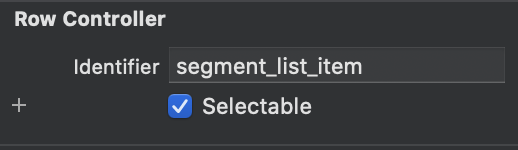
我也有同样的问题,结果是我在故事板中没有选中我的行项的“可选”框。
https://stackoverflow.com/questions/36104830
复制相似问题
腾讯云开发者

Copyright © 2013 - 2026 Tencent Cloud. All Rights Reserved. 腾讯云 版权所有
深圳市腾讯计算机系统有限公司 ICP备案/许可证号:粤B2-20090059  粤公网安备44030502008569号
腾讯云计算(北京)有限责任公司 京ICP证150476号 | 京ICP备11018762号