
Azure计算仿真器不会启动
有一段时间,我的Azure计算模拟器将不会启动。当我尝试时,我会收到以下错误:
Cannot create a file when that file already exists. (Exception from HRESULT: 0x800700B7)如果我点击“表演细节”,我会得到以下信息:
System.Runtime.InteropServices.COMException (0x800700B7): Cannot create a file when that file already exists. (Exception from HRESULT: 0x800700B7)
   at System.Runtime.InteropServices.Marshal.ThrowExceptionForHRInternal(Int32 errorCode, IntPtr errorInfo)
   at Microsoft.WindowsAzure.GuestAgent.EmulatorRuntime.EmulatorRuntimeImpl.Initialize(String runtimeConfigIniFile, String serviceName, String rootPath, String logFilePath)
   at Microsoft.ServiceHosting.Tools.DevelopmentFabric.Fabricator.InitializeEmulatorRuntime()
   at Microsoft.ServiceHosting.Tools.DevelopmentFabric.Fabricator.InitializeRuntimeAgents()
   at Microsoft.ServiceHosting.Tools.DevelopmentFabric.Fabricator.Initialize()
   at Microsoft.ServiceHosting.Tools.DevelopmentFabric.Program.Main(String[] args)
我不知所措,我已经完全卸载了Azure (当前版本和所有以前的版本),然后只重新安装了最新的(2.8)。我已经关闭了IIS功能,并再次打开。我已经删除/清理了dftmp文件。我尝试过修复2014 R1和Visual 2015。我不知道它在说什么端口文件。我已经重新启动电脑几百次了。当调度启动计算仿真器时,Microsoft计算仿真程序服务流程将与DFService.exe和dfMonitor.exe一起启动并保持运行状态。想法已经用完了。有人知道怎么解决这个问题吗?或者它指的是什么文件才能被删除?顺便说一句,存储仿真器的启动非常好。
附加信息:
Windows命令提示符
csrun /devfabric:shutdown

"The compute emulator is not running."
但是,它不会结束进程并保持文件活动,因此干净就无法删除EmulatorRuntime.log或DFService.log。如果我在任务管理器中结束流程,然后运行clean,它就会进行实际的清理。
csrun /devfabric:start

"Starting the compute emulator..."
然后什么都不会发生。相当令人兴奋。
sqllocaldb stop MSSQLLocalDB

"LocalDB instance 'MSSQLLocalDB' stopped."

sqllocaldb delete MSSQLLocalDB

"LocalDB instance 'MSSQLLocalDB' deleted."
此时,我还删除了%UserProfile%/AzureStorage仿真器Db42.mdf和.ldf
sqllocaldb delete MSSQLLocalDB

"LocalDB instance 'MSSQLLocalDB' started."
此时,它不再包含数据库AzureStorageEmulatorDb42,而是返回所有表为空,只有一个devstorageaccount1行的帐户除外。
EmulatorRuntime.log
[00015280:00006600, 2016/03/18, 21:57:59.949, INFO ] Initializing agent runtime. isDesktop: TRUE allowMultipleRoles:TRUE rootPath: C:\Users\tyangell\AppData\Local\dftmp\
[00015280:00006600, 2016/03/18, 21:57:59.949, INFO ] Agent: Starting.
[00015280:00006600, 2016/03/18, 21:57:59.949, INFO ] Agent: Initialized.
[00015280:00006600, 2016/03/18, 21:57:59.949, INFO ] Machine Configuration:
[00015280:00006600, 2016/03/18, 21:57:59.964, INFO ] Agent flags value = 0x980
[00015280:00006600, 2016/03/18, 21:57:59.997, INFO ] Deleting sublayer 7ad92418-6582-4371-96f1-703ce4f99418
[00015280:00006600, 2016/03/18, 21:57:59.998, INFO ] Agent: Initializing disks.
[00015280:00020148, 2016/03/18, 21:57:59.999, INFO ] ACLing root folder C:\Users\tyangell\AppData\Local\dftmp\
[00015280:00020148, 2016/03/18, 21:58:00.001, INFO ] Finished ACLing root folder C:\Users\tyangell\AppData\Local\dftmp\
[00015280:00006600, 2016/03/18, 21:58:00.001, INFO ] Root folder ACL thread finished executing.
[00015280:00006600, 2016/03/18, 21:58:00.001, INFO ] Agent: Disks initialized.
[00015280:00006600, 2016/03/18, 21:58:00.001, INFO ] Agent: Initializing runtime.
[00015280:00006600, 2016/03/18, 21:58:00.001, INFO ] Setting all Sids to Built-in administrators...
[00015280:00006600, 2016/03/18, 21:58:00.001, INFO ] Initializing Runtime Http Monitor...
[00015280:00006600, 2016/03/18, 21:58:00.001, INFO ] Finished initializing Runtime Http Monitor.

[00015280:00006600, 2016/03/18, 21:58:00.001, WARN ] Container 00000000-0000-0000-0000-000000000000 not found.
[00015280:00019052, 2016/03/18, 21:58:00.001, INFO ] >>>>_Context_Start: {17477CD7-A015-46C5-8EA6-0F8CD34F5796}     Context={{ RuntimeHttpMonitor }}
[00015280:00006600, 2016/03/18, 21:58:00.001, WARN ] <- RuntimeFindContainer=0x80070490
[00015280:00006600, 2016/03/18, 21:58:00.001, INFO ] Agent: Runtime initialized.
[00015280:00006600, 2016/03/18, 21:58:00.180, INFO ] Agent: Started.
[00015280:00006600, 2016/03/18, 21:58:00.180, INFO ] >>>>_Context_Start: {032EB212-30FC-469C-9CE7-6792CCB409E5}     Context={{ AgentCreateContainer:    ContainerId=EmulatorContainer}
[00015280:00006600, 2016/03/18, 21:58:00.180, WARN ] <- AgentMonitoringObject::EventStart(0x00007FFA1197E5A0) =0x80070015       Context={{ AgentCreateContainer:    ContainerId=EmulatorContainer}
[00015280:00006600, 2016/03/18, 21:58:00.180, INFO ] >>>>_Context_Start: {AB8AB0D3-A170-4223-9B31-3562305D67AA}     Context={{ AgentpCreateContainerWorker:     Id=EmulatorContainer }}
[00015280:00006600, 2016/03/18, 21:58:00.180, INFO ] >>>
AgentCreateContainerWorker() called with
    Id=EmulatorContainer
        Context={{ AgentpCreateContainerWorker:     Id=EmulatorContainer }}
[00015280:00006600, 2016/03/18, 21:58:00.180, INFO ] Creating a container of type 1     Context={{ AgentpCreateContainerWorker:     Id=EmulatorContainer }}
[00015280:00006600, 2016/03/18, 21:58:00.180, WARN ] Container EmulatorContainer not found.     Context={{ AgentpCreateContainerWorker:     Id=EmulatorContainer }}
[00015280:00006600, 2016/03/18, 21:58:00.180, WARN ] <- RuntimeFindContainer=0x80070490     Context={{ AgentpCreateContainerWorker:     Id=EmulatorContainer }}
[00015280:00006600, 2016/03/18, 21:58:00.180, WARN ] <- AgentMonitoringObject::EventStart(0x00007FFA1197E5A0) =0x80070015       Context={{ AgentpCreateContainerWorker:     Id=EmulatorContainer }}
[00015280:00006600, 2016/03/18, 21:58:00.180, INFO ] AgentpCreateContainerWorker Returning
    00000000.
<<<     Context={{ AgentpCreateContainerWorker:     Id=EmulatorContainer }}
[00015280:00006600, 2016/03/18, 21:58:00.180, INFO ] <<<<_Context_Ends: {AB8AB0D3-A170-4223-9B31-3562305D67AA}  Return value = 00000000.        Context={{ AgentpCreateContainerWorker:     Id=EmulatorContainer }}
[00015280:00006600, 2016/03/18, 21:58:00.180, WARN ] <- AgentMonitoringObject::EventEnd(0x00007FFA1197E5A0) =0x80070015
[00015280:00006600, 2016/03/18, 21:58:00.180, INFO ] <<<<_Context_Ends: {4BE85F52-DC49-4359-AD52-AD97661E9109}  Return value = 00000000.
[00015280:00006600, 2016/03/18, 21:58:00.180, INFO ] >>>>_Context_Start: {BDC4EA59-A0B2-454F-9B28-187515E8E947}     Context={{ StartContainer:  ContainerId=EmulatorContainer }}
[00015280:00006600, 2016/03/18, 21:58:00.180, WARN ] <- AgentMonitoringObject::EventStart(0x00007FFA1197E5A0) =0x80070015       Context={{ StartContainer:  ContainerId=EmulatorContainer }}
[00015280:00006600, 2016/03/18, 21:58:00.180, INFO ] >>>>_Context_Start: {8ED05D2B-1F69-4A43-9449-BAA47C9DFEAE}     Context={{ AgentpStartContainerWorker:  Id=EmulatorContainer }}
[00015280:00006600, 2016/03/18, 21:58:00.180, WARN ] <- AgentMonitoringObject::EventStart(0x00007FFA1197E5A0) =0x80070015       Context={{ AgentpStartContainerWorker:  Id=EmulatorContainer }}
[00015280:00006600, 2016/03/18, 21:58:00.180, INFO ] <<<<_Context_Ends: {8ED05D2B-1F69-4A43-9449-BAA47C9DFEAE}  Return value = 00000000.        Context={{ AgentpStartContainerWorker:  Id=EmulatorContainer }}
[00015280:00006600, 2016/03/18, 21:58:00.180, WARN ] <- AgentMonitoringObject::EventEnd(0x00007FFA1197E5A0) =0x80070015
[00015280:00006600, 2016/03/18, 21:58:00.180, INFO ] <<<<_Context_Ends: {4BE85F52-DC49-4359-AD52-AD97661E9109}  Return value = 00000000.
DFService.log
Started: "C:\Program Files\Microsoft SDKs\Azure\Emulator\devfabric\DFService.exe" -sp "C:\Users\tyangell\AppData\Local\dftmp" -enableIIS -singleInstance -elevated回答 3
Stack Overflow用户
发布于 2016-07-22 18:33:11
在搜索了将近一年的博客文章之后,找到了解决方案!!https://blogs.msdn.microsoft.com/cie/2016/05/17/azure-emulator-crash-with-error-0x800700b7-cannot-create-a-file-when-that-file-already-exists!
由于博客帖子链接有改变的趋势,我在此重申:
首先,我建议您查看下一个伟大的支持博客:
然后,在检查了博客文章之后,您需要检查哪个是丢失的WMI类,还是失败的WMI类,方法是遵循以下步骤:
- 转到“开始运行”并键入wmimgmt.msc。
- 右键单击本地WMI控件(本地)并选择属性。
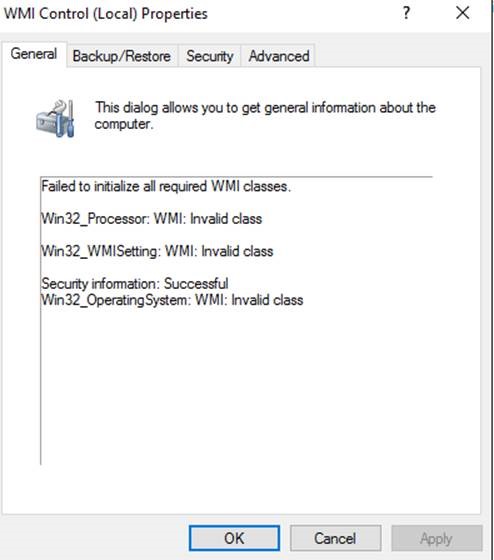
- 在“常规”选项卡上,如果该框中有任何故障,则表示存在核心WMI问题。
- 为.MOF命名空间/类找到Win32_Processor文件
对于本例,我看到有一些WMI无效类:
- Win32_Processor
- Win32_WMISetting
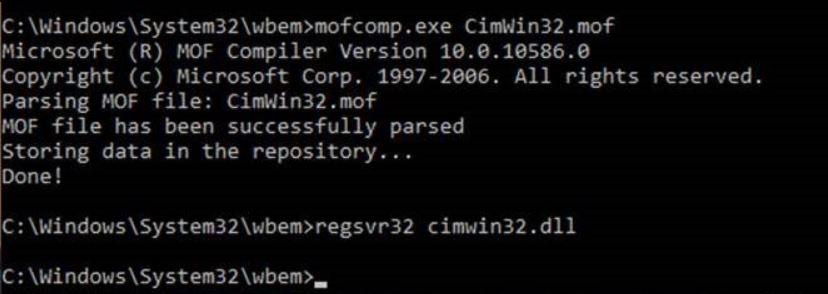
- 通过运行mofcomp.exe修复MOF文件。mofcomp.exe位于C:\Windows\System32 32\wbem文件夹中。
C:\Windows\System32\wbem>mofcomp.exe CimWin32.mof - 然后通过运行命令regsvr32
C:\Windows\System32\wbem>regsvr32 cimwin32.dll重新注册相关的DLL。
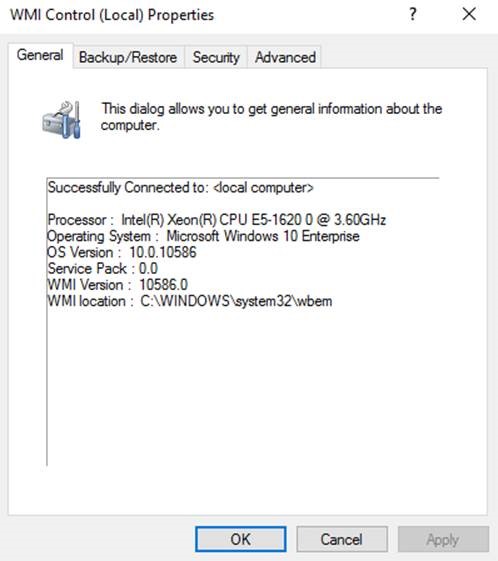
- 通过再次检查WMI控件(wmimgmt.msc)来验证它是否已修复。这一次,您可以在下面的图像中看到,没有更多的WMI类错误。
- 然后,重新启动模拟器,这一次您将看到模拟器再次运行,这次没有问题/崩溃。
微软对Julio公司的信任。
Stack Overflow用户
发布于 2018-03-07 14:21:15
对于那些遇到这个问题( VS 2017的最新版本15.6)并且对WMI没有任何问题的人来说,你并不是唯一的人:(
看来这个错误已经适应了,现在是由其他原因引起的。
Stack Overflow用户
发布于 2018-11-22 10:42:59
在最近的windows更新之后,当我尝试运行以前运行时没有出现错误的应用程序时,我开始看到这个错误。
通过尝试通过Azure (也称为"Microsoft提示符“)启动计算模拟器作为管理员,然后使用命令csrun /devfabric /usefullemulator提示我是否允许计算模拟器通过windows防火墙进行通信。启用此功能之后,我就能够像往常一样再次使用VS(2017),而没有出错。
https://stackoverflow.com/questions/36095771
复制相似问题
腾讯云开发者

Copyright © 2013 - 2026 Tencent Cloud. All Rights Reserved. 腾讯云 版权所有
深圳市腾讯计算机系统有限公司 ICP备案/许可证号:粤B2-20090059  粤公网安备44030502008569号
腾讯云计算(北京)有限责任公司 京ICP证150476号 | 京ICP备11018762号