
QMessageBox“显示细节”
QMessageBox“显示细节”
提问于 2016-03-18 11:46:58
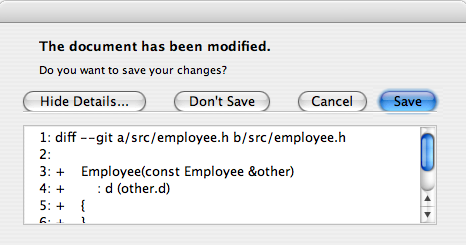
当您打开具有详细文本设置的QMessageBox时,它有“显示详细信息”按钮。我希望在默认情况下显示详细信息,而不是用户必须单击Show .按钮第一。
回答 2
Stack Overflow用户
发布于 2016-03-18 12:15:31
从来源的快速浏览中我可以看出,没有一种简单的方法可以直接打开细节文本,或者访问“显示详细信息.”按钮。我能找到的最好的方法是:
- 遍历消息框上的所有按钮。
- 提取一个角色
ActionRole,因为这对应于“显示详细信息.”按钮。 - 对此手动调用
click方法。
这方面的代码示例如下:
#include <QAbstractButton>
#include <QApplication>
#include <QMessageBox>

int main(int argc, char *argv[]) {
    QApplication app(argc, argv);

    QMessageBox messageBox;
    messageBox.setText("Some text");
    messageBox.setDetailedText("More details go here");

    // Loop through all buttons, looking for one with the "ActionRole" button
    // role. This is the "Show Details..." button.
    QAbstractButton *detailsButton = NULL;

    foreach (QAbstractButton *button, messageBox.buttons()) {
        if (messageBox.buttonRole(button) == QMessageBox::ActionRole) {
            detailsButton = button;
            break;
        }
    }

    // If we have found the details button, then click it to expand the
    // details area.
    if (detailsButton) {
        detailsButton->click();
    }

    // Show the message box.
    messageBox.exec();

    return app.exec();
}Stack Overflow用户
发布于 2021-04-22 09:26:21
至少在Qt5上:
    QMessageBox msgBox;
    msgBox.setText("Some text");
    msgBox.setDetailedText(text);

    // Search the "Show Details..." button
    foreach (QAbstractButton *button, msgBox.buttons())
    {
        if (msgBox.buttonRole(button) == QMessageBox::ActionRole)
        {
            button->click(); // click it to expand the text
            break;
        }
    }

msgBox.exec();页面原文内容由Stack Overflow提供。腾讯云小微IT领域专用引擎提供翻译支持
原文链接:
https://stackoverflow.com/questions/36083551
复制相关文章
相似问题
腾讯云开发者

Copyright © 2013 - 2026 Tencent Cloud. All Rights Reserved. 腾讯云 版权所有
深圳市腾讯计算机系统有限公司 ICP备案/许可证号:粤B2-20090059  粤公网安备44030502008569号
腾讯云计算(北京)有限责任公司 京ICP证150476号 | 京ICP备11018762号