
灯光游戏对象没有灯光组件?
我有点被灯光管理困住了。
我有4个灯;每个灯都有一个标签“lights_hall”。
roomlights = Gameobject.FindGameObjectsWithTag("lights_hall");我得到了带有游戏对象的列表,我假设它们是灯。
然后,我遍历列表中的每个元素,打开和关闭它们,但是当脚本试图检索组件"Light“时,我会得到一个错误。
    foreach (GameObject single_light in roomlights)
    {
        if (single_light.GetComponent<Light>().intensity == 1)
            single_light.SetActive(false);
        else
            single_light.SetActive(true);
    }
统一告诉我,没有轻组件附加到游戏对象。如果轻组件是轻游戏对象的一部分,这是怎么可能的?
我确实检查了一些示例,它们都是这样做的:创建一个游戏对象列表,使用find获取所有具有指定标记的灯,然后访问列表中每个元素的light组件。
我是不是漏掉了什么?我也尝试过访问每个单元素轻量级组件,所以我可以使用.enable,但是它不会出现在自动完成中。
EDIT==================================
这是我使用的脚本,它附加到一个简单的立方体上,它有一个对撞机,所以当第一个人控制器进入触发区域,然后在键盘上按"l“键,连接应该关闭。
我确实验证了名称,并且名称与场景中的点灯游戏对象相匹配;尽管统一打印错误"MissingComponentException: There is no "Light" attached to the "switch" game object, but a script is trying to access it. You probably need to add a Light to the game object "switch". Or your script needs to check if the component is attached before using it"
韧带是点灯,没有什么不寻常的东西。
using UnityEngine;
using System.Collections.Generic;

public class LightsSwitch : MonoBehaviour {

    private bool istriggered = false;
    public GameObject[] roomlights;

    // Use this for initialization
    void Start () {
        roomlights = GameObject.FindGameObjectsWithTag("lights_hall");
        foreach (GameObject light in roomlights)
            Debug.Log(light.name);

    }

    // Update is called once per frame
    void Update () {

        if (istriggered && Input.GetKeyDown(KeyCode.L))
        {

            foreach (GameObject single_light in roomlights)
            {
                if (single_light.GetComponent<Light>().intensity == 1)
                    single_light.SetActive(false);
                else
                    single_light.SetActive(true);
            }
        }

    }

    void OnTriggerEnter(Collider world_item)
    {
        istriggered = true;
        Debug.Log("light switch");
    }

    void OnTriggerExit(Collider world_item)
    {
        istriggered = false;
        Debug.Log("light switch gone");

    }
}回答 1
Stack Overflow用户
发布于 2016-03-18 04:17:23
几个问题。
首先,在您的代码中:
roomlights = Gameobject.FindGameObjectsWithTag("lights_hall");确保将游戏对象更改为O弹出。
现在,假设房间灯是GameObject[],将代码设置如下:
foreach (GameObject single_light in roomlights)
    {
        if (single_light.GetComponent<Light>().enabled == true)
            single_light.SetActive (false);
        else
            single_light.SetActive (true);
    }
我的建议是禁用Light,而不是整个GameObject本身。这可以通过以下方式实现:
single_light.GetComponent<Light>().enabled = false;我已经设置了一个示例项目,这个实现应该适用于您。
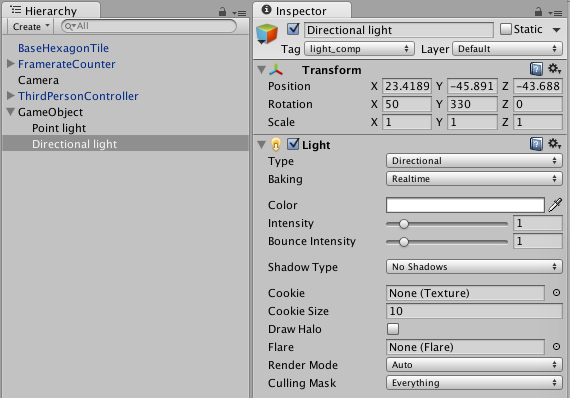
using UnityEngine;
using System.Collections;

public class turnofflight : MonoBehaviour {

    public GameObject[] roomlights;

    // Use this for initialization
    void Start () {
        roomlights = GameObject.FindGameObjectsWithTag("light_comp");
        foreach (GameObject light in roomlights)
            Debug.Log(light.name);
    }

    // Update is called once per frame
    void Update () {

        foreach (GameObject single_light in roomlights)
            {
            if ((single_light.GetComponent<Light>().intensity == 1.0f))
                    single_light.SetActive(false);
                else
                    single_light.SetActive(true);
            }

    }
}
我对这个实现没有任何问题。
https://stackoverflow.com/questions/36073601
复制相似问题
腾讯云开发者

Copyright © 2013 - 2026 Tencent Cloud. All Rights Reserved. 腾讯云 版权所有
深圳市腾讯计算机系统有限公司 ICP备案/许可证号:粤B2-20090059  粤公网安备44030502008569号
腾讯云计算(北京)有限责任公司 京ICP证150476号 | 京ICP备11018762号