
wkhtmltopdf:如何设置拉伸的A4 PDF文档?
wkhtmltopdf:如何设置拉伸的A4 PDF文档?
提问于 2016-03-16 16:35:35
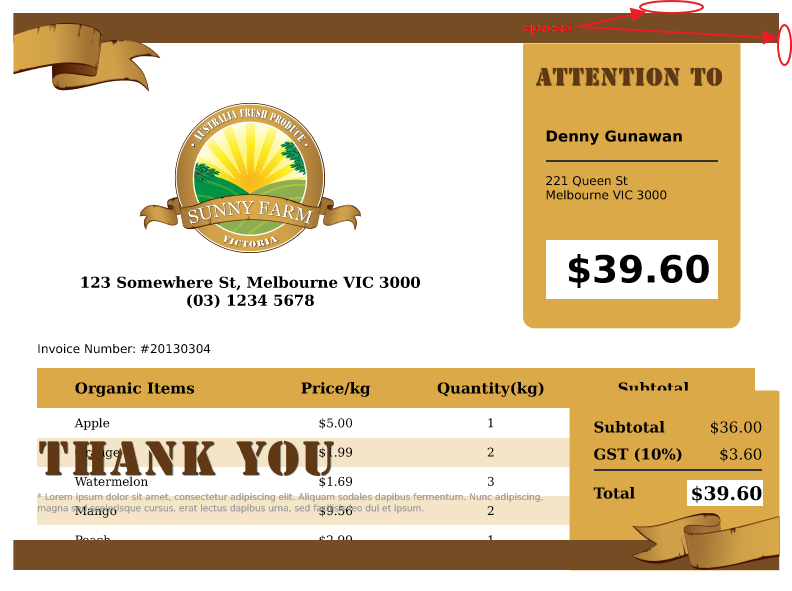
我有一个要转换为PDF的页面,我希望它看起来像"Prince“做的那样,但是使用wkhtmltopdf。
如果您查看这个示例:http://www.princexml.com/samples/invoice/invoicesample.pdf
然后看一下原来的HTML:http://www.princexml.com/samples/invoice/invoicesample.html
您可以看到HTML有100%的宽度,但是由于页面大小(A4),它缩小了它的宽度。
我已经尝试了太多的'wkhtmltopdf‘选项,但没有得到任何好的结果!
这是属性列表:rc2-doc.html#Global%20Options
你能帮我找到正确的显示器吗?
以下是我在很多方面尝试过的选择:
$options = array(
    // 'page-width' => '216mm',
    // 'page-height' => '279mm',
    'page-size' => 'A4',
    //'dpi' => 96,
    //'image-quality' => 100,
    //'disable-smart-shrinking',
    //'no-outline',
    'no-outline',           // option without argument
    'encoding' => 'UTF-8',  // option with argument
    'user-style-sheet' => $cssPath,
    'margin-top'    => 0,
    'margin-right'  => 0,
    'margin-bottom' => 0,
    'margin-left'   => 0,


    // 'orientation' => 'portrait',
    // 'images' => true,
    // 'cookie' => array(),
    // 'dpi' => 300,
    // 'image-dpi' => 300
    // Default page options
    //'disable-smart-shrinking'
    );
在左上角有空白处,显示器有一个宽屏幕,100%的元素不会变小。
回答 1
Stack Overflow用户
回答已采纳
发布于 2016-06-03 11:24:41
enable/disable-smart-shrinking选项将帮助您。默认情况下,wkhtmltopdf将内容缩放到已配置的页面大小。您应该禁用此行为。
页面原文内容由Stack Overflow提供。腾讯云小微IT领域专用引擎提供翻译支持
原文链接:
https://stackoverflow.com/questions/36041668
复制相关文章
相似问题
腾讯云开发者

Copyright © 2013 - 2026 Tencent Cloud. All Rights Reserved. 腾讯云 版权所有
深圳市腾讯计算机系统有限公司 ICP备案/许可证号:粤B2-20090059  粤公网安备44030502008569号
腾讯云计算(北京)有限责任公司 京ICP证150476号 | 京ICP备11018762号