
用户的电子邮件总是空的- Social登录
据Facebook的官方文件称,只要用户在使用Facebook登录时接受并授予许可,任何应用程序都可以使用电子邮件访问。
我已经检查了我们的应用程序定义,我可以看到电子邮件应该是可访问的。
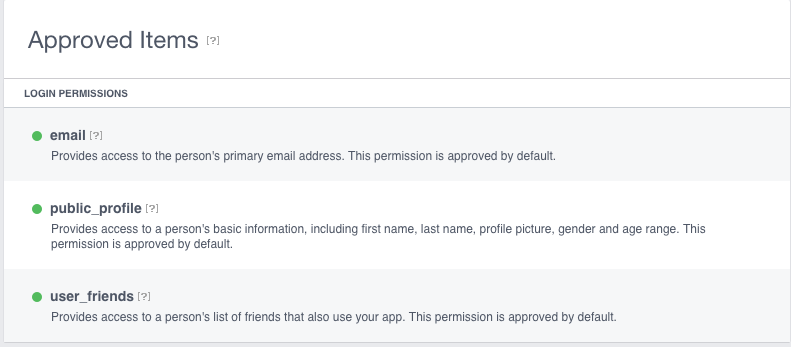
我用的是Social的最新版本
<spring-social-security>1.1.4.RELEASE</spring-social-security>
<spring-social-core>1.1.4.RELEASE</spring-social-core>
<spring-social-facebook>2.0.3.RELEASE</spring-social-facebook>
用户成功地使用Facebook作为提供商以及Google+和Twitter登录。
不幸的是,对于,除了我自己的用户之外,所有的电子邮件都是空的。
但是,有两种情况下电子邮件可能为空
- 如果有人用电话号码而不是电子邮件地址注册Facebook,则电子邮件字段可能为空
- 如果没有有效的电子邮件地址,将不返回此字段。
我已经三次访问了我的一个朋友的账户
- 一封有效的电子邮件被确认了
- 它有一个电话号码
- 我们是彼此的朋友
- 他的电话和电子邮件都能为他的朋友看到
我去了GraphApi浏览器,但是从来没有回复过电子邮件。
有什么建议吗?谢谢。
回答 3
Stack Overflow用户
发布于 2016-03-18 18:00:15
我找到了问题所在。我没有将所需的作用域添加到社会连接工厂。
FacebookConnectionFactory fcf = new FacebookConnectionFactory(
            env.getProperty("oauth.facebook.api.key"),
            env.getProperty("oauth.facebook.api.secret"));
   //this is the important bit
   fcf.setScope("public_profile,email");

.....电子邮件不见了。
Stack Overflow用户
发布于 2016-03-16 17:42:25
也许问题在于您试图获取用户名。目前,Facebook取消了用户名,因为用户名是通过Facebook发送电子邮件的一种方式。
您可以尝试删除这一行:
final String uemail = userProfile.getUsername();看看你能不能收到电子邮件。以下是我用来获取电子邮件等的代码:
OAuth2Operations oauthOperations = fbProvider.getOAuthOperations();
AccessGrant accessGrant = oauthOperations.exchangeForAccess(authorizationCode, facebookCallback, null);
String accessToken = accessGrant.getAccessToken();

Connection<Facebook> connection = fbConnectionFactory.createConnection(accessGrant);

UserProfile profile = connection.fetchUserProfile();
ConnectionKey connectionKey = connection.getKey();
String usn = connectionKey.getProviderUserId();
String email = profile.getEmail();Stack Overflow用户
发布于 2018-05-21 05:56:11
正如@felipe所提到的,在春季社交网站facebook登录期间,它需要设置权限/范围来获取电子邮件。
如果您使用的是XML格式,而不是java类的配置,那么您可以定义范围如下。
 <bean id="connectionFactoryRegistry"
              class="org.springframework.social.security.SocialAuthenticationServiceRegistry">
            <property name="authenticationServices">
                <util:list>
                    <bean class="org.springframework.social.facebook.security.FacebookAuthenticationService">
                        <constructor-arg value="${facebook.clientId}"/>
                        <constructor-arg value="${facebook.clientSecret}"/>
                        <property name="defaultScope" value="email"/>
                    </bean>
                </util:list>
            </property>
        </bean>
        <alias name="connectionFactoryRegistry" alias="connectionFactoryLocator"/>
我花了几个小时找到一种通过XML配置设置“范围”的方法。因此,在这里张贴解决方案,可以帮助其他人。
https://stackoverflow.com/questions/36040439
复制相似问题
腾讯云开发者

Copyright © 2013 - 2026 Tencent Cloud. All Rights Reserved. 腾讯云 版权所有
深圳市腾讯计算机系统有限公司 ICP备案/许可证号:粤B2-20090059  粤公网安备44030502008569号
腾讯云计算(北京)有限责任公司 京ICP证150476号 | 京ICP备11018762号