
市场营销人员的MVC Web表单-如何修改字段?
市场营销人员的MVC Web表单-如何修改字段?
提问于 2016-03-16 07:46:15
我已经将WFF2.4安装在我的Sitecore 7.2MVC上,它的工作正常。现在,我希望修改字段的呈现方式,以便应用/使用现有的css。以前有人遇到过这种情况吗?我正在更改default.css以获得一些正确的样式,但是有一些字段我需要更改它们的呈现方式。
回答 1
Stack Overflow用户
回答已采纳
发布于 2016-03-16 07:50:50
在您的主机名\Views\Form文件夹中,您有下一个内容的index.cshtml:
 @using Sitecore.Forms.Mvc
 @using Sitecore.Forms.Mvc.Html
 @model Sitecore.Forms.Mvc.ViewModels.FormViewModel

@{
ViewContext.ViewData.TemplateInfo.HtmlFieldPrefix = Model.ClientId;

var main = string.Format("{0}main.js", Constants.ScriptsBaseUrl);
var requirejs = string.Format("{0}require-2.1.15.js", Constants.ScriptsBaseUrl);
var bootstrap = string.Format("{0}content/bootstrap.min.css", Constants.ScriptsBaseUrl);
var fieldsCss = string.Format("{0}content/Fields.css", Constants.ScriptsBaseUrl);
var jqueryui = string.Format("{0}content/themes/base/all.css", Constants.ScriptsBaseUrl);
}

@Html.RenderStyles(jqueryui, fieldsCss)

@if (Settings.EnableBootstrapCssRendering)
{
@Html.RenderStyles(bootstrap)
}

@Html.EditorFor(x => Model)

@Html.RenderScripts(requirejs)
@Html.RenderScripts(main)
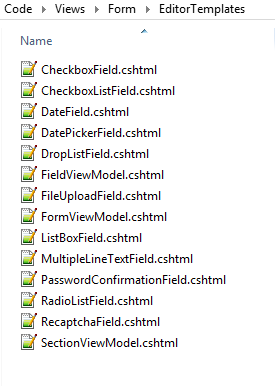
您可以更改使用的css和js文件。上面的内容来自8.1的解决方案,但在7.2上我猜几乎是一样的。在视图/窗体/EditorTemplate上,对于每种类型的字段都有cshtml文件。
页面原文内容由Stack Overflow提供。腾讯云小微IT领域专用引擎提供翻译支持
原文链接:
https://stackoverflow.com/questions/36029544
复制相关文章
相似问题
腾讯云开发者

Copyright © 2013 - 2026 Tencent Cloud. All Rights Reserved. 腾讯云 版权所有
深圳市腾讯计算机系统有限公司 ICP备案/许可证号:粤B2-20090059  粤公网安备44030502008569号
腾讯云计算(北京)有限责任公司 京ICP证150476号 | 京ICP备11018762号