
IBOutlets约束冲突
IBOutlets约束冲突
提问于 2016-03-09 22:15:24
当我尝试手动设置IBOutlet的约束时,我遇到了一个IBOutlet冲突。本质上,我只是在故事板中放置视图,以了解视图的外观,然后创建IBOutlet来引用它们。但所有约束都是在代码中添加的:
class LoginViewController: UIViewController, UITextFieldDelegate {


    @IBOutlet weak var view1: UIView!
    @IBOutlet weak var view2: UView2!
    @IBOutlet weak var name: UITextField!

    override func viewDidLoad() {
        super.viewDidLoad()


        view2.addSubview(name)

        //add constraints
        NSLayoutConstraint(item: view1, attribute: .CenterX, relatedBy: .Equal, toItem: self.view, attribute: .CenterX, multiplier: 1, constant: 0).active = true
        NSLayoutConstraint(item: view1, attribute: .CenterY, relatedBy: .Equal, toItem: self.view, attribute: .CenterY, multiplier: 1, constant: -self.view.frame.height * 0.07).active = true
        NSLayoutConstraint(item: view1, attribute: .Width, relatedBy: .Equal, toItem: self.view, attribute: .Width, multiplier: 0.8, constant: 0).active = true
        NSLayoutConstraint(item: view1, attribute: .Height, relatedBy: .Equal, toItem: self.view, attribute: .Height, multiplier: 0.4, constant: 0).active = true

        NSLayoutConstraint(item: view2, attribute: .Width, relatedBy: .Equal, toItem: view1, attribute: .Width, multiplier: 1, constant: 0).active = true
        NSLayoutConstraint(item: view2, attribute: .CenterX, relatedBy: .Equal, toItem: view1, attribute: .CenterX, multiplier: 1, constant: 0).active = true
        NSLayoutConstraint(item: view2, attribute: .Top, relatedBy: .Equal, toItem: view1, attribute: .Bottom, multiplier: 1, constant: self.view.frame.height * 0.01).active = true
        NSLayoutConstraint(item: view2, attribute: .Height, relatedBy: .Equal, toItem: self.view, attribute: .Height, multiplier: 0.1, constant: 0).active = true


      }
}当我只是在代码中创建视图,即var view2 = UIView(),或者如果我注释掉view2的约束时,var view2 = UIView()冲突就消失了,我不明白。
编辑:基于日志,问题似乎是NSIBPrototypingLayoutConstraint和UIView-Encapsulated-Layout-Height' for view2,尽管故事板中没有设置自动布局约束。让我困惑的是,为什么view1没有这个问题,因为它们都是在故事板中添加的?
回答 1
Stack Overflow用户
回答已采纳
发布于 2016-03-09 22:45:22
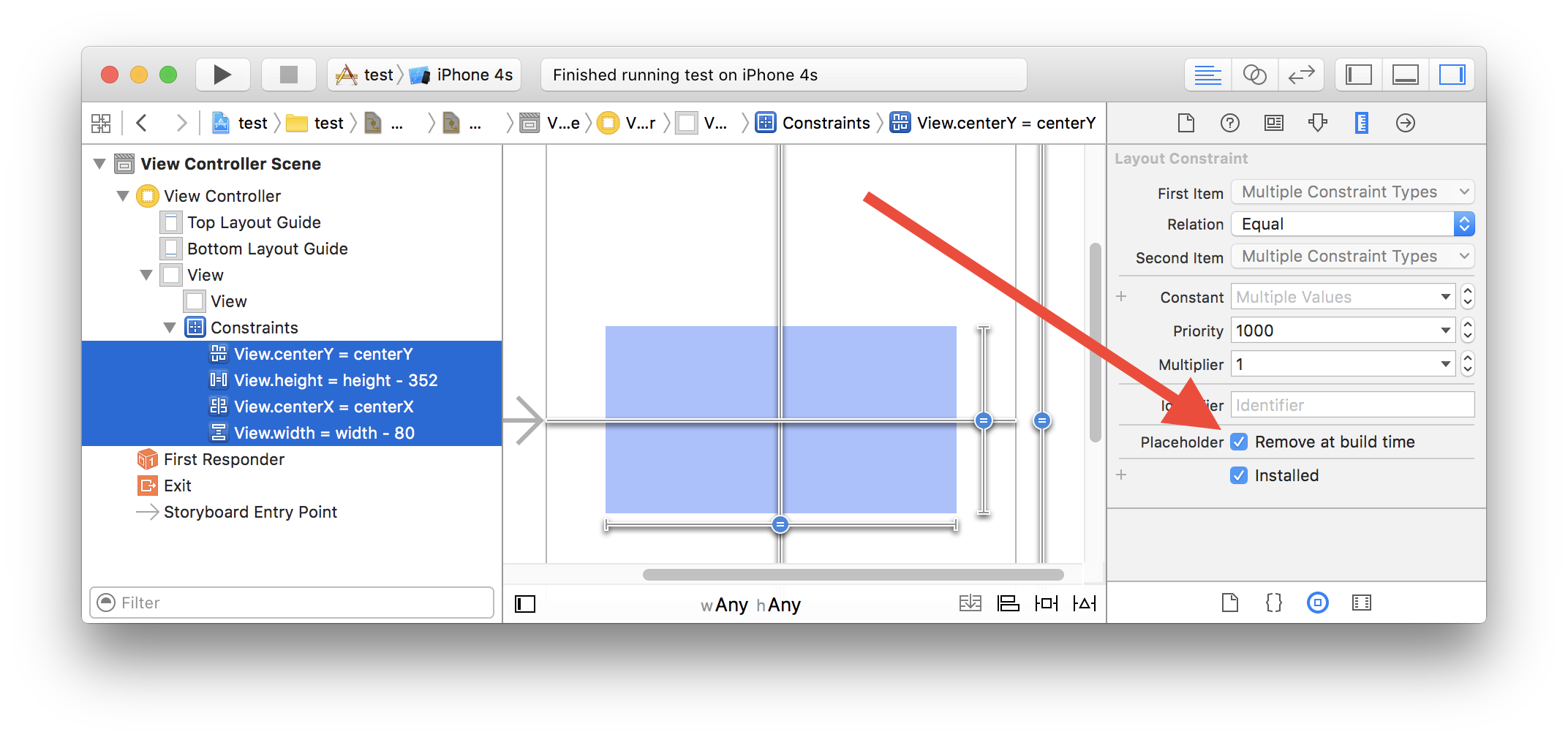
您还没有在故事板中对view2设置约束,所以Xcode正在秘密地为您添加约束。您需要做的是在故事板中添加view2的约束,并告诉Xcode在构建时删除这些约束:
页面原文内容由Stack Overflow提供。腾讯云小微IT领域专用引擎提供翻译支持
原文链接:
https://stackoverflow.com/questions/35903754
复制相关文章
相似问题
腾讯云开发者

Copyright © 2013 - 2026 Tencent Cloud. All Rights Reserved. 腾讯云 版权所有
深圳市腾讯计算机系统有限公司 ICP备案/许可证号:粤B2-20090059  粤公网安备44030502008569号
腾讯云计算(北京)有限责任公司 京ICP证150476号 | 京ICP备11018762号