
通过CLI生成本地虚拟图像
通过CLI生成本地虚拟图像
提问于 2016-03-08 13:48:40
我需要生成一些(数千)本地虚拟图像来测试基于CLI的内容转换器。文件名已设置。
例如,名称列表:
fw4df.jpg
antotherName.jpg
诸若此类。
我会使用ImageMagick扩展编写一个脚本,用一些虚拟内容创建这些图像。
有什么更聪明的办法解决这个问题吗?
回答 3
Stack Overflow用户
回答已采纳
发布于 2016-03-08 15:59:48
我会对1,000张图片这样做:
head -1000 /path/to/your/word/list |
   while read word; do                              \
      echo -n $word | convert label:@- "$word.jpg"  \
   done
你会得到

Stack Overflow用户
发布于 2016-03-08 15:01:40
ImageMagick提供了一些内置的图像。最常见的是wizard:、rose:和logo:
convert wizard: wizard.jpg
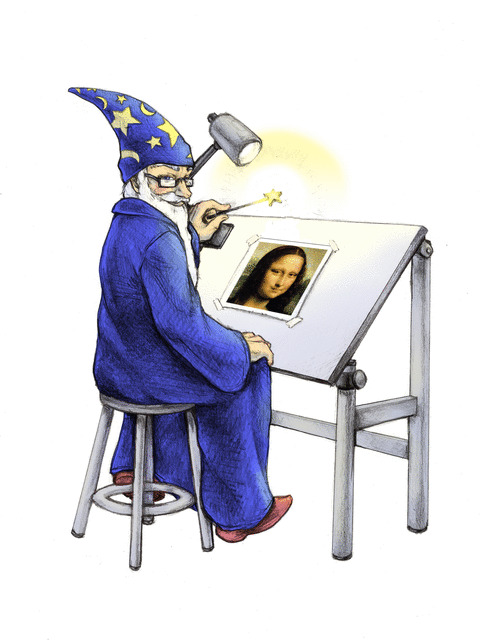
convert rose: rose.jpg

convert logo: logo.jpg

编辑
如果您只想要一个聪明的PHP函数,我将继续使用PseudoImages来简化一切。
function createPseudoImage($label_text, $width, $height, $label_format='No. %d') {
  $background = new Imagick;
  $background->newPseudoImage($width, $height, 'PATTERN:HORIZONTALSAW');

  $label = new Imagick();
  $label->setBackgroundColor('transparent');
  $label_width = $background->getImageWidth() * 0.8;
  $label_height = $background->getImageHeight() * 0.8;
  $label_text = sprintf('CAPTION:'.$label_format, $label_text);
  $label->newPseudoImage($label_width, $label_height, $label_text);
  $offset_x = $background->getImageWidth()/2 - $label->getImageWidth()/2;
  $offset_y = $background->getImageHeight()/2 - $label->getImageHeight()/2;
  $background->compositeImage($label, Imagick::COMPOSITE_ATOP, $offset_x, $offset_y);
  return $background;
}

$fpo = createPseudoImage(49, 500, 200);
$fpo->writeImage('/tmp/out.png');

但YMMV
Stack Overflow用户
发布于 2016-03-08 15:12:53
我根据PHP示例编写了一个脚本。也许它会对某人有帮助:
<?php

generateDummyImages(array("test.jpg", "test2.jpg"));

/**
 *
 * @param array $files
 * @param string $dataOutPath
 */
function generateDummyImages($files, $dataOutPath = "") {
    $width                      = 500;
    $height                     = 500;
    $imageCompressionQuality    = 90;

    foreach($files as $i => $filename) {
        /* Create a new imagick object */
        $im = new Imagick();

        /* Create new image. This will be used as fill pattern */
        $im->newPseudoImage($width, $height, "gradient:red-black");

        /* Create imagickdraw object */
        $draw = new ImagickDraw();

        /* Start a new pattern called "gradient" */
        $draw->pushPattern('typo', 0, 0, $width, $height);

        /* Composite the gradient on the pattern */
        $draw->composite(Imagick::COMPOSITE_OVER, 0, 0, $width, $height, $im);

        /* Close the pattern */
        $draw->popPattern();

        /* Use the pattern called "gradient" as the fill */
        $draw->setFillPatternURL('#typo');

        /* Set font size to 52 */
        $draw->setFontSize(100);

        /* Annotate some text */
        $draw->annotation($width / 2 - 100, $height / 2, "No. " . $i);

        /* Create a new canvas object and a white image */
        $canvas = new Imagick();
        $canvas->newImage($width, $height, "white");

        /* Draw the ImagickDraw on to the canvas */
        $canvas->drawImage($draw);

        /* 1px black border around the image */
        $canvas->borderImage('black', 1, 1);

        /* Set the format to PNG */
        $canvas->setImageFormat('jpg');
        $canvas->setImageCompression(Imagick::COMPRESSION_JPEG);
        $canvas->setCompressionQuality($imageCompressionQuality);

        /* Output the image */
        $canvas->writeimage($dataOutPath . $filename);
        echo "Image generated: " . $dataOutPath . $filename . PHP_EOL;
    }
}

?>页面原文内容由Stack Overflow提供。腾讯云小微IT领域专用引擎提供翻译支持
原文链接:
https://stackoverflow.com/questions/35869163
复制相关文章
相似问题
腾讯云开发者

Copyright © 2013 - 2026 Tencent Cloud. All Rights Reserved. 腾讯云 版权所有
深圳市腾讯计算机系统有限公司 ICP备案/许可证号:粤B2-20090059  粤公网安备44030502008569号
腾讯云计算(北京)有限责任公司 京ICP证150476号 | 京ICP备11018762号