
在一行中加上装饰下划线的div标签。
在一行中加上装饰下划线的div标签。
提问于 2016-03-08 11:32:51
我试图设置三个div标签在一行,并被一些空格和不同的下划线颜色隔开。为了让事情变得更简单,这就是我想做的:
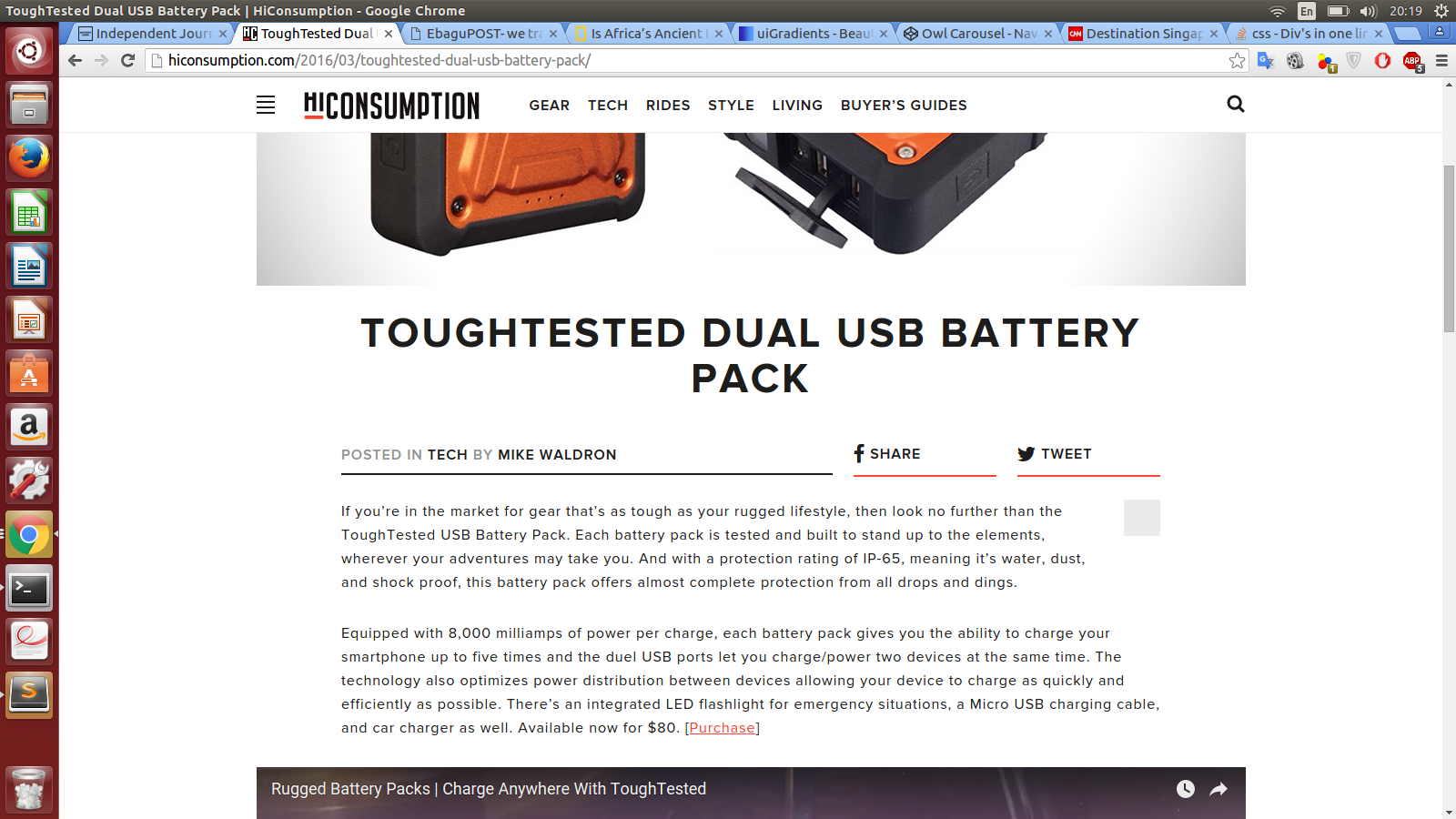
见“科技与分享”和“推特”。这就是我想要做的。我看到了他们的源代码,并试图模仿。但失败了。你能帮帮我吗?
<div class="source">
    <a href="#"><h3>source</h3></a>
</div>
<div class="share">
    <h3>share</h3>
</div>
<div class="share">
    <h3>tweet</he>
</div>回答 4
Stack Overflow用户
回答已采纳
发布于 2016-03-08 11:45:34
请删除内联样式并在样式表中添加类:
<div style="float:left; border-bottom:2px solid #1D1D1B; width:48%; margin-right:2%"><a href="#">POSTED IN TECH</a>
</div>
<div style="float:left; border-bottom:2px solid #FB473A; width:23%; margin-right:2%;">SHARE
</div>
<div style="float:left; border-bottom:2px solid #FB473A; width:23%;  margin-right:2%;">TWEET
</div>Stack Overflow用户
发布于 2016-03-08 11:50:24
div
{
  display:inline-block;
  }
.source
{
  border-bottom:1px solid #000;
  }
.share
{
  border-bottom:1px solid red;
}<div class="source">
<a href="#"><h3>Lorem ipsum dolor sit amet, consectetur adipiscing</h3></a>
</div>
<div class="share">
<h3>share</h3>
</div>
<div class="share">
<h3>tweet</he>
</div>
Stack Overflow用户
发布于 2016-03-08 11:58:17
使用display:flexbox;对同一行中的项进行居中,使用border-bottom获取着色行,并使用margin-right表示间距。
.source, .share{
    font-family:sans-serif;
    width:100%;
    margin-right:5px;
}
.source a{
    text-decoration:none;
    color:black;
}
.source h3,.share h3{
    margin-bottom:5px;
}
.share{
    border-bottom:2px solid red;
}
.source{
    border-bottom:2px solid gray;
}
.flex{
    display:flex;
    width:100%;
    -webkit-justify-content: center;
    justify-content: center;
}<div class="flex">
<div class="source">
<a href="#"><h3>source</h3></a>
</div>
<div class="share">
<h3>share</h3>
</div>
<div class="share">
<h3>tweet</he>
</div>
</div>
页面原文内容由Stack Overflow提供。腾讯云小微IT领域专用引擎提供翻译支持
原文链接:
https://stackoverflow.com/questions/35866234
复制相关文章
相似问题
腾讯云开发者

Copyright © 2013 - 2026 Tencent Cloud. All Rights Reserved. 腾讯云 版权所有
深圳市腾讯计算机系统有限公司 ICP备案/许可证号:粤B2-20090059  粤公网安备44030502008569号
腾讯云计算(北京)有限责任公司 京ICP证150476号 | 京ICP备11018762号