
python自动检查网站上的考试日期/时间
python自动检查网站上的考试日期/时间
提问于 2016-03-06 13:12:58
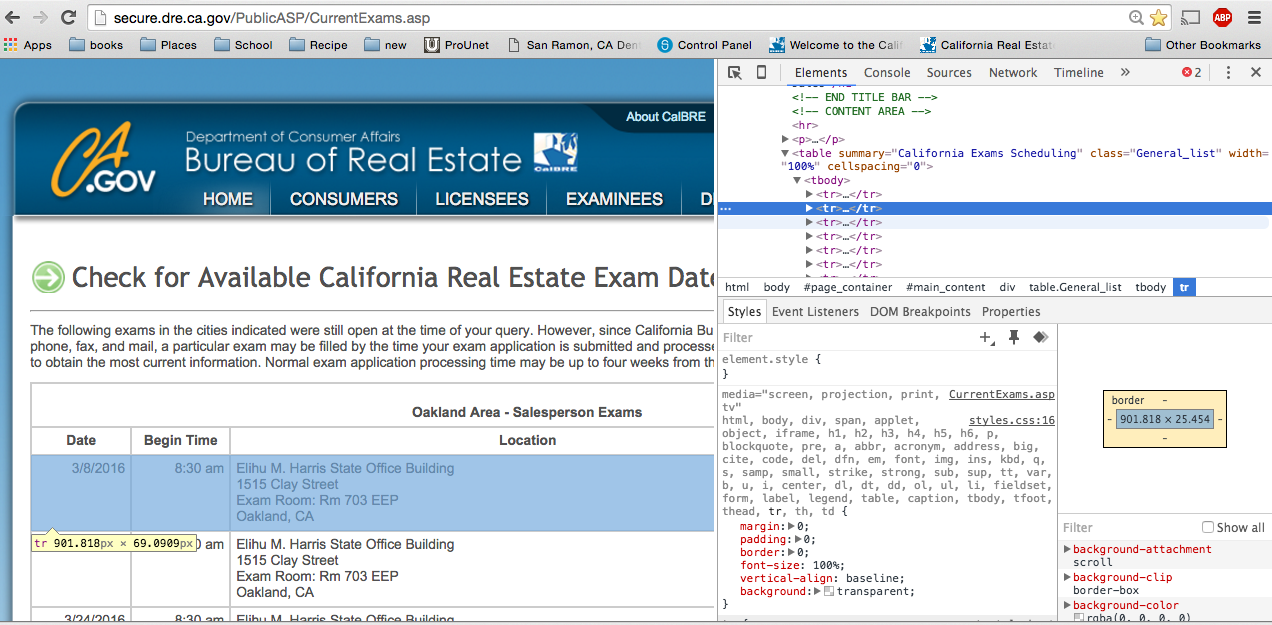
我正在使用Python机器检查考试的日期/时间,如果结果中有特定的日期/时间,我会发送电子邮件给某人(结果页面截图)
import mechanize
from BeautifulSoup import BeautifulSoup
URL = "http://secure.dre.ca.gov/PublicASP/CurrentExams.asp"


br = mechanize.Browser()
response = br.open(URL)


# there are some errors in doctype and hence filtering the page content a bit
response.set_data(response.get_data()[200:])

br.set_response(response)
br.select_form(name="entry_form")

# select Oakland for the 1st set of checkboxes

for i in range(0,     len(br.find_control(type="checkbox",name="cb_examSites").items)):
    if i ==2:
        br.find_control(type="checkbox",name="cb_examSites").items[i].selected =True

# select salesperson for the 2nd set of checkboxes

for i in range(0, len(br.find_control(type="checkbox",name="cb_examTypes").items)):
    if i ==1:
        br.find_control(type="checkbox",name="cb_examTypes").items[i].selected =True

reponse = br.submit()
print  reponse.read()
我能够得到响应,但由于某种原因,表中的数据丢失了。
下面是初始html页面中的按钮
<input type="submit" value="Get Exam List" name="B1">
<input type="button" value="Clear" name="B2" onclick="clear_entries()">
<input type="hidden" name="action" value="GO">
输出的一部分(提交响应),其中实际数据位于
<table summary="California Exams Scheduling" class="General_list" width="100%" cellspacing="0"> <EVERTHING INBETWEEN IS MISSING HERE>
</table>
表中的所有数据都丢失了。我从chrome浏览器中提供了表格元素的屏幕截图。
- 谁能告诉我出什么事了吗?
- 有人能告诉我如何从响应中获取日期/时间(假设我必须使用BeautifulSoup),所以必须在这些行中。我正在试图找出在回复中我所想到的一个特定日期(比如3月8日)是否显示了1:30 pm..screenshot的开始时间。 BeautifulSoup=response.read()打印soup.find(name="table")
更新-看起来我的问题可能与this question有关,并且正在尝试我的选择。我尝试了下面的答案之一,但无法在数据中看到任何tr元素(尽管当我手动检查时可以在页面源中看到这一点)。
soup.findAll('table')[0].findAll('tr')
对此进行了更新,使其使用selenium,不久将尝试进一步改进。
from selenium.common.exceptions import NoSuchElementException
from selenium.webdriver.common.keys import Keys
from bs4 import BeautifulSoup
import urllib3


myURL = "http://secure.dre.ca.gov/PublicASP/CurrentExams.asp"
browser = webdriver.Firefox() # Get local session of firefox
browser.get(myURL) # Load page

element = browser.find_element_by_id("Checkbox5")
element.click()


element = browser.find_element_by_id("Checkbox13")
element.click()

element = browser.find_element_by_name("B1")
element.click()回答 1
Stack Overflow用户
发布于 2021-04-03 01:49:02
五年后,也许这能帮到一个人。我把你的问题当作训练练习。我使用请求包完成了它。(我使用python 3.9)
以下代码分为两部分:
- 在POST request.the请求部分url = "https://secure.dre.ca.gov/PublicASP/CurrentExams.asp“标头={”用户代理“:"Mozilla/5.0 (Windows 10.0;Win64;x64;( rv:88.0) Gecko/20100101火狐/88.0“} params ={ "cb_examSites":”弗雷斯诺“、”Los+Angeles“、”SF/奥克兰“、”萨克拉门托“、”San+Diego“、"cb_examTypes":”经纪人“、”销售人员“、"B1":"Get+Exam+List","action":"GO“}s= rq.Session() r= s.get(url,headers=headers) s.headers.update({"Cookie":"%s=%s”% (r.cookies.keys(),r.cookies.values()}) r2 = s.post(url=url,data=params) headers=headers= bs(r2.content,"lxml") #包含您想要的数据
- 解析响应(很多方法都是我的方法,可能有点闷) table = soup.find_all("table",class_="General_list") title= el.text for el in table.find_all("strong") def beetweenBr(soupx):final_str = [] for br in soupx.findAll('br'):next_s = br.nextSibling,如果没有(next_s和isinstance(next_s,NavigableString)):继续next2_s = next_s.nextSibling,如果next2_s和isinstance(next2_s ),和next2_s.name == 'br':text = str(next_s).strip() if文本: final_str.append(next_s.strip())返回"\n".join(final_str) d= {} trs = table.find_all(" tr ")作为tr中的tr: tr_text = tr.text if tr_text in title: curr。_title = tr_text splitx = curr_title.split(“- ")区域,job = splitx.split(“")拆分(“")如果不是d.keys()中的作业: djob = {}如果不是djob.keys():djob = []继续if (在标题中不是tr_text )& (tr_text != "DateBegin TimeLocationScheduledCapacity"):tds = tr.find_all("td") sub = []td枚举(Td):if itd == 2: sub.append(beetweenBr(td))其他: sub.append(td.text) djob.append(sub)
"d“包含您想要的数据。我还没发邮件呢。
页面原文内容由Stack Overflow提供。腾讯云小微IT领域专用引擎提供翻译支持
原文链接:
https://stackoverflow.com/questions/35827238
复制相关文章
相似问题
腾讯云开发者

Copyright © 2013 - 2026 Tencent Cloud. All Rights Reserved. 腾讯云 版权所有
深圳市腾讯计算机系统有限公司 ICP备案/许可证号:粤B2-20090059  粤公网安备44030502008569号
腾讯云计算(北京)有限责任公司 京ICP证150476号 | 京ICP备11018762号